Planview saves 40+ hours per audit cycle by automating SOC 2 compliance with Kiro CLI
Medha Aiyah
Developer
Keerthi Konjety
Developer
Mukesh Belde
Planview
Faizan Mansuri
Planview
Compliance management can sometimes feel overwhelming. For many engineering teams, it ends up requiring significant ongoing attention. Teams spend 40 or more hours per annual cycle collecting evidence, navigating cloud provider consoles, and compiling spreadsheets while audit deadlines approach.
Planview, a leader in strategic portfolio management serving over 3,000 customers globally, faced a familiar problem. Maintaining SOC 2 compliance across a multi-service AWS infrastructure consumed engineering time that could go toward building features for customers. Here’s how Planview transformed their compliance workflow with Kiro CLI and saved more than 40 hours per compliance cycle.
Compliance is hard
Here’s what compliance management looked like for Planview before Kiro:
Engineers collected evidence manually across more than 20 cloud services, pulling data from consoles and APIs.
Teams performed spreadsheet archaeology to track security controls, timestamps, and audit trails.
Audit prep cycles consumed 40+ hours, pulling engineers away from product development.
Coordination overhead spanned multiple team members with specialized knowledge of both the cloud provider and SOC 2 requirements.
Many engineering teams managing cloud compliance face similar challenges. Time spent auditing, context switching, the potential for manual errors, and the planning for the quarterly cycle compound the cost.
A different approach to compliance
Rather than building yet another compliance dashboard, Planview took a different path. They used Kiro to bring compliance automation directly into their development workflow with Kiro CLI.
Initially, Planview’s SOC 2 compliance process was entirely manual, requiring significant time and resources from their security and engineering teams. For streamlining compliance workstreams, the team evaluated commercial continuous compliance platforms in Q1 2025. Although Planview plans to adopt continuous compliance capabilities long-term, the team needed an interim solution that could deliver value quickly without the overhead of a full commercial platform. This need made Kiro a strong fit. Kiro integrated directly with Planview’s existing workflows and provided automation benefits right away, without closing the door on a full compliance platform later.
Creating a custom compliance agent in Kiro CLI
Planview used Kiro CLI’s inbuilt aws tool and custom agents feature to configure granular read access to cloud services. Custom agents in Kiro allow you to create purpose-built AI assistants with specific context and tool permissions tailored to your use case. For Planview, this meant creating an agent with pre-approved, read-only access to query cloud services and retrieve technical evidence relevant to their SOC 2 compliance workflows. Pre-approved means the agent does not require manual authorization for each read operation. This eliminates the need to manually grant permissions for each audit cycle or evidence collection task, transforming what was previously a 40+ hour manual process into an automated workflow. The integration operates with read-only, non-invasive access, ensuring your infrastructure remains secure and unchanged. This isn’t limited to compliance. For example, you could create a custom agent for infrastructure monitoring that queries CloudWatch metrics, S3 bucket configurations, and Lambda function logs, giving it pre-approved read access to AWS services to automatically generate operational health reports. Learn how to create custom agents and review configuration examples.
The following example is a reference to create a custom soc2-compliance agent JSON that is stored under ~/.kiro/agents/soc2-compliance.json. This can be leveraged as an assistant to help in the SOC 2 Compliance process and it can then be initiated using "kiro-cli --agent soc2-compliance (or your custom agent name) in the CLI.
This JSON defines a specialized agent configuration designed to assist with security controls, audit preparation, and policy enforcement. Here’s what each section means:
name- The agent’s identifier/namedescription- Human-readable explanation of the agent’s purpose (SOC 2 compliance work)prompt- Path to a markdown file containing the agent’s system instructions/behavior (./prompts/soc2-expert.md)tools- Tools the agent has access to:read (in-built tool) - Read files/directories
write (in-built tool) - Create/modify files
aws (in-built tool) - Make AWS CLI calls
allowedTools- Tools that don’t require user approval (only read is auto-approved here; write and aws need confirmation)toolsSettings- Fine-grained permissions for each tool:write.allowedPaths- Agent can only write to these specific directories (compliance docs, policies, audit files, security files)aws.allowedServices- Agent can only interact with these AWS services (IAM, CloudTrail, Config, GuardDuty, SecurityHub, Inspector, KMS, S3 - all security/compliance related)
aws.autoAllowReadonly- Read-only AWS operations (like describe-, list-, get-*) don’t require approvalresources- Files automatically loaded into the agent’s context when it starts:Policy markdown files
Compliance documentation
Audit JSON files
Security control YAML files
Alternatively, rather than manually authoring the agent configuration JSON, you can use Kiro CLI’s /help agent, a built-in assistant that generates smart agent configuration recommendations from a natural language description. By running /help Help me create a custom agent for soc-2 compliance inside Kiro CLI, Kiro automatically produces a first draft for you to assist with SOC 2 compliance.
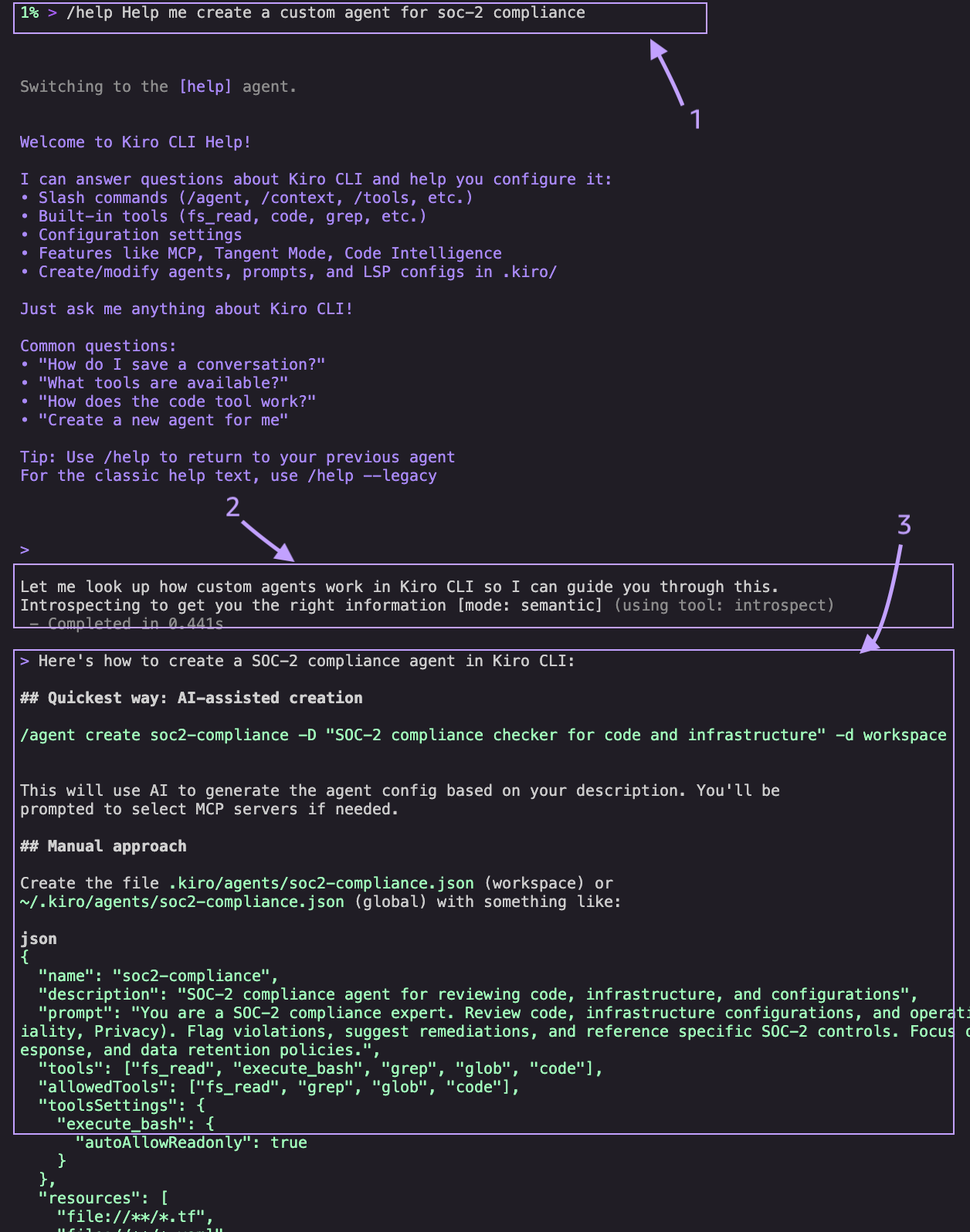
Here’s what happens when you run /help Help me create a custom agent for soc-2 compliance
Kiro switches to the built-in
/helpagent, purpose-built to answer questions about Kiro CLI and generate configurations on your behalf.The
/helpagent introspects Kiro's internal documentation to look up the correct agent configuration schema, ensuring the generated config uses valid fields and follows best practices.The
/helpagent produces a recommended config, including tools, permissions, resource patterns, and a tailored system prompt without requiring manual JSON authoring. You can refine this as needed.
Using your custom agent in Kiro CLI
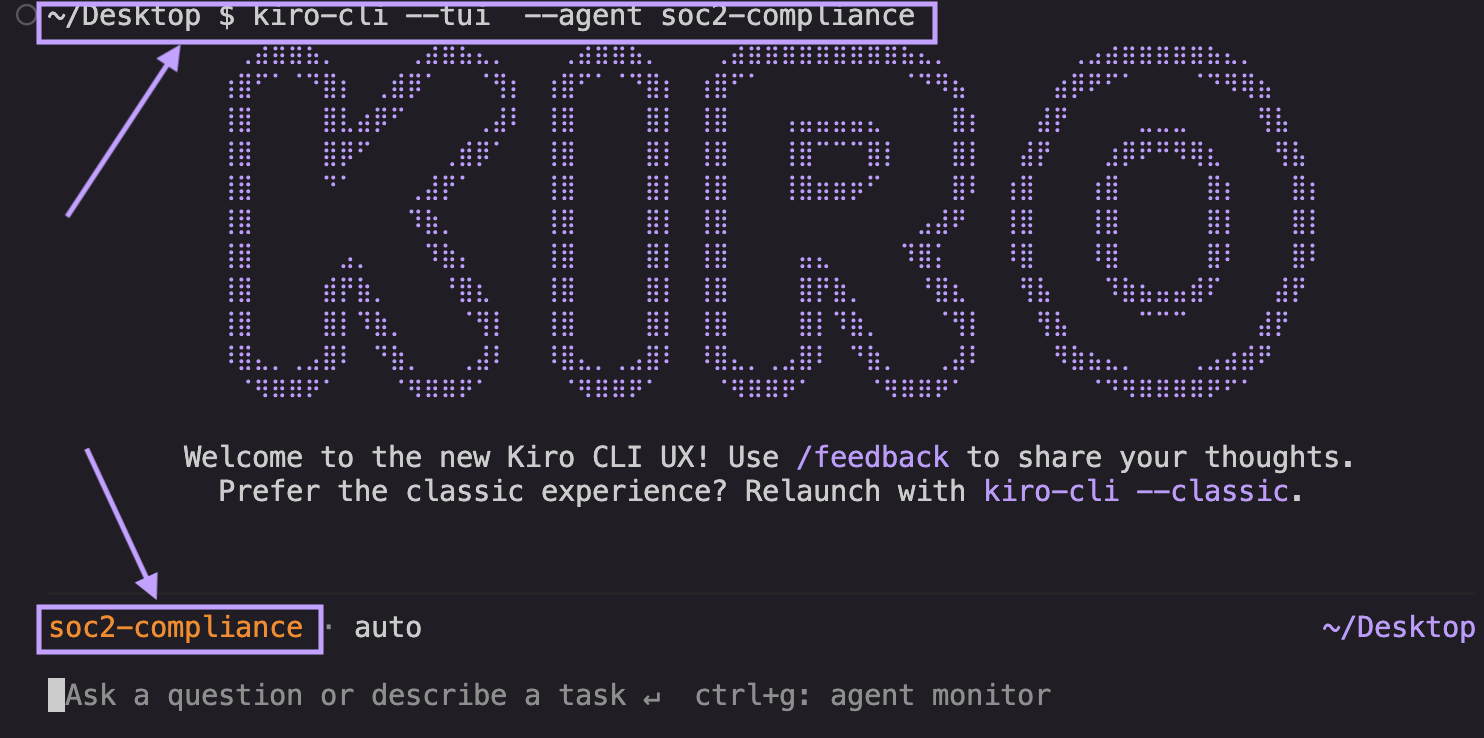
When a developer launches this custom agent in the terminal with kiro-cli --tui --agent soc2-compliance, it loads the context and the permission for the “aws” tool with the allowedServices, resources and allowed paths when you initiate a chat session. It loads the new UX for Kiro CLI when you use the --tui flag . If you would like to use the regular kiro-cli terminal experience, you can use kiro-cli --classic --agent soc2-compliance or use /agent soc2-compliance from within the Kiro terminal.
Example prompt: “Generate a SOC 2 CC6.1 compliance report showing all S3 buckets with their encryption status, public access settings, and access logging configuration.”
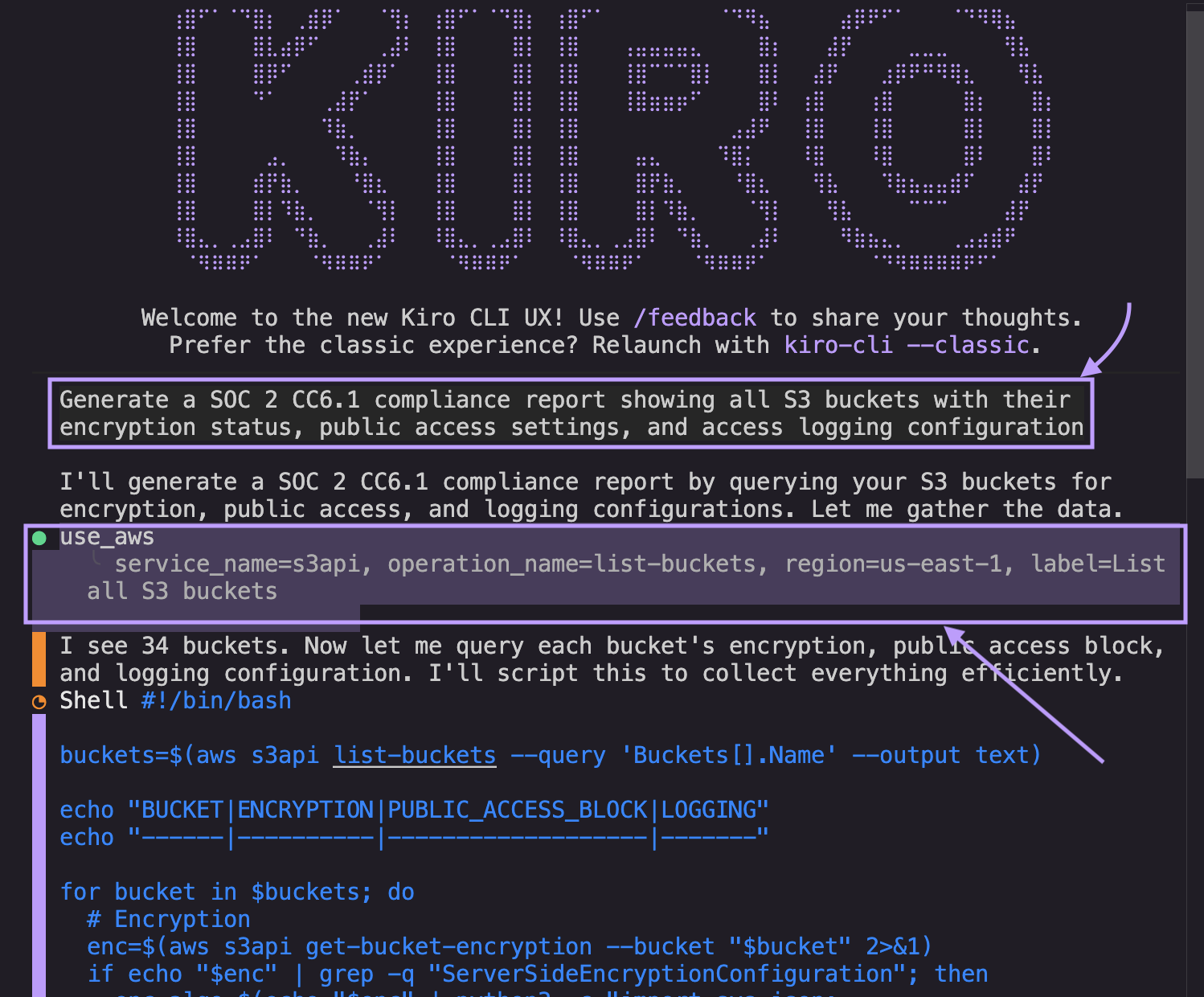
Using Kiro’s capabilities, Planview simplified the collection of timestamps for SOC 2 and ISO evidence. The system could now pull information with timestamps which allowed Kiro to automatically:
Query S3 configurations across all regions or create scripts that can help in running queries that produce the same results
Check encryption settings and key management
Verify access control lists and bucket policies
Generate formatted compliance evidence with timestamps
The agent handles the complexity and the team gets the evidence they need.
Note: It’s important to note that AI-generated compliance outputs are highly dependent on the specificity and scope of the prompts provided to the agent. This is a tool to accelerate the auditing process but should not be the replacement for any deterministic compliance tools. All AI-generated recommendations, policy text, and audit evidence should be reviewed and validated by qualified compliance professionals before being used in production environments or submitted to auditors.
Results
What used to require manual data gathering now happens automatically. Kiro pulls compliance evidence with timestamps, conducts security scans with AWS allowed services mentioned above, and organizes artifacts that align with specific SOC 2 and ISO control requirements. The workflow integrates with Planview’s existing processes without requiring changes to their development environment. Evidence collection that was previously manual now runs through Kiro CLI’s built-in tools, with a conversational interface for feedback. The Planview team noticed significant, measurable impact right away:
40+ hours saved per compliance cycle. Time saved is now used in building customer value instead of collecting evidence.
60% overall efficiency gain through automation, with the team responding 3-4x faster to audit requests.
1 to 1.5 software development engineer (SDE) sprint time saved per team member, now redirected to features and enhancements.
On-demand evidence collection helps teams prepare for audits throughout the year rather than carve specific time for it.
But the real win here is that engineering resources are back where they belong, building products instead of compiling spreadsheets.
Conclusion
Planview’s approach demonstrates that compliance work doesn’t have to be a burden. You can provide compliance requirements as specifications and bring AI directly into your development workflow. Features like custom agents help you maintain your security standards while freeing your team to focus on delivering value to customers.
Planview is expanding their use of Kiro CLI’s custom agent for use cases beyond compliance management. This will enable more developers across the organization to use repeatable workflows and multiply the efficiency gains.
Get started with Kiro CLI today.