The hidden inefficiencies in AI coding (and how we find them)
A task is completed. The code compiles, the tests are green, everyone moves on. But what if that “passing” task took 17 turns because the agent couldn’t find a file that was right there? What if it burned through retries on a shell command pattern that was never going to work?
Benchmarks don’t catch this. Pass/fail metrics see a success and move on. We wanted to look deeper, at the full path the agent took, not just where it ended up. So we built a specialized system for continual optimization via reasoning and adaptive learning — affectionately nicknamed CORAL internally.
Why benchmarks aren’t enough
AI coding agents are typically evaluated on benchmarks: pass rates, token counts, latency. These metrics tell you what happened, but not why, and they don’t tell you how to improve the overall process.
A task can “pass” while the agent wastes turns on broken search patterns. Another fails not because the model is weak, but because a tool description is misleading. When you're processing thousands of agent interactions daily, manual review doesn’t scale.
We needed a system that could learn from production automatically, finding the patterns that benchmarks miss.
How we analyze agent behavior
Our adaptive learning system analyzes real Kiro interactions to surface inefficiencies that pass/fail metrics overlook.1
Think of it like a chess player reviewing their games. After each match, they don’t just check the result. They ask: Where did I lose tempo? What patterns led to mistakes? What should I do differently next time? Our system does this for Kiro’s agent, automatically and at scale.
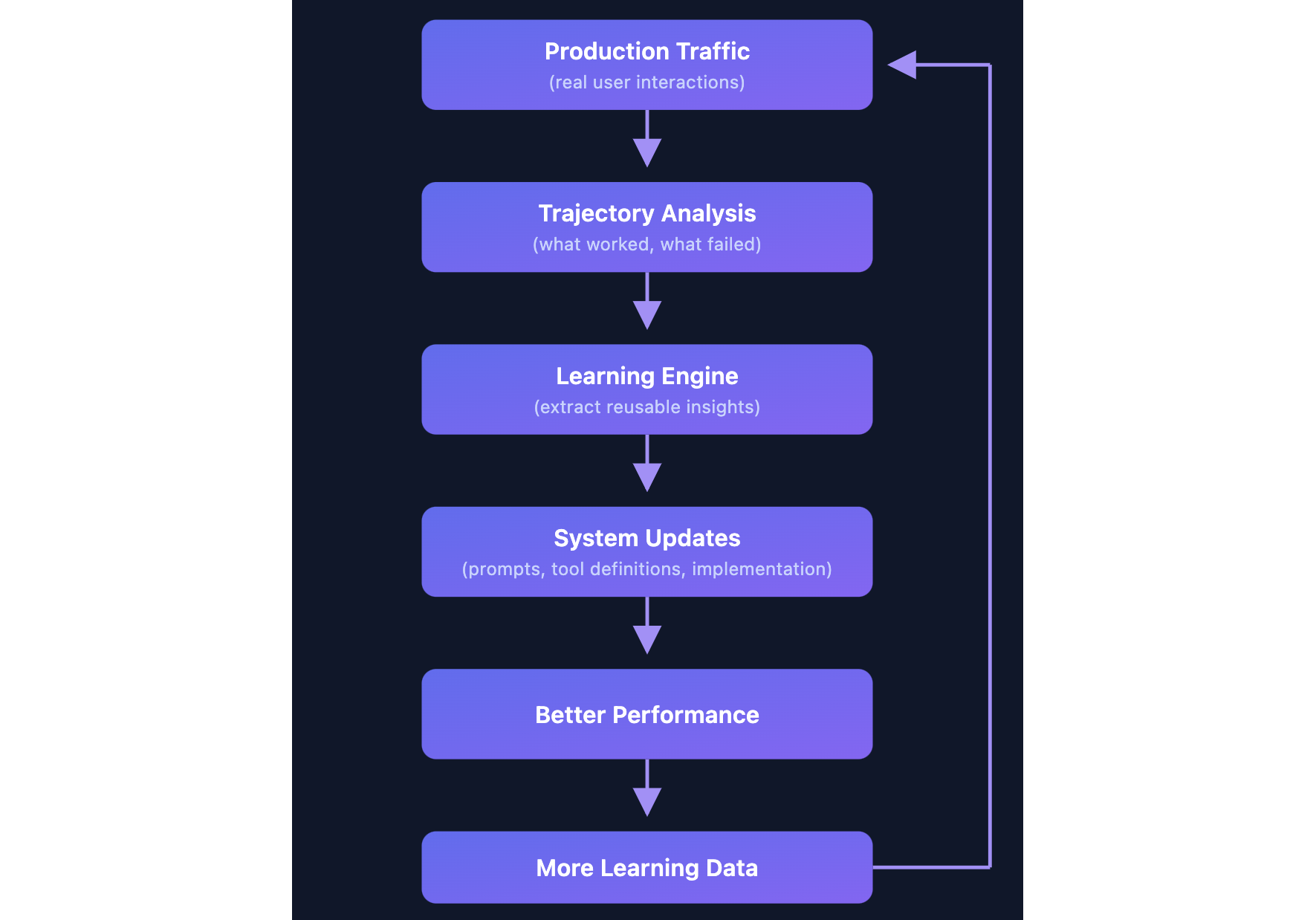
To do this, it uses trajectory-based learning. Instead of just checking whether code compiles, our system examines the full sequence of actions the agent took: every tool call, every decision point, every recovery attempt. A task that passes in 5 clean steps looks very different from one that passes in 17 messy ones, and it can tell the difference.
How it works
Every day, we sample thousands of real Kiro sessions from users who have given us permission and examines them using LLM-based analysis. For each trajectory, it asks: what did the agent do, what went wrong (or right), and why?
It doesn’t just see surface-level outcomes like “search returned no results.” It traces the full sequence of actions: what the agent tried, how it recovered, and where it lost time. From that sequence, the LLM performs root cause analysis and extracts a generalizable lesson, not a one-off fix, but something that applies across tasks.
That lesson gets checked against everything it has already learned. Is it new? Is it specific enough to act on? Does it conflict with an existing insight? If it passes, it’s added to a structured knowledge base organized by category: tool usage, workflow patterns, error recovery, behavioral guidance.
Each insight also tracks evidence. If a pattern keeps showing up across many trajectories, confidence grows. If an earlier insight turns out to cause problems, it gets revised or removed. The knowledge base isn’t static; it evolves as the agent and tools change.
When we find a high-confidence insight, we turn it into a concrete fix: a tool description update, a system prompt change, or an agent behavior modification. These ship immediately, no model retraining needed. As the agent improves, we collect more data from real sessions, and the cycle continues.
Two real-world examples
Discovery #1: the silent search failure
Here’s a pattern we caught that most metrics might miss.
What was happening: Agents were searching for files using patterns like *.py and getting zero results. The searches were marked as successful tool calls (no error thrown), so the agent assumed the files simply didn’t exist. But they did exist. The agent just couldn’t find them.
Why: LLMs learn from tools like ripgrep, where *.py searches recursively by default. But Kiro’s search API, built on Code-OSS, requires **/*.py for recursive matching. A subtle difference, and the tool description didn’t call it out.
The cost: Over a quarter of grep searches were silently failing. When a search returns nothing, the agent doesn’t give up. It improvises. It reads files manually, retries with different queries, explores directory trees. On average, agents burned ~5 extra turns recovering from each failed search, doing work that shouldn’t have been necessary.
The fix: One line in the tool description.
The result:
Metric | Before | After |
Incorrect pattern rate | 26.10% | 0.30% |
Affected sessions | ~23% | <0.3% |
A single line change reduced incorrect grep patterns by ~99% in production.
Discovery #2: the cd command trap
What was happening: Agents were writing shell commands like cd src && npm test. Every single one failed. Kiro's executeBash tool runs each command from the workspace root and rejects cd usage through input validation, so cd has no lasting effect. The tool provides a cwd parameter for exactly this purpose, but in about 4% of bash calls, the model fell back to familiar shell patterns learned from its training data instead of following the tool’s description.
Why: cd dir && command is one of the common patterns in shell scripting. LLMs have seen it millions of times. The cwd parameter approach is unfamiliar, so agents defaulted to muscle memory.
The cost: 3.46% of all shell calls used this pattern, affecting 18% of sessions. Every attempt failed, and agents spent an average of 2.7 turns recovering: retrying commands, exploring alternatives, sometimes never fully recovering within the session.
The fix: Rather than just prompting the restriction harder, we built auto-correction. When the agent sends:
Kiro silently transforms it to:
After execution, a gentle reminder reinforces the correct pattern:
This keeps the agent oriented. It always knows where it is, which prevents the confusion and cascading errors that follow a lost working directory.
Projected impact:
Metric | Before | After (projected) |
| 100% | ~0% (auto-corrected) |
Affected sessions | 18% | ~0% |
Patterns on our radar
The analysis doesn’t just find big wins. It continuously surfaces smaller patterns that add up. Here are a few we’re actively investigating:
Tool interaction patterns
Content drift after formatting. An agent edits a file, then a formatter like Prettier or Black reshapes the whitespace and structure. The agent’s next edit assumes the file still looks the way it wrote it, but reality has drifted. Our analysis found this causes repeated “oldStr not found” failures when the agent tries to make follow-up changes. We’re exploring ways to make the agent re-read modified sections before attempting further edits on files that may have been auto-formatted.
Scattered multi-file edits. When changes span multiple files, agents that dive straight into editing often miss related code in other files. We found that agents who first map all modification points across the codebase (using search) before making any changes produce more complete, consistent results. We’re looking at ways to encourage this “map first, edit second” pattern for cross-file tasks.
Communication patterns
The acknowledgment dead-end. We spotted trajectories where agents respond to a request with “Understood” or “Got it” and then do nothing. The user has to prompt again to get actual work done. It’s a small thing, but it wastes a turn and breaks the flow. We’re working on behavioral guidance to ensure the agent acts immediately rather than just acknowledging.
The ambiguity tax. Sometimes the best move is to ask a clarifying question. We found trajectories where agents guessed wrong on ambiguous requests, built the wrong thing, then had to redo the work. A single question upfront would have saved multiple turns of wasted effort. We’re investigating when and how to prompt the agent to seek clarification rather than guess.
The compounding effect
Each individual fix is small: a line in a tool description, a behavioral nudge, an auto-correction, but for you, they compound. A search that finds the right file on the first try instead of the fifth. A shell command that just works instead of failing and retrying. Fewer wasted turns means faster results and less time waiting on the agent to find its footing.
We are optimistic about using trajectory-level analysis to fix many of these issues quickly. Traditional evaluation sees a passing task and moves on. The system sees a completed task that took 17 turns with broken search patterns, and asks: how do we make that 5 turns the next time?
Instead of just measuring outcomes, we’re actively analyzing the full execution path to find inefficiencies that pass/fail metrics can miss.
A continuously improving developer experience
All of this runs behind the scenes, surfacing fixes that our team reviews and ships — with the goal of making this loop fully automatic over time. Your Kiro agent today is better than it was last month, and next month it’ll be better still, without you having to do anything. However, when you leave feedback on Kiro’s suggestions, report issues, or flag something that felt off, that signal feeds into our learning system. Your input helps Kiro get smarter for everyone.
The discoveries above are just the beginning. We are finding new patterns every week, and we’ll keep sharing what we learn.
Get started with Kiro and see how it keeps getting better.
1 You can opt out of sharing your Kiro interactions. Enterprise users are opted out by default.