Refactoring made right: how program analysis makes AI agents safe and reliable
You ask your AI coding assistant to do something simple—rename a function or move a file—and suddenly you’re in recovery mode. Imports break or references point to files that no longer exist. A codebase that compiled five minutes ago starts throwing errors everywhere. What should have been a 20-second refactor turns into a 5-minute debugging and cleanup session.
Why refactoring is hard for agents
Refactoring isn't just find-and-replace at scale—it's a graph traversal problem across your codebase's semantic structure. When you rename a function, the changes cascade: every call site across the workspace, type definitions and interfaces that reference it, import/export statements, tests, and (optionally) documentation and comments. Moving a file triggers an even more complex ripple, affecting import paths in every dependent file, barrel files (index.ts) and re-exports, module resolution assumptions baked into tsconfig paths and bundler configs, and scattered configuration files like Webpack config, just to name a few. Here's the fundamental mismatch: LLMs excel at generating plausible code through pattern matching, but refactoring demands precision over plausibility. It's not a creative task—it's a constraint satisfaction problem that requires exact understanding of symbol relationships, language-specific semantics, and the project's dependency graph. An agent that “looks right” but misses one import in a deeply nested module hasn't just made a minor error; it's introduced a runtime failure that won't surface until production. This is why text generation, no matter how sophisticated, is an unreliable tool for structural code transformation.
The problem: when agents work harder, not smarter
Many AI agents stumble with refactoring because they treat structural edits like text edits. Here are some failure modes developers keep hitting:
The ask: “Rename this method.”
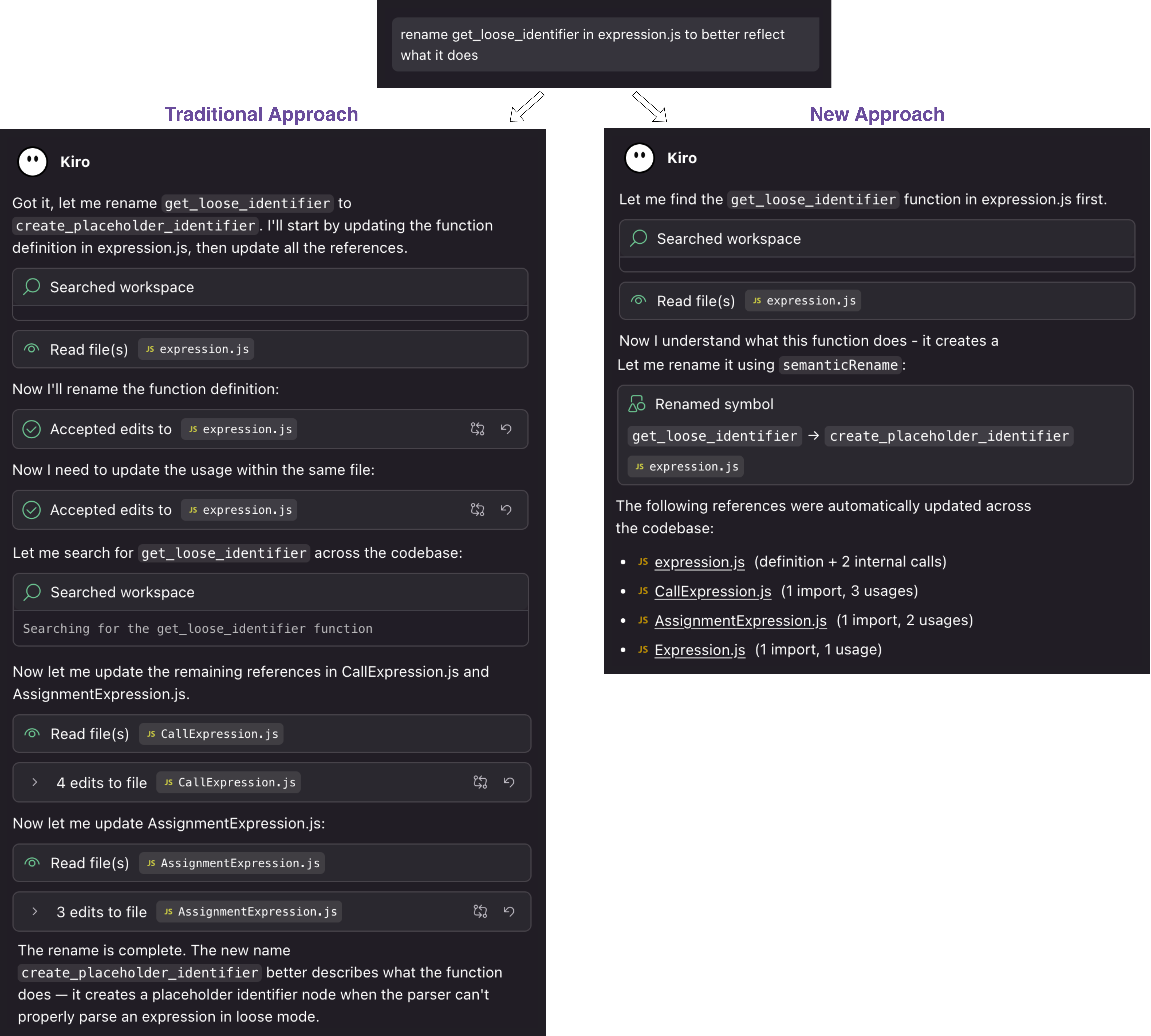
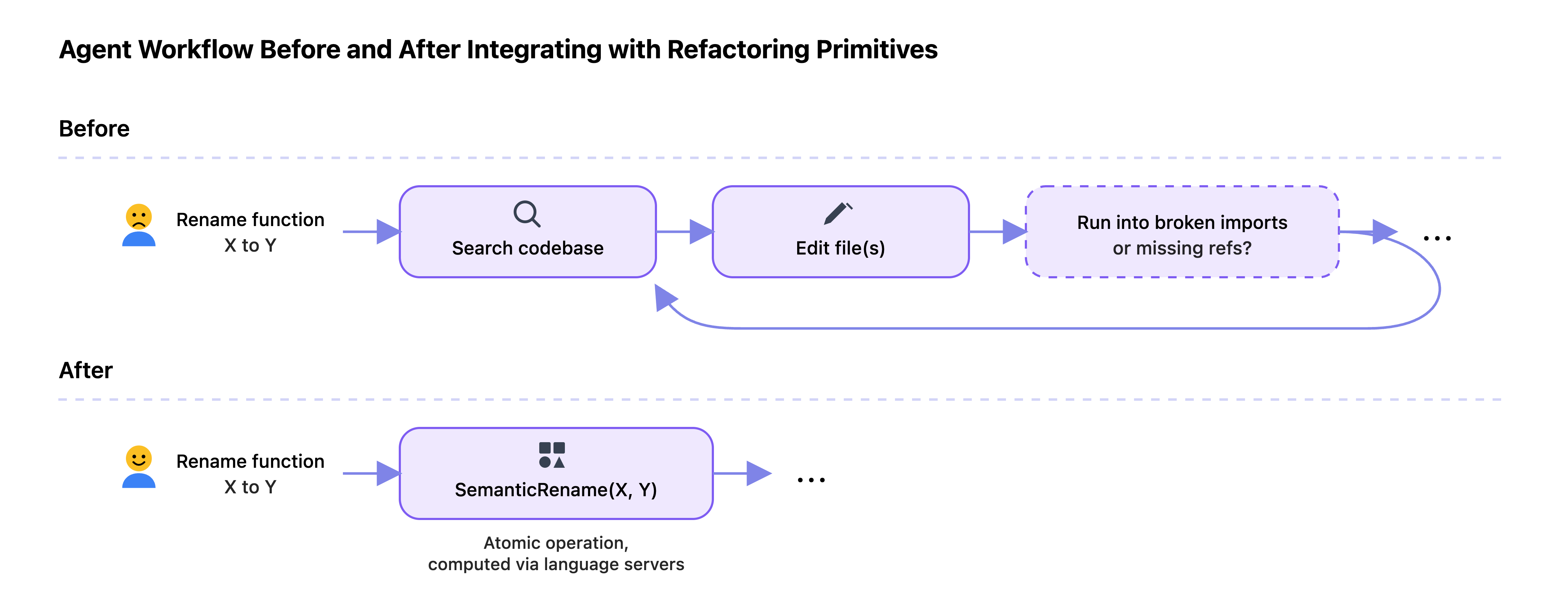
The traditional failure: The agent updated the method definition but missed call sites across the project. Even when the prompt explicitly asked it to update references, the process turned into a slow, error-prone loop: search for the old name and replace it. Consider this prompt: rename get_loose_identifier in expression.js to better reflect what it does. Renaming this symbol propagates to four files, impacting eight references and three imports. The left side of the following figure (Traditional Approach) shows how this operation plays out without a dedicated refactoring tool: after renaming the symbol in the first file (expression.js), the agent searches the codebase for get_loose_identifier and updates CallExpression.js and AssignmentExpression.js through multiple LLM calls and tool invocations. Despite the effort, it still misses the remaining references.
How Kiro handles it: Consider what developers would do manually to perform this task in an IDE. They would press F2 on get_loose_identifier, type the new name, and press enter. The IDE would automatically perform the renaming along with updating all eight references and three imports across the codebase. This is precisely what a semantic rename tool does. The right side of the following figure (New Approach) shows how Kiro performs the entire renaming properly in a single tool invocation.
The ask: “Fix the lint errors in this file”
The traditional failure: The agent treated the linter output as a to-do list of text edits. It renamed function names in the signatures from camelCase to snake_case in one file, but introduced “missing reference” and “missing import” errors in other files. It failed to propagate the changes to all usages.
How Kiro handles it: Here's an example showing how an agent benefits from the semantic rename tool even if the user doesn't directly ask for a rename. The user asks the agent to “fix lint errors in text_helpers.py”. The lint errors indicate that normalizeText and slugifyTitle in utils/text_helpers.py must change to snake_case. A partial snapshot of the codebase is shown below:
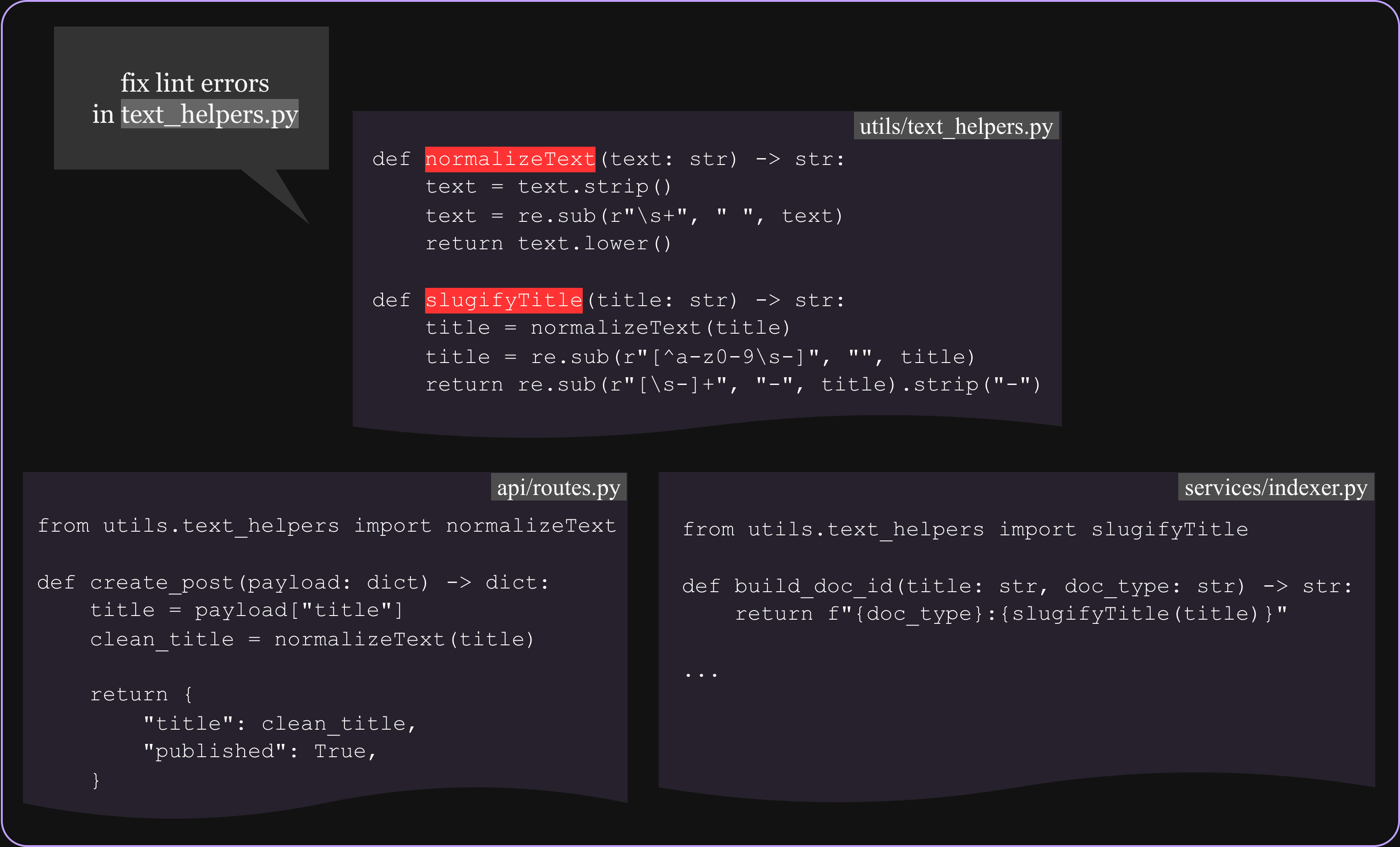
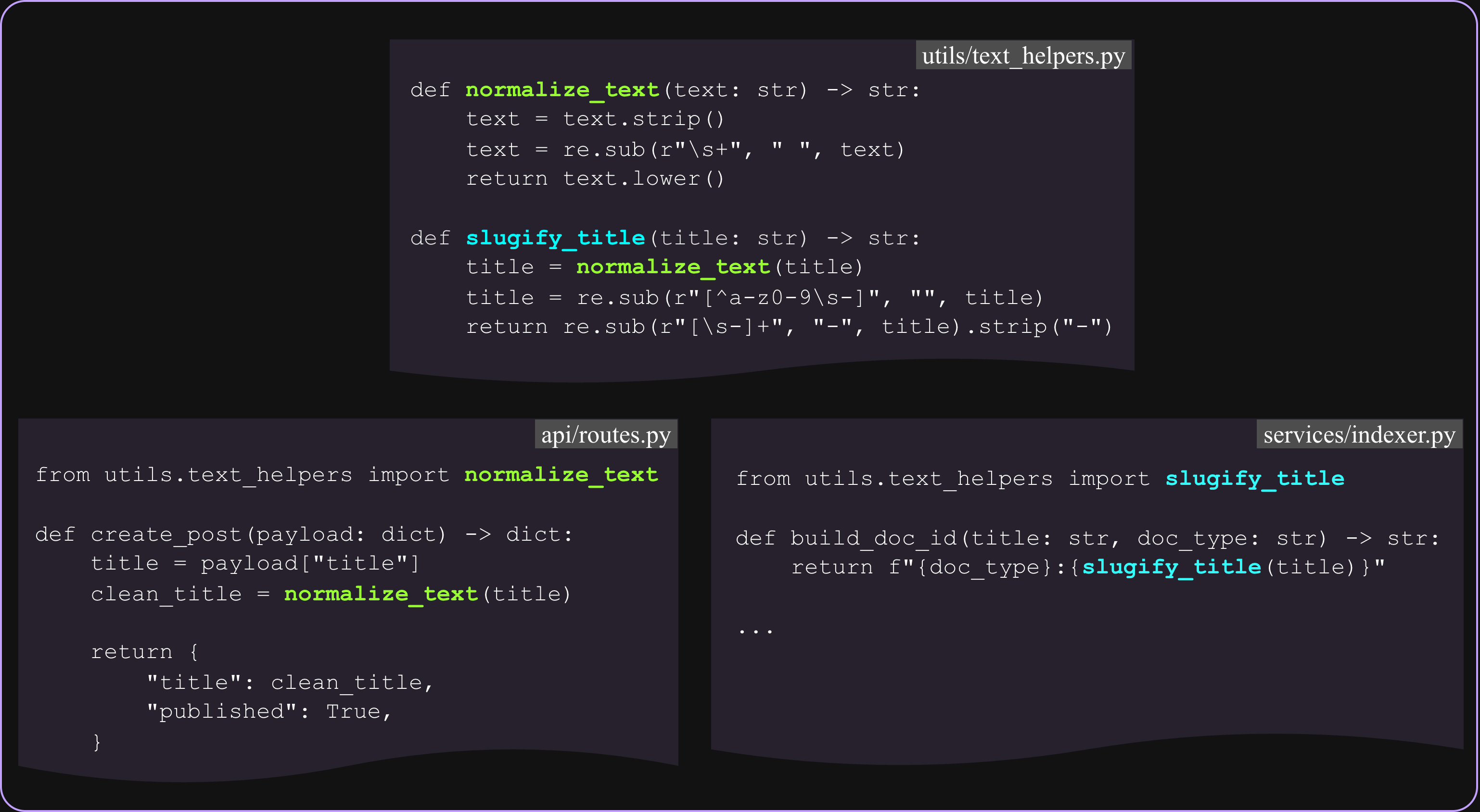
An agent that treats these fixes as text edits will rename the function definitions and may fix local references, but it will likely miss imports and call sites elsewhere, causing ImportError/NameError at runtime. By using the semantic rename tool, Kiro updates the definitions as well as the imports and calls in api/routes.py and services/indexer.py, as illustrated in the image below.
The ask: “Reorganize our components - move Button.tsx from src/components/ to src/shared/ui/”
The traditional failure: The agent treated the task as a simple file operation. The file moved successfully, but now every import statement pointing to the old location is broken. The agent then attempted to fix imports file-by-file with find-replace operations, but missed dynamic imports: import('../components/Button').
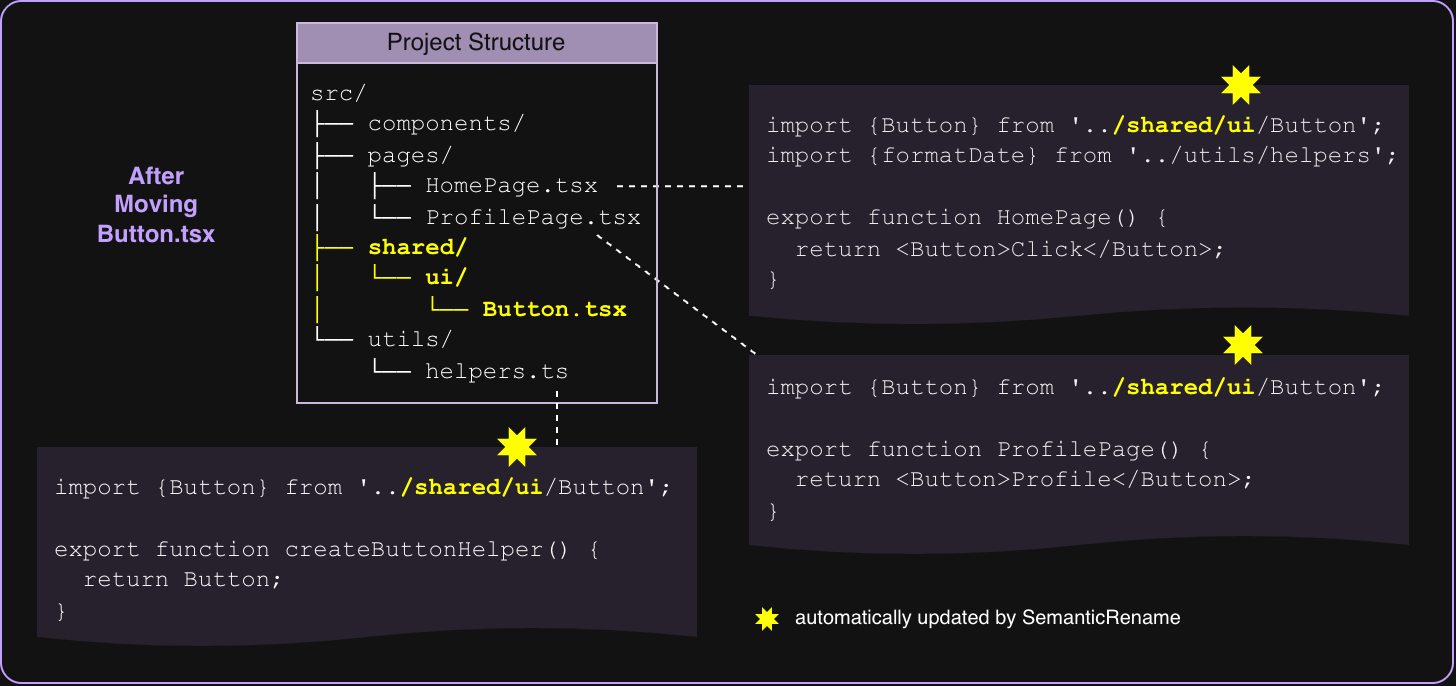
How Kiro handles it: Here's a concrete example showing how Kiro automatically updates import paths. The diagram shows a partial snapshot of the project structure and some of the dependent code snippets:
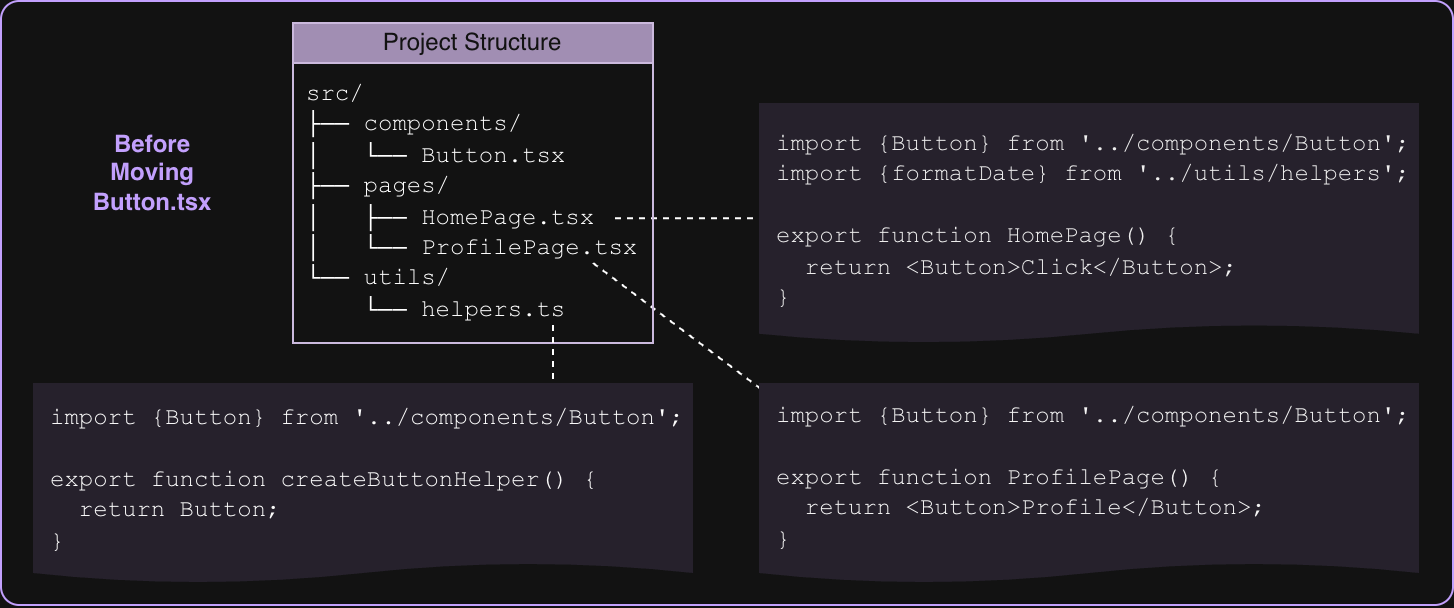
After moving Button.tsx from src/components/ to src/shared/ui/, Kiro automatically updates all the import statements involving the moved file.
Key Benefits:
No manual find-replace needed because the built-in language server handles the edits.
Language-aware: Understands TypeScript/JavaScript module resolution.
Safer: Less likely to break working code.
Handles edge cases: Works with path aliases, monorepos, and more.
This is exactly what happens when you drag-and-drop a file in VSCode's Explorer. The semantic rename tool is the agentic equivalent!
How Kiro agents refactor
IDEs already solved this problem before the rise of agentic AI. When you press F2 to rename a symbol in VSCode, the IDE doesn't guess. It consults the language server that understand your code's structure, computes a workspace-wide edit, and applies it safely. VSCode's workspace edit capabilities enable a programmable, semantic find-and-replace that understands your code's structure rather than just text patterns. The Kiro agent doesn’t attempt to simulate refactoring through LLM reasoning alone. Instead, the agent uses the same mechanism described above to register two new refactoring tools that expose these battle-tested IDE capabilities programmatically. When the agent has to rename a symbol or move a file, it intelligently recognizes the intent, selects the appropriate refactoring tool, and invokes it. The agent orchestrates the refactoring workflow while the IDE’s language server helps validate correctness.
Let’s look at how these agent-registered refactoring tools work under the hood.
Semantic rename tool: renaming done right
This tool taps directly into VSCode's symbol renaming API; the same one you use when you hit F2. It uses vscode.prepareRename to validate the symbol is renameable (e.g., it is not a keyword) and vscode.executeDocumentRenameProvider to generate a workspace edit with all necessary changes across the workspace. For TypeScript, JavaScript, TSX, and JSX, built-in VSCode rename providers handle everything. For Python, Go, Java, and beyond, the tool relies on your installed language extensions and the language servers they provide.
The smart relocate tool: moving files without breaking everything
This tool uses VSCode's file moving capabilities to relocate files while automatically updating all references. It's the programmatic equivalent of dragging and dropping in VSCode's explorer, except the agent can do it for you. Using vscode.WorkspaceEdit.renameFile and vscode.workspace.applyEdit, the tool generates comprehensive changes across multiple files and updates impacted imports.
Why this matters
Precision over creativity: Refactoring doesn't need an LLM to imagine what the code should look like. It needs tooling that understands what the code actually is and can modify it surgically.
Trust through proven infrastructure: These aren't experimental LLM features, but rather direct integrations with the refactoring infrastructure that developers already rely on daily. If it works when you press F2, it works when the agent does it.
Language agnostic: Because the heavy lifting is done by language servers, the approach generalizes across tech stacks and languages.
Maintain productivity: A 20-second manual refactor shouldn't become a 5-minute AI-generated recovery mission. With proper tooling, the operation stays fast and atomic.
The bigger picture
Building on our philosophy of correctness by construction—the same principle that guided our IDE diagnostics integration—we're extending this approach to cover the full spectrum of VSCode's refactoring capabilities. Just as we integrated real-time diagnostics to catch errors before they compound, we've now expanded those battle-tested deterministic IDE capabilities to our new internal smart relocate and semantic rename tools.
But refactoring capabilities don't stop at renaming and relocating. VSCode's language servers offer a rich suite of automated code transformations that agents should leverage: Extract Method/Function to pull out code blocks into reusable functions, Inline Variable/Function to simplify code, Change Signature to update method parameters across all call sites, and Convert to Arrow Function or other language-specific transformations are prime candidates.
By taking this approach, we can build correctness, security, and reliability into the foundation that agents run on. The pattern we've established with these tools will guide new additions to our toolkit: instead of asking LLMs to generate fragile text-replacement scripts, intelligent coding agents will continue leveraging these battle-tested IDE operations that developers already trust. When the IDE knows how to do it right, we let it do the work. As agents become more capable, this is a good technique to also make their outputs more trustworthy.
Ready to experience the difference? Get started with Kiro for free and see how it can transform your development workflow. Join our growing community on Discord to share feedback, ask questions, and connect with other developers building with AI-assisted coding.
Acknowledgements
Credit to Al Harris for the engineering insights and valuable feedback.