Kiro provides proactive usage notifications to help you monitor your credit consumption and avoid unexpected charges. These notifications keep you informed about your usage patterns and help you make informed decisions about your subscription tier.
Loading image...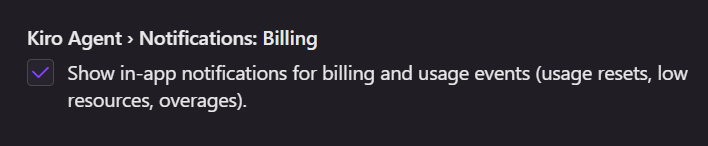
Notification types
Kiro sends several types of usage notifications to help you stay on top of your credit consumption:
Low resource notifications
When you reach 80% of your monthly credit usage, Kiro sends a low resource notification with options based on your current plan:
- Free tier users receive suggestions to upgrade to a paid tier for continued access, with a reminder that credits reset monthly and overages aren't available.
- Paid tier users receive different options depending on their situation:
- If you can upgrade, you'll be prompted to upgrade for more credits or enable overages as an alternative.
- If you have the highest tier, you'll be prompted to enable overages for uninterrupted access or reminded that overages are already enabled with current rates.
Overage notifications
When you exceed your monthly credit limit with overages enabled, Kiro immediately sends notifications:
- If you can upgrade, you'll be prompted to upgrade for more credits or enable overages as an alternative.
- If you have the highest tier, you'll be alerted that overages are now in effect and receive details on when your usage limit will reset.
Usage reset notifications
At the start of each billing cycle, usage reset notifications are sent when your credits refresh:
- If you have overages disabled, you'll receive an alert on the total number of credits available.
- If you have overages enabled, you'll receive an alert on the total number of credits available and confirmation that you have overages enabled.
Managing notification preferences
By default, billing notifications are enabled. You can disable these notifications in your settings:
- Open Settings: Command Palette (
⌘/Ctrl+Shift+P) - Search for
Notifications: Billing - Unselect Notifications: Billing to disable billing-related notifications.
Understanding your usage patterns
Proactive notifications help you:
- Identify usage spikes – Understand when and why your credit consumption increases
- Right-size your plan – Determine if you need to upgrade or downgrade your subscription
- Optimize workflows – Adjust your development patterns to use credits more efficiently
- Avoid surprises – Stay informed about potential overage charges before they occur
Page updated: November 15, 2025
Managing proactive usage notifications