Enterprise governance: control your MCP servers and models
Enterprise security and compliance teams evaluating AI coding tools consistently prioritize two capabilities: centralized control over MCP server connections and governance over which AI models are used across their organization.
Both reflect how enterprises approach any new category of developer tooling. MCP servers extend the IDE by connecting to databases, documentation, APIs, and internal tools and can add real productivity value. AI models ship regularly, each with different data processing characteristics and inference regions. At enterprise scale, organizations expect the same policy-driven controls over these that they have over any other part of their development environment.
For organizations with heightened compliance requirements, these controls are often a prerequisite for broad adoption. Security teams need to verify that MCP server access aligns with organizational policy, and that model usage stays within approved boundaries before greenlighting rollout across engineering teams.
Today, we're shipping two new enterprise governance features for Kiro: an MCP server registry that lets administrators allowlist approved MCP servers, and model governance controls that let organizations define which models their developers can use. Kiro enforces these policies deterministically across both the IDE and the CLI.
The problem: MCP without guardrails
MCP has become the standard way AI coding tools connect to external systems. Kiro has supported MCP since launch first with local servers, then with remote servers. Developers use MCP servers to connect Kiro to their documentation systems, databases, ticketing tools, cloud infrastructure, and more.
As MCP adoption scales across an organization, enterprise security teams naturally want the same centralized oversight they apply to any other integration point in the development environment. When hundreds of developers are connecting to external systems through MCP, administrators need a way to define and enforce which servers are approved for use — the same way they govern package registries, CI/CD plugins, or API access.
This was one of the most consistent requests we heard from enterprise customers: give administrators a way to manage MCP server access through policy rather than leaving it to individual developer discretion. Organizations wanted to move fast on MCP adoption while maintaining the governance posture their security teams require.
How it works: the MCP registry
Kiro’s MCP governance gives admins two controls: an MCP on/off toggle that disables MCP, and now an MCP registry that lets administrators set a JSON allow-list of approved MCP servers for Kiro. Both controls are part of the Kiro Profile that gets created for enterprise users, and can be set at the account level for all subscribers on that account.
![Shared settings:
Include suggestions with code references
[on] Include suggestions with code references
Model Context Protocol (MCP)
[on] Kiro and Q Developer agents can use Model Context Protocol (MCP)
Web search and web fetch tools
[on] Kiro and Q Developer agents can use web tools
Encryption key
[off] Use custom encryption key
Uses default key when setting is turned off
Member account subscriptions
[off] View subscriptions from member accounts with Trusted Access
MCP registry URL (optional)
Not configured, link: Edit
Model availability, link: View list of models
[off] Control which models are available to users](/images/blogs/enterprise-governance-mcp-and-models/shared-settings.png?h=c97c002e)
The registry itself is a JSON file that you create and host on any HTTPS endpoint such as Amazon S3, nginx, or an internal web server. You add the URL to your profile in the Kiro admin console, and Kiro handles the rest in a deterministic fashion. Every Kiro client fetches the registry at startup and re-syncs every 24 hours. If a locally installed MCP server is no longer in the registry, Kiro terminates it and prevents the developer from adding it back. If the registry specifies a newer version of a server, Kiro automatically relaunches it with the updated version.
When a developer runs /mcp add in the Kiro CLI, they see only the servers from the registry. Server parameters defined in the registry — URLs, package identifiers, runtime arguments — are read-only. Developers can still add their own environment variables (for authentication keys or local paths) and HTTP headers, but they can’t connect to servers that aren’t on the list.
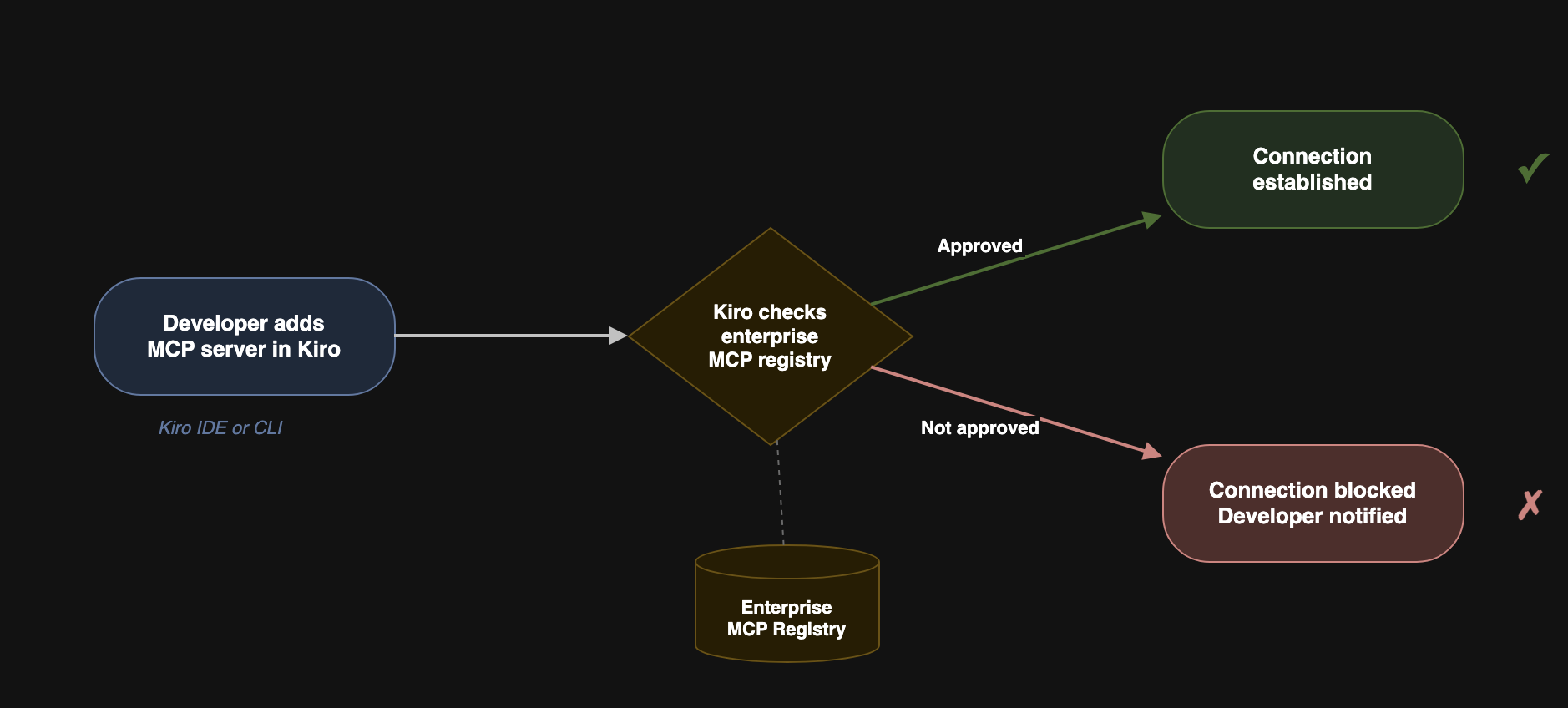
The registry supports both remote and local MCP servers:
Remote servers connected via
streamable-httporssetransport, with configurable endpoint URLs and HTTP headers.Local servers defined as packages from npm, PyPI, or OCI registries, running over
stdiotransport. Kiro usesnpx,uvx, ordockerto download and run them — the appropriate package runner must be installed on the developer’s machine.
Built on the MCP Registry open standard
Kiro’s registry file format is a subset of the MCP registry standard, an open-source specification for MCP server discovery and distribution that is maintained by the MCP project (originally created by Anthropic and now governed as an open standard). This ensures that your investment in MCP governance doesn’t tie you to a single service provider. The registry spec defines a standardized data model for how MCP servers are cataloged, versioned, and discovered.
The Kiro registry definition follows a subset of the server schema from the spec in JSON format. Each server entry includes a name (unique within the file), description, version (semantic versioning recommended), and either a remotes array (for HTTP-based servers) or a packages array (for local stdio servers). Here’s a simplified example:
For the full JSON schema and attribute reference, see the Kiro MCP governance documentation.
Model governance: control which models your developers can use
Kiro keeps adding new model options such as the open weight models or the latest from Anthropic like Opus 4.6 and Sonnet 4.6. More choice is good for developers. But for enterprises with model approval processes, every new model is a compliance question that needs answering before anyone can use it.
Today, we’re also shipping model governance for Kiro enterprise customers. Kiro administrators can now restrict which models are available to their developers by disabling those not yet approved.
To be clear: this is not “bring your own model.” Model governance does not let you add models to Kiro. It lets you remove models from the list that is already available. If your organization hasn’t approved a model yet, you can disable it so developers don’t see it as an option until your review process is complete.
![Modal showing:
List of available models
There are 7 models available in Kiro. You can approve or remove a model from the approved list to control what users can access. You can change the default model selection.
[checked] Auto
Models chosen by task for optimal usage and consistent quality
link: Set as default
[unchecked] Claude Opus 4.6
Experimental preview of Claude Opus 4.6
[checked] Claude Sonnet 4.6 - Default
Experimental preview of the latest Claude Sonnet model
[checked] Claude Opus 4.5
The Claude Opus 4.5 model
link: Set as default
[checked] Claude Sonnet 4.5
The Claude Sonnet 4.5 model
link: Set as default
[checked] Claude Sonnet 4
Hybrid reasoning and coding for regular use
link: Set as default
[checked] Claude Haiku 4.5
The latest Claude Haiku model
link: Set as default
button: Cancel
button: Save list](/images/blogs/enterprise-governance-mcp-and-models/models.png?h=24f18d1e)
Why this matters
Enterprise model approval processes exist for good reasons. Different models have different training data provenance, different licensing terms, and different data processing characteristics. Some organizations require legal review before any new model is used. Others have technical evaluation processes that take weeks.
Without model governance, every time Kiro ships a new model, it’s immediately available to every developer in the organization. Admins have no way to enforce their approval process and they’re relying on developers to check a policy document before selecting a model in the IDE. That doesn’t scale.
Data residency and experimental models
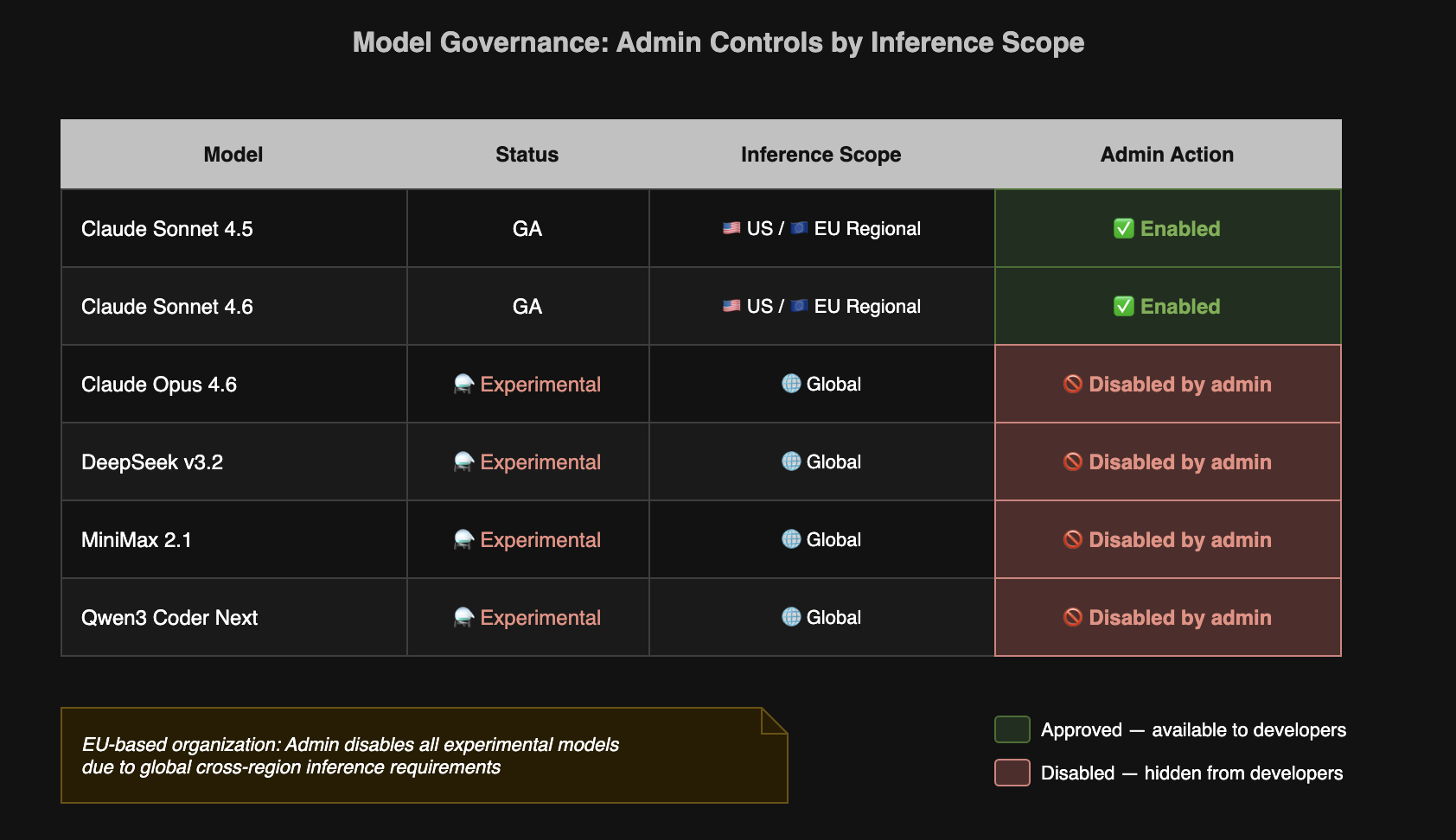
This is especially important for customers with data residency requirements. Kiro’s generally available models use regional cross-region inference which means your data stays within your selected geography (US or Europe). But newer models launched with experimental support may use global cross-region inference, meaning requests may be processed in AWS Regions outside your selected geography.
For organizations with heightened data residency requirements, this distinction matters. An experimental model that routes inference globally may not be compatible with your compliance obligations, even if the model itself is technically excellent.
Model governance gives admins a straightforward way to handle this: disable experimental models until they’ve been reviewed against your data residency requirements. When a model moves from experimental to generally available with regional inference, enable it. Your developers get access to new models on your timeline, not ours.
How it works
Admins configure model availability through the Kiro admin settings in the AWS Management console. The interface shows every model Kiro supports, along with its current status (GA or experimental) and inference scope. Administrators can toggle models on or off. Disabled models don’t appear in the model selector for any developer in the organization for both the IDE and the CLI.
When Kiro launches a new model, administrators can easily move to turn it off until their ready. Developers see only the models your organization has approved.
Get started
MCP governance and model governance are available in Kiro IDE 0.11.28 or Kiro CLI 1.23 or later for Kiro enterprise customers authenticating through AWS IAM Identity Center, Okta, or Microsoft Entra ID. Configure your MCP registry and model policies in the Kiro admin settings console.