Run all tasks: the feature we refused to ship (until now)
Victor Ding
Developer
Nikhil Swaminathan
Product Lead
When we first launched Kiro, we made a deliberate decision that frustrated some early users: we didn’t include an “run all tasks” button. You had to check in with the agent after every task. That wasn't an oversight. It was intentional.
The tension between speed and control
“Why can’t I just run all the tasks in my spec at once?” was one of the top questions we got after launching 6 months ago. The request made sense—specs often contain 5, 10, sometimes 20+ tasks. Clicking through each one individually felt tedious. Isn’t an agent supposed to help you be as hands-off as possible? Yes and no.
Our core belief with Kiro has always been that AI development works best when developers maintain visibility and control. We wanted you to watch what was happening, understand each task’s execution, and catch issues early. The alternative—letting an AI run through your entire codebase while you grab coffee—felt reckless. We did internal testing and noticed that at times the agent would actually work well autonomously. But other times, it would mess up and the user would spend too much time backtracking and figuring out where things went wrong and trying to fix the issues.
So we said no. And kept saying no. Even as the requests piled up.
Building the foundation first
Instead of rushing to ship what users asked for, we focused on building the engine that would make run-all actually safe. Over the past several months, we’ve quietly shipped a series of features that fundamentally changed Kiro’s reliability:
Property-Based Testing (PBTs) - “does this task do what I want it to do?”: We now generate property-based tests that validate not just that code runs, but that it meets the specification’s requirements. These aren’t simple unit tests—they're invariant checks that ensure your code behaves correctly across a range of inputs. With PBTs, the agent could check that the task implementation behaved as expected before moving on.
Dev Servers and LSP Diagnostics - “does the implementation work in practice?”: Real validation environments where tasks are tested against running servers and analyzed with language server diagnostics. Your code gets validated for both runtime behavior and static correctness, catching issues before they reach your main branch.
Subagents - “does the agent stay on track without getting lost in context rot?”: Specialized agents that handle specific tasks while maintaining their own local context. As your main agent progresses through a spec, subagents prevent it from getting overwhelmed by keeping context management distributed and focused.
Together, these features transformed Kiro from a tool that generates code to one that validates it. They gave us confidence that executing multiple tasks wouldn’t just be fast—it would be safe.
Run all tasks: now available
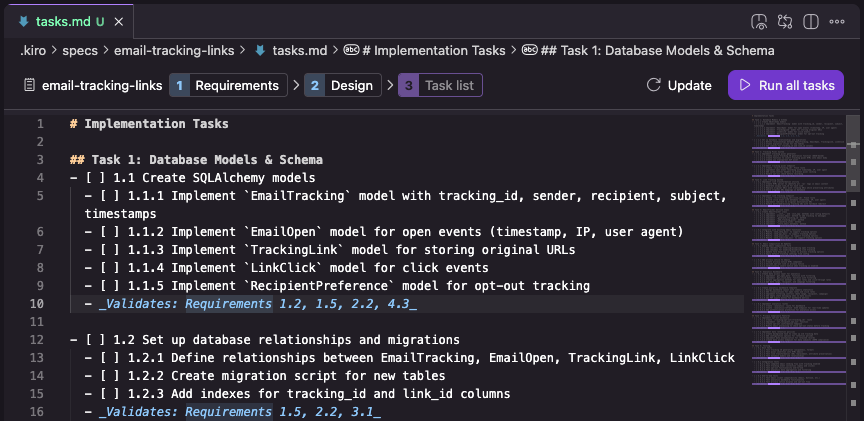
Today, we’re shipping what you've been asking for: the ability to run all tasks in a spec with a single click. The feature follows the spirit of what you’ve been asking for, but our implementation gives you the confidence to use it as often as you need to.
When you hit “Run all tasks” now, you're not just running code faster. You’re running it through a gauntlet of validation:
Each task’s output is verified against property-based tests (PBTs)
Code is validated against dev servers and checked with LSP diagnostics
Subagents maintain focused, local context so your main agent stays effective across the entire spec
You get real-time visibility into what’s happening at each step
The result? You get the speed of automated execution with the reliability of careful, watched development.
We think this is great for smaller feature specs where you do not want to handhold the agent. And as always, spending a bit of time up front validating the specs that Kiro came up with based on your prompts will help you ship the actual code you want that much faster overall.
“Run all tasks” isn’t just a button we added. It’s the culmination of months of work that makes batch execution actually trustworthy so you can save time and effort while running tasks instead of needing to fix a more complex mess after the fact.
“Run all tasks” is available now for all Kiro users. Try it on your next spec and let us know what you think.