Administrators can now export Kiro subscription data as a CSV file directly from the Kiro Console. The new "Download CSV" button on the Users & Groups page's Subscriptions table exports user name, subscription plan, status, type, and activation date.
General
Models
Claude Opus 4.6 and Claude Sonnet 4.6 now support a 1M context window, up from 200K, and are no longer marked as experimental. Both models are now generally available in the Kiro IDE and Kiro CLI for Pro, Pro+, and Power tier subscribers. Restart your IDE or CLI to see the updated models. Learn more ->
Models
MiniMax M2.5 is now available in eu-central-1 (Frankfurt) for users authenticating with AWS IAM Identity Center, extending support beyond us-east-1 (N. Virginia). Available on all subscription tiers with a 0.25x credit multiplier and 200K context window. Restart your IDE or CLI to access it from the model selector. Learn more ->
1.28.0CLI
This release brings an experimental refreshed terminal UI behind the --tui flag. The new experience features a live status bar, rich markdown rendering with syntax-highlighted code blocks, interactive panels for managing context and sessions, and contextual overlays for tools and help. You also get /chat new for starting fresh conversations without restarting the CLI, and --list-models for quickly checking which models are available.
New Terminal Experience
Get a richer chat experience with the new TUI. Agent responses render with full markdown, syntax-highlighted code blocks, tables, and nested formatting. Tool calls show descriptive titles and progress indicators as they run. Interactive panels let you browse context, switch sessions, and manage tools without leaving the terminal. The classic interface remains the default, so you can switch back at any time. Try it with kiro-cli --tui or set it permanently with kiro-cli settings chat.ui "tui". Learn more ->
Models
A new open weight model is now available with experimental support in the Kiro IDE and CLI. Available on Free, Pro, Pro+, and Power tiers with all authentication methods. Supported in us-east-1 (N. Virginia). Restart your IDE or CLI to access it from the model selector.
MiniMax M2.5 matches frontier-class coding performance at a fraction of the cost. Trained with reinforcement learning across hundreds of thousands of real-world environments, it delivers strong results across the full development lifecycle from system design to code review and completes complex agentic tasks significantly faster than its predecessor. 200K context window with a 0.25x credit multiplier.
General
Eligible university students now get one full year of free access to Kiro with 1,000 credits per month. No credit card required, no trial timer. Kiro's spec-driven development teaches structured problem decomposition — useful whether you're building class projects, hackathon prototypes, or startup MVPs. Every job now expects AI fluency; Kiro helps students build with AI from day one.
What's included
Students receive 1,000 credits per month for 12 months, with full access to Kiro IDE and CLI agentic capabilities including spec-driven development. Verification is handled through SheerID using a university-affiliated email.
How to get started:
Sign up or log in at kiro.dev/students using your university email
Verify student status through SheerID (takes about a minute)
Start building — credits are available immediately after verification
Available with 11 eligible universities, with more coming soon. For the full list and details, visit kiro.dev/students.
Models
MiniMax 2.1, DeepSeek 3.2, and Qwen3 Coder Next are now available for AWS IAM Identity Center users. All three open weight models are available on all plans in both the Kiro IDE and CLI. MiniMax 2.1 and Qwen3 Coder Next are available in both us-east-1 (N. Virginia) and eu-central-1 (Frankfurt). DeepSeek 3.2 is available in us-east-1 only. Credit multipliers are unchanged: DeepSeek 3.2 at 0.25x, MiniMax 2.1 at 0.15x, and Qwen3 Coder Next at 0.05x. Learn more ->
0.11IDE
This release gives enterprise teams centralized control over MCP server access and model availability, and adds document attachment support to chat.
MCP Registry Governance

Enterprise administrators using IAM Identity Center can now control which MCP servers their organization is allowed to use. Create a JSON registry file listing approved servers, host it over HTTPS, and configure the URL in the Kiro console. The registry supports remote (HTTP) and local (stdio) servers across npm, PyPI, and OCI package types, with ${VAR} placeholders for user-specific values like auth tokens. Kiro syncs with the registry every 24 hours, enforces version-pinned access, and works alongside the existing MCP on/off toggle to give you full control at the org or account level.
Model Governance
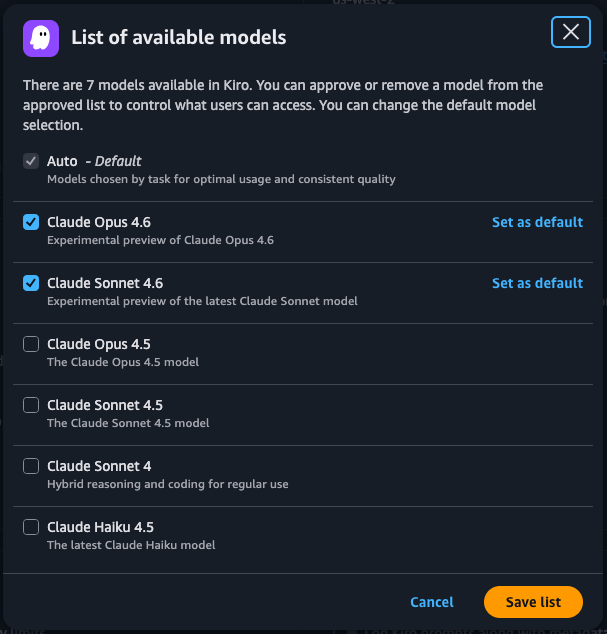
Enterprise administrators can now control which AI models are available to users in their organization. Toggle on model access management in the Kiro console under Settings > Shared settings > Model availability, then curate an approved list of models. You can also set a default model that auto-applies across all clients. This is especially relevant for data residency requirements — experimental models using global cross-region inference can be removed from the approved list until they move to GA with regional inference. Once enabled, only approved models appear in the model selector across both the IDE and CLI.
Document Attachments
You can now attach documents directly to chat messages by pasting or dragging files into the input. Supported formats include PDF, CSV, DOC, DOCX, XLS, XLSX, HTML, TXT, and Markdown. Documents are sent to the model as native document blocks, so the agent can read and reason over their contents. You can attach up to 5 documents per message and mix them with text and images in the same prompt.
1.27CLI
This release streamlines how you create and manage agents. Describe what you need and Kiro CLI generates your agent config, use the new session settings tool to tweak preferences mid-conversation without editing config files, and control exactly which shell commands you trust with granular scoped permissions.
Simplified Agent Creation
The /agent create command now defaults to AI-assisted mode, merging the previous /agent generate workflow into a single command. Describe what you want your agent to do and Kiro generates the agent configuration for you. Pass --manual to use the previous editor-based creation flow. You can also specify creation arguments directly at invocation time to bypass the interactive menu entirely. Learn more ->
Granular Tool Trust
When Kiro asks to use a tool, you now get an interactive picker to choose how broadly to trust it. For shell commands, select from tiered scopes — trust the exact command, the command with any arguments, or the base command with wildcards. For read and write tools, scope trust to specific file paths, the containing directory, or the entire tool. The picker adapts to each action, skipping tiers that aren't meaningful, and handles chained shell commands automatically. Learn more ->
Session Settings Tool
You can now ask the agent to adjust settings temporarily within your current session — change model preferences, toggle features, or tweak behavior without modifying your config files. All session overrides apply in-memory and reset automatically when the session ends. Learn more ->
0.10IDE
This release introduces new spec workflows that let you design features architecture-first and fix bugs with structured root cause analysis. Supervised mode now lets you review changes at the hunk level for precise control. New hook triggers automate work around spec tasks, and MCP servers can now surface prompts, templates, and elicitation support directly in chat.
Design-First Feature Specs
A new Design-First workflow lets you start a feature spec from technical architecture instead of requirements. Provide a high-level or low-level design, pseudocode, or system diagram and Kiro derives feasible requirements from it. This is ideal when you have strict non-functional constraints, an existing design to port, or want to think through the architecture before defining user-facing behavior. Learn more ->
Bugfix Specs
Specs now include a dedicated Bugfix workflow. Describe the issue you're seeing and Kiro walks you through root cause analysis, fix design, and regression prevention. The result is a `bugfix.md` that captures current behavior, expected behavior, and what must remain unchanged, giving the agent clear guardrails before it writes a single line of code. Learn more ->
Hunk-Based Review in Supervised Mode
Supervised mode now presents file changes as individual hunks instead of full-file diffs. Each hunk is a logical group of related lines that you can independently accept, reject, or discuss with inline chat. You can also accept changes at the file level or accept all changes at once. This gives you precise control over exactly which parts of a change to keep. Learn more ->
Pre and Post Task Execution Hooks
Two new hook triggers let you automate work around spec task execution. Pre Task Execution fires before a task begins, so you can run setup scripts or validate prerequisites. Post Task Execution fires after a task completes, letting you run tests, linting, or notify external systems automatically. Combine these with the existing hook actions to build end-to-end automation around your spec workflows. Learn more ->
MCP Prompts, Resource Templates, and Elicitation
MCP servers can now provide prompts and resource templates that appear in the context provider (#) menu in chat. Select a prompt to insert pre-built instructions, or fill in a resource template's parameters to pull in specific content as context. During tool execution, servers can also request additional input from you through elicitation. Kiro supports elicitation so servers can request the information they need without interrupting your workflow. Learn more ->