Specs just got faster (and smarter)
Ankit Sharma
Product
When we introduced spec-driven development, we knew the spec flow might slow you down a little at the start, but would deliver a higher quality implementation at the end. But over time we started questioning the assumption that structure and quality imply slowness.
For example, you've got a feature spec with ten tasks. Six of them are independent: different endpoints, different files, no shared state. But Kiro runs them one after another. Or you've got a clear idea for a feature where you know the scope, the constraints, and the edge cases. In that case, the current step-by-step approval flow can feel like more process than the problem requires. The flip-side also happens, where a deceptively simple feature prompt includes many unstated assumptions and ambiguities that can take the implementation in the wrong direction. Small clarifications up-front can save significant implementation time (and tokens!). Today, we're introducing improvements in the Kiro IDE to address all these issues, so you can start your spec flow faster, implement it faster, and get the solution right the first time. You now get speed where it helps and depth where it matters.
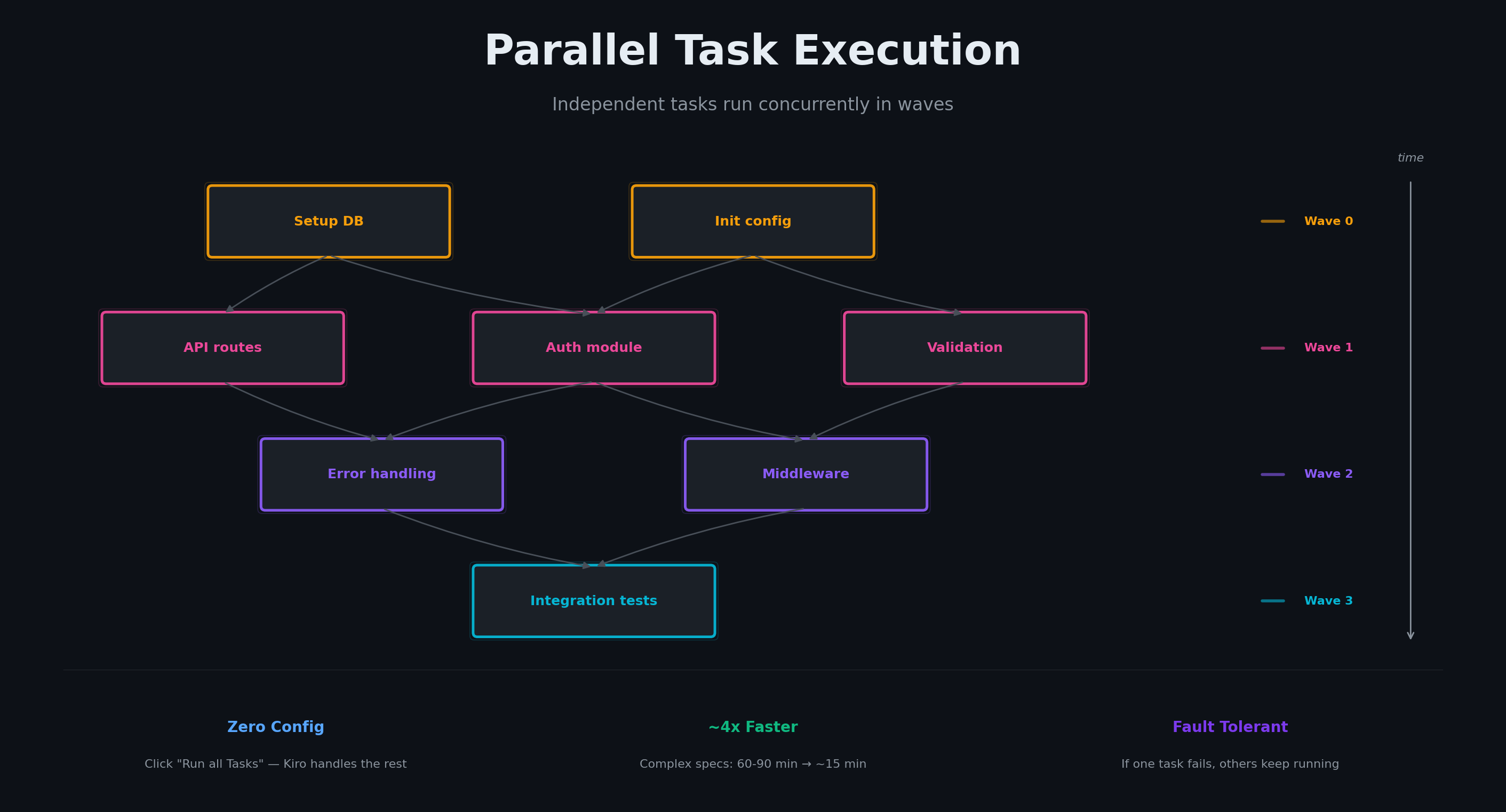
When you click "Run all Tasks" on a spec, Kiro now analyzes your task list and figures out which tasks can run at the same time. Most task lists aren't truly sequential. They have a dependency structure. Task 2 and Task 3 might both depend on Task 1, but they don't depend on each other. Running them one after another wastes time. Kiro builds a dependency graph from your task list, identifying which tasks write to the same files, which tasks test code from earlier tasks, and which are truly independent. Tasks that touch the same files are never run in parallel. Setup and infrastructure work runs first. Tests run after the code they validate. Everything else runs concurrently, grouped into waves that execute simultaneously. Each task runs in its own isolated context, so there's no state leaking between them. If a task fails, the others keep running. You see which ones succeeded and which need attention. Tasks that depend on earlier work still wait their turn. To run tasks in parallel, you don't need to configure anything. Click "Run all Tasks" and Kiro handles the rest. For specs with several independent tasks, you'll feel the difference immediately. Anecdotally, we've seen full spec implementation times go down from over an hour for large specs, to about a quarter of that time.
The standard spec flow has three phases: requirements, design, tasks. You approve each one before the next begins. This is valuable when you're exploring unfamiliar territory. But for well-understood features, where you already have a clear picture of the scope, quick plan mode lets you move faster without sacrificing correctness.
Based on your prompt, Kiro asks clarifying questions up front (scope, constraints, edge cases) then auto-generates requirements, design, and tasks in one pass. Before asking questions, Kiro scans your workspace detecting your language, frameworks, and project structure so questions are specific to your stack. Questions target four dimensions: scope and constraints, ambiguity in your description, implementation forks, and directional decisions about the feature's shape. You land on the task list, ready to build. The artifacts are still created, saved, and used by the agent during execution. You can review and edit them after the fact. If you ask to change a task, only tasks are regenerated. If you adjust the design, design and tasks are rebuilt. If you change scope, the full pipeline reruns from requirements. Kiro only regenerates what's affected.
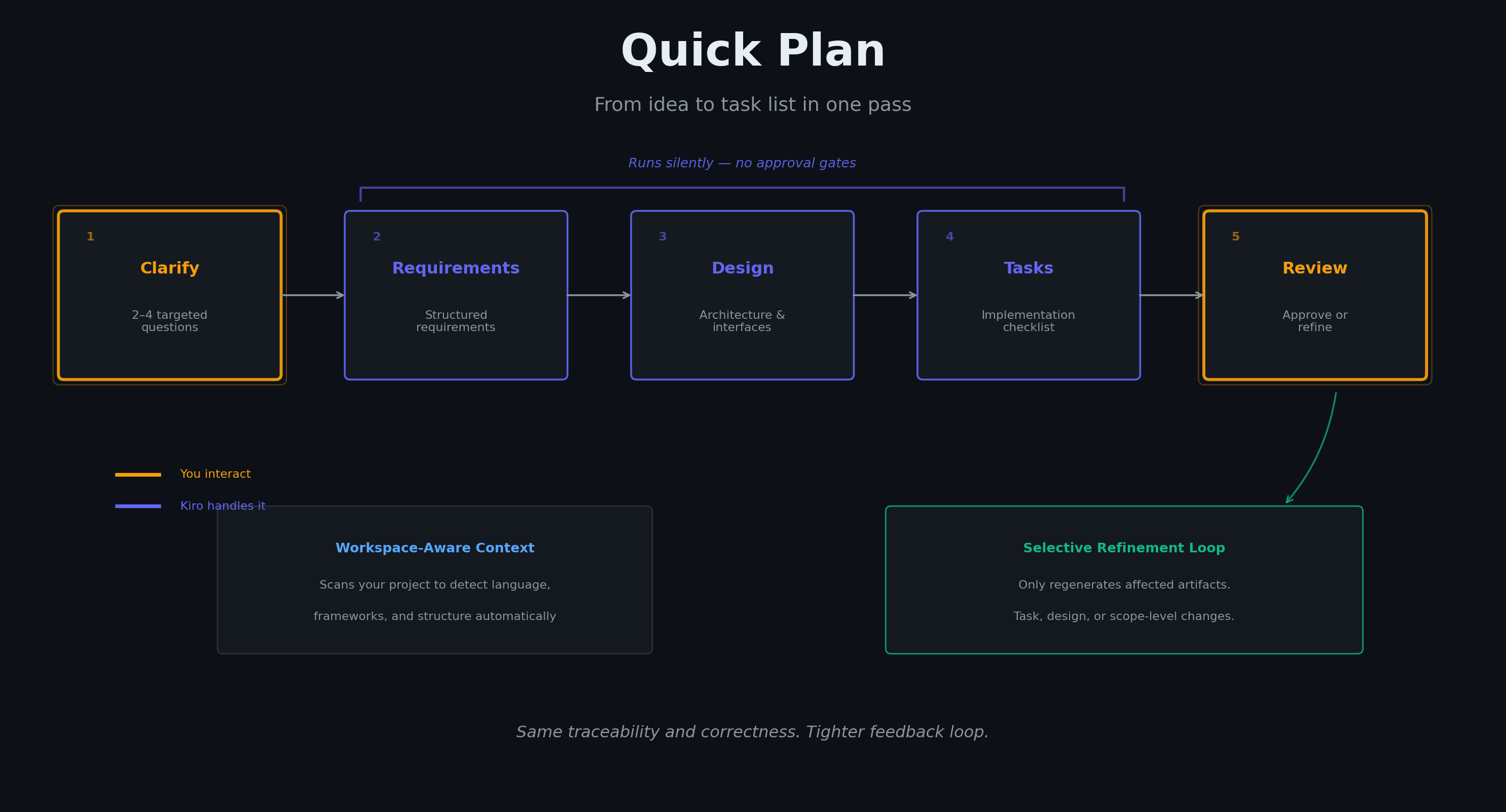
Kiro uses the spec artifacts as its source of truth during implementation so that every decision it makes traces back to a documented requirement or design choice. Quick plan is a faster path to the same outcome, not a shortcut that skips structure.
Requirements can contain subtle issues that are hard to catch at a quick glance. Two requirements can make sense individually, but are collectively impossible. Semantic uncertainty - language that produces different implementations depending on who reads it. Unstated assumptions that everyone thinks are obvious until they're not.
After Kiro generates requirements based on your prompt, you can select "Analyze Requirements" to kick off a deep analysis powered by Neurosymbolic AI, which combines LLMs and automated reasoning to go beyond what either can do alone. Kiro surfaces ambiguities and conflicts in your requirements as it finds them (with proposed fixes) so you can move into design and implementation with confidence.
Ambiguity detection. Kiro samples multiple interpretations of each requirement to find places where the language could mean two different things to two different developers. "Remove the record" - does that mean hard delete or soft delete? When Kiro finds a genuine ambiguity, it surfaces the disagreement as a simple two-option question: which meaning did you intend?
Logical analysis. Kiro uses automated reasoning to validate whether your requirements are consistent (no two requirements contradict) and to find gaps where the requirements are silent about what should happen. This isn't an LLM guessing there might be a conflict, but using mathematical logic to validate that no implementation can satisfy both rules simultaneously.
To see how this works under the hood, read our deep-dive into requirements analysis.
These three new features make specs faster and smarter. Quick plan mode fast-tracks generation. Parallel task execution fast-tracks implementation. Requirements analysis catches the issues that a read-through misses. Structure should make software better without making the process slower, now it does both.
Quick plan, parallel task execution, and requirements analysis are available now. Get started with Kiro specs.