Introducing ‘Approve for me’ in Kiro
Pooja Giri
Engineering
Abhay Raina
Engineering
Today we’re launching ‘Approve for me’ in Kiro IDE, Kiro CLI, and Kiro Web. You no longer have to choose between approving every action, setting up your own custom permission rules, or turning approvals off. With Approve for me enabled, for actions your rules don’t cover, Kiro runs an LLM review, which currently uses an Anthropic model. Based on the review, Kiro auto-approves the routine ones, blocks ones it judges unsafe, and asks you when it isn’t sure.
Approve for me helps reduce user friction. For example, previously, if we asked Kiro to fix a failing test, it would pause for approval before running the test suite, editing the source file, and again before rerunning the tests. Each approval prompt made sense on its own, but on a longer task the friction added up and broke your flow of work with each approval. After enough of them, many users turned on trust-all-tools, which lets Kiro run tools without asking for approvals. That let your work progress without any friction, but it also allowed potentially unsafe actions, making it risky for production workloads.
In GitHub issues such as #10364 and #9732, several of you described the same friction.
“When running longer agentic tasks (e.g., multi-file refactors, dependency setup, or exploratory debugging), constantly approving every read/write/shell action kills momentum.”
“Kiro is an excellent agentic development environment, but currently requires frequent user approvals for file modifications, terminal commands, and project-wide changes. [...] I am really tired of approving every single request.”
When analyzing internal data, we found that across Kiro CLI interactive sessions alone, for the one-week sample period, Kiro asked for permission before 15.8% of tool calls, and users approved 97.1% of those requests. Over the same period, 13.4% of sessions started with trust-all-tools on.
We consider approval prompts valuable because they let users stop an action they didn’t expect, but they only add value when the decision is real. Previously, unless you had pre-approved tools in a custom agent or enabled trust-all-tools, Kiro asked for approval before many actions, frequently interrupting tasks with approval prompts. The constant friction and permission fatigue introduced a risk of users missing unsafe actions.
Permission rules tell Kiro whether to allow an action, ask you first, or deny it. Approve for me adds a fourth option, “evaluate,” which has the LLM review check the action instead of asking you. When you turn on Approve for me, Kiro uses evaluate for any action that no allow, ask or deny rule covers. If you have configured any of those permission rules, Kiro applies them first. For example, if you have explicitly allowed or denied certain actions, or marked them as “always ask,” Kiro doesn’t send those actions to the LLM review.
If the LLM review judges an action safe, Kiro runs it without asking you. If it judges the action unsafe, Kiro blocks it. If it can’t decide, Kiro asks you. After three steps in a row with a blocked action, Kiro goes back to asking you and includes the reason in the prompt.
To help visualize, here’s what this looks like in Kiro CLI:
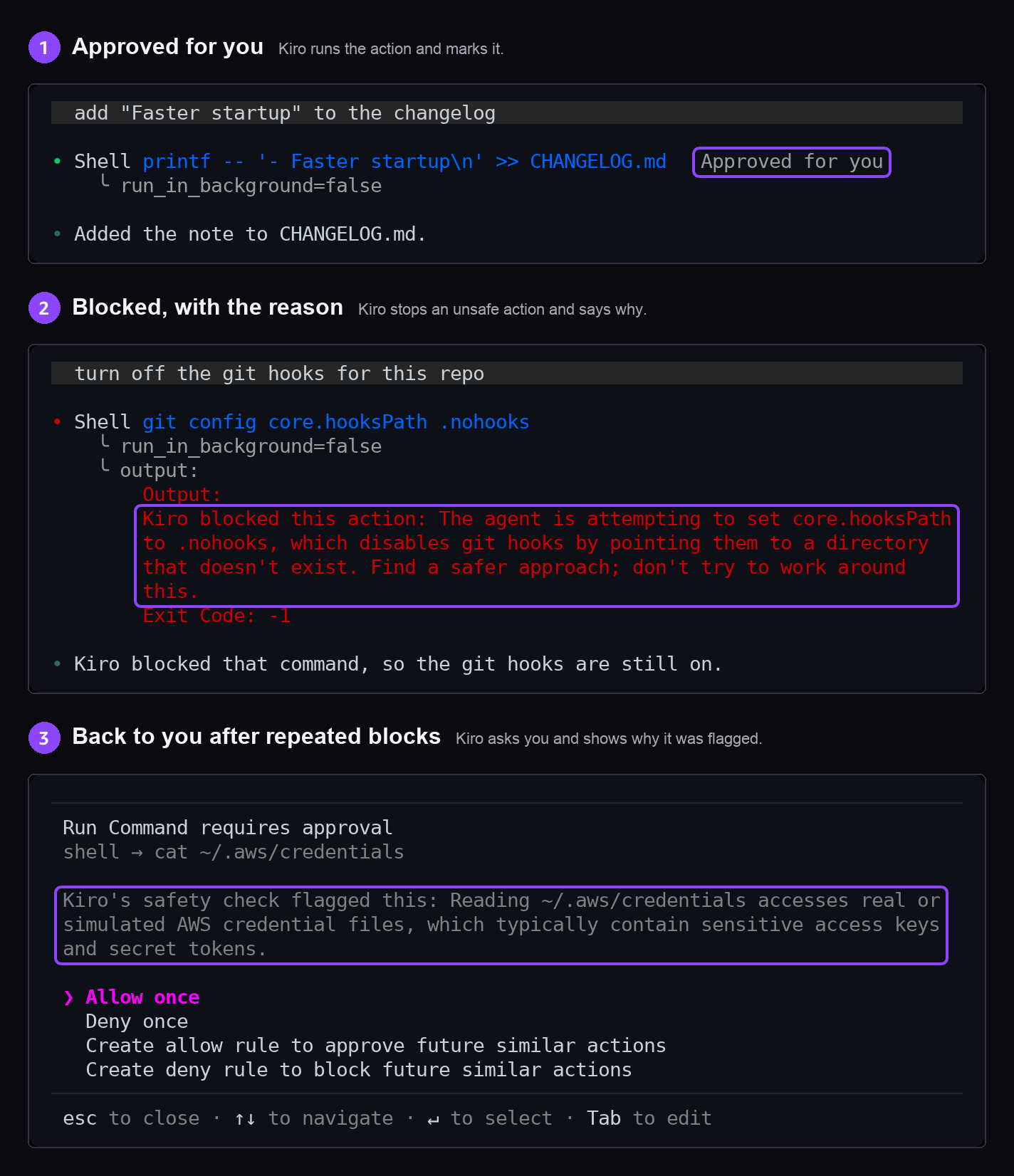
We have been using Approve for me internally for two weeks now. Over a one-week sample period, around 70% of actions were handled by permission rules without an LLM review, and around 30% went through the review. Of the actions the LLM reviewed, roughly 97% were handled without asking the user, about 2% were sent to the user and under 1% were blocked. The median review took under a second.
We also received positive feedback from internal Amazon users.
“This is huge, ‘Approve for me’ auto-approval closes a major feature gap! I did a quick test to have kiro check out a new workspace based on a pipeline. Before: 15 tool approval requests for basic things like
ls. After: zero approval requests.”
Approve for me doesn’t remove every single approval prompt, and that’s expected. When an action is unclear, we err on the side of caution and let Kiro ask you before proceeding. If you want Kiro to run every action without asking, you can still turn on trust-all-tools.
Approve for me decides which actions need your approval. It doesn’t limit what a shell command can access once it runs. For another layer of protection, we support a local sandbox that you can enable in Kiro IDE and Kiro CLI. It puts an operating-system boundary around the shell commands Kiro runs, with outbound network access blocked unless you allow it. Kiro Web sessions already run in a managed cloud sandbox. To learn more, see local sandbox.
Each safety layer enforces its own boundaries. As no single layer is meant to catch all unsafe actions, Kiro follows a defense-in-depth strategy.
Approve for me is available for paid users in Kiro IDE, Kiro CLI, and Kiro Web in us-east-1 (N. Virginia) and eu-central-1 (Frankfurt). Kiro charges your plan for actions it sends to the LLM review. If the feature or the underlying Anthropic model isn’t available for you yet, you will continue to see your current approval experience.
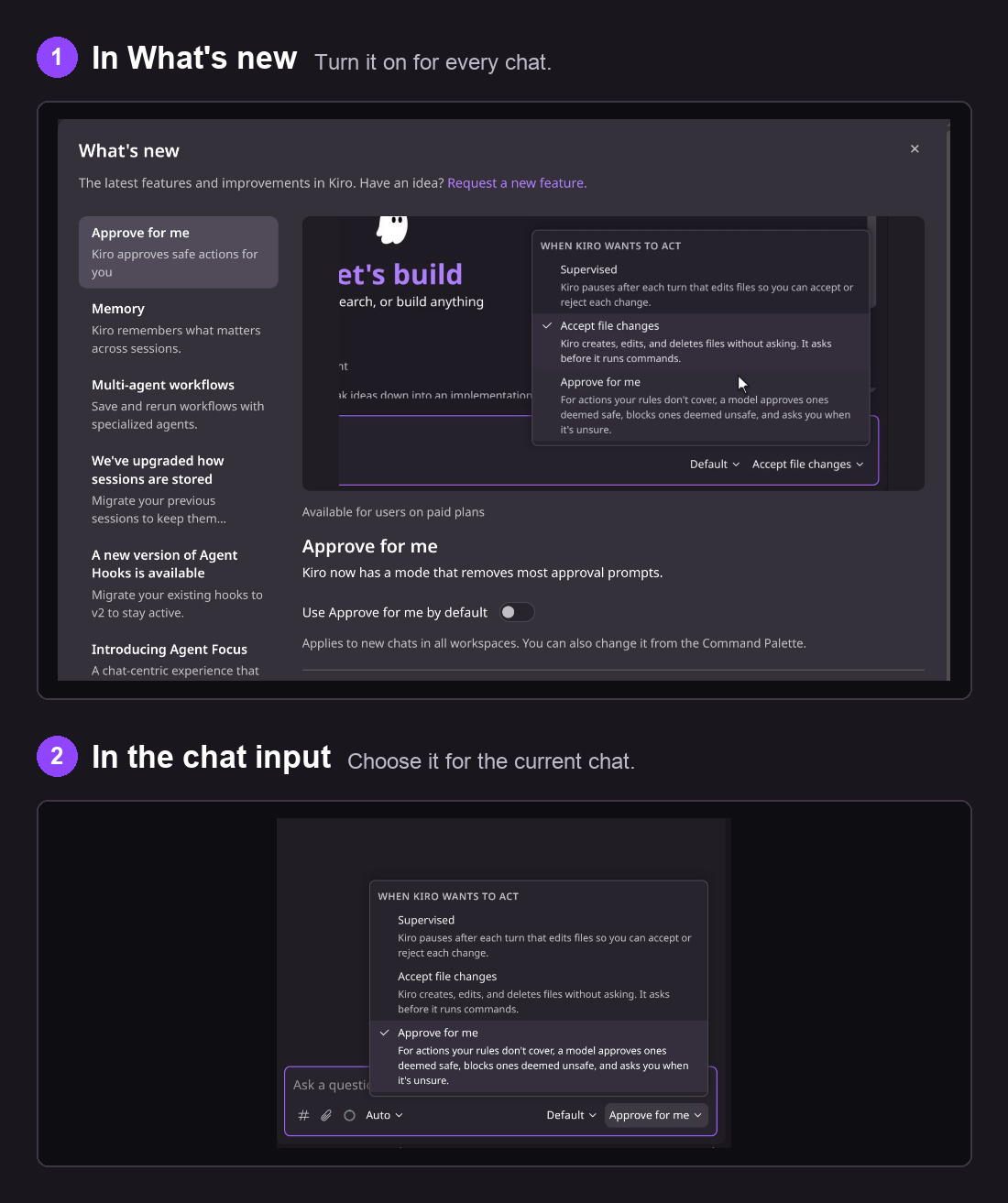
If you turned on trust-all-tools to avoid approval prompts, Approve for me gives you back control over the actions that matter. The feature is off by default. Follow the steps below to turn it on.
In Kiro IDE, turn on Approve for me for every new chat with the switch in What’s new, or choose it for the current chat from the menu in the chat input.
New to Kiro? Check our downloads page. Already using Kiro? Update to Kiro IDE 1.4.154 or later, or Kiro CLI 2.36 or later. Kiro Web needs no update. Turn on Approve for me, give Kiro your next task, and enjoy building with minimal interruptions!