Introducing Kiro Crew
It’s late on a beautiful Friday afternoon, and you’re getting ready to sign off and enjoy the weather. Just as you’re wrapping up, a teammate pings about an urgent latency spike and needs your help. You remember a similar incident, which metrics to investigate, diagnostic tests to run, and where the logs pointed last time. Isolating the issue won’t be especially difficult. It’s just that you need to be across several tools, and you can only be in one place at one time.
That’s the shape of real engineering work. It was never one task in one session. It spans repos, tools, reviews, and days. Even when a single task runs on its own, you are still the one holding it together, reconnecting context, coordinating the handoffs, and stitching your tools into something that keeps moving. You end up being the integration layer between your own tools, and the moment you step away, everything stalls and waits for you to come back.
Kiro Crew takes on that work instead. Now you can shoot off a message to your crew to find what you did last time, write it up, and send it to your colleague, without needing to step in again to make it happen, and you wrap up your day and head out, seeing a note from your team that the issue is resolved.
Hand Kiro Crew a ticket queue and it triages and dispatches, identifies owners, and flags what needs your attention. Point it at an incident spread across repos and it investigates while you stay on the fix. Kick off a migration and it keeps moving through checkpoints and retries while you are in a meeting or asleep. It connects the tools you already use and coordinates the work across sessions, so you come back to progress, not a workflow to restart.
Kiro Crew began as a side project called MeshClaw inside Amazon. Three of us wanted something simple that wasn’t available internally, a way to kick off a task, walk away, come back to something worth reviewing, and to run several tasks at once instead of babysitting one prompt at a time. We were inspired by the momentum of OpenClaw and various tools with self-learning agents taking over AI work, but we needed something that met our security requirements for internal development work. As our go-to coding tool, building something on top of the Kiro harness via the CLI felt right.
We built it for ourselves first. Then other builders inside Amazon picked it up, and the shape of what happened next is the whole reason we are releasing it openly. Builders of diverse backgrounds weren’t just using it, they were extending it for what they needed. When someone hit a gap in their own workflow, they added the piece they needed and it stayed, for them and for everyone after them. A lot of what got built was work that would otherwise have sat in a backlog, the narrow edge cases and the quality-of-life fixes that only the person living in that workflow would ever think to add. In less than 6 months, Kiro Crew has been adopted internally by over 39,000 Amazon builders, with nearly 500 contributors shipping 597 updates at an average pace of 143 weekly commits. Those small, specific contributions compounded, and a personal side project became something maintained by a community across many roles, not just engineers.
Those compounding contributions are what convinced us to open source it. A workspace with access to your code and tools should be something you can read, run where you want, inspect, and change, even if you are the only person who wants a particular tweak. This space is moving fast, and open source is how we put something we already know is useful into developers’ hands and let it keep evolving with the people who use it.
Handing that work over means giving Kiro Crew real access to your code and CI, so it is built to be safe from the first commit. Kiro Crew ships with defense in depth from day one, an OS-level sandbox, denied-by-default commands, suspicious-pattern blocking, input validation, sensitive-path blocking, credential redaction, and a signed audit log of every action. Plenty of agents are open source. What makes Kiro Crew safe to hand real work is that it is built for developers from the ground up, with the security posture production code demands. Because it is open, you can verify every layer against the source and watch what it does with the access you give it.
A workspace acting on your code should also never be a black box. Kiro Crew orchestrates agents behind Agent Client Protocol (ACP), and every step is observable live. You can watch how it plans a task, spawns parallel sub-agents, decides which tools to call, gates each action for approval, and synthesizes the results back together. The Activity view shows each agent’s reasoning, every tool call, and the results as they happen, as one card per agent on the dashboard.
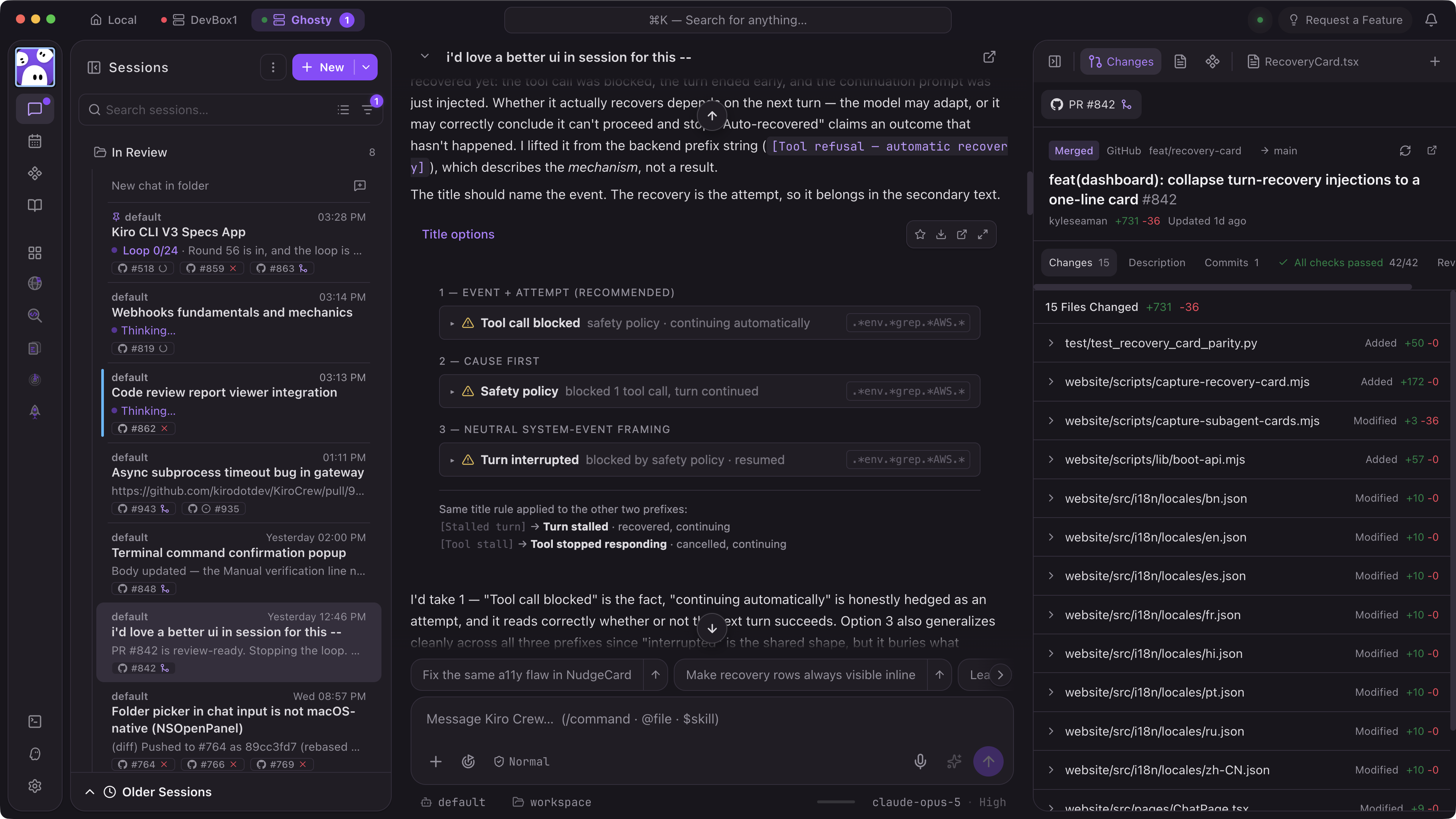
You also decide where it runs. Work with Kiro Crew directly through the desktop app, web dashboard, or TUI, across conversations, files, tasks, approvals, memory, schedules, and Apps, and run it locally or on a remote machine you control. Connect tools like Slack, Telegram, and Discord and continue the same work from another surface without moving the workspace or its state. The dashboard binds locally by default, sensitive paths and credentials are guarded at runtime, tool requests can require approval, and activity is recorded for review.
Kiro Crew is built to run across sessions, like investigating an incident across several repos at once, running a multi-hour migration while you are away, or a morning update that checks open PRs and fixes the flaky tests before you log on. A few things make that possible.
Agents are self-learning and self-evolving: Memory carries preferences, active-project context, and relevant history into new sessions, so it does not start cold. Corrections become durable lessons that change later behavior, including workspace-scoped lessons for project-specific guidance. Repeated patterns become reusable skills you can inspect, edit, or remove as your work changes. Memory, lessons, and skills stay visible, so you decide what your crew carries forward.
Your agent crew keeps working when you are not: Recurring jobs run on schedules you define. A morning digest can collect what needs your attention, a heartbeat can watch a PR or deployment until its state changes, and an authenticated webhook can start work when an external event arrives. Jobs that do not need reasoning run as plain scripts or commands without a model call. Longer tasks keep moving through checkpoints, validation, and retries while you work on something else.
It coordinates more than one agent: For work that benefits from more than one, run several conversations concurrently, each with isolated context, or delegate independent research and implementation to subagents that return their results to the parent conversation. The main conversation stays focused on the goal while specialized agents handle work in parallel.
It brings the work into purpose-built interfaces: Some work does not belong in a chat window. Kiro Crew brings it into Apps, sharable, purpose-built interfaces to automate your workday without chatting every instruction. Apps combine custom UI with agents, skills, schedules, integrations, and backend services. MCP Apps and plugins bring data and actions into that experience, while Kiro Crew organizes how work moves from intake through review to completion. An issue-triage App, for example, brings repository data into a queue with a reading pane, triage controls, specialized agents, and scheduled scans. The available Apps in the app store will continue to expand, but at launch will include Apps like DevFleets for work tree management, Task Runner for executing long-running tasks, and Issue Radar for triaging issues and pull requests. You can also create your own Apps with the App SDK for any tools or use cases not yet captured or quite how you want it.
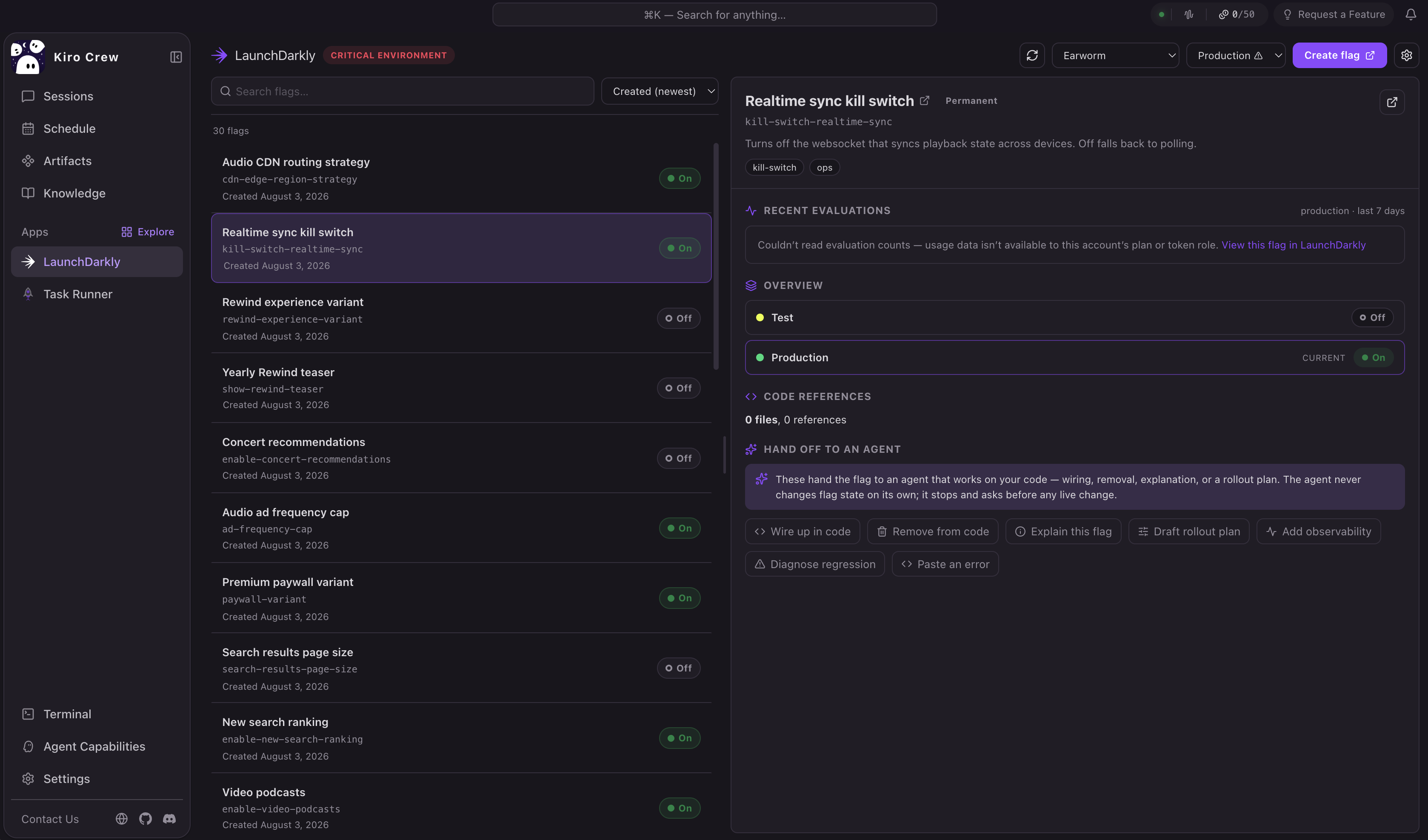
_The LaunchDarkly App brings feature management directly into Kiro Crew. Developers can browse, search, create, and update LaunchDarkly feature flags across any project or environment without leaving the workspace. Built on LaunchDarkly's MCP server and public APIs, flags become a native part of the AI coding session. An agent can find flag references in code, implement a change behind a flag, and hand you back the controls to roll it out. _
Kiro Crew did not grow because of its architecture. It grew because people could bend it to their own work and preferences. That same potential is now yours, to build your own customized crew of agents at your disposal, coordinating across your unique tools and workflows to keep your work moving.
The features launching today were built by people using Kiro Crew for their own real work. The ones you need next, you can build. Bring the tools you already use over MCP, build an App, shape the orchestration, and keep iterating on what you make. Skills you already have work here too. Anything built for other open standards-based agent platforms runs with Kiro Crew without modification, so you can bring what you have rather than start over.
We want our developer community to experience the joy of building with Kiro Crew the way we have internally as MeshClaw was developed. So, Kiro Crew is built in the open, and that includes how it is governed. The project is run by a steering committee of maintainers listed publicly in MAINTAINERS.md, working under a deliberately minimal governance model. Proposals are filed as pull requests and debated in the repository, and decisions are documented there for anyone to read. Any developer can take part in those discussions. Contribution, discussion, governance, and roadmap planning all happen in the open, so the community can directly shape what ships next.
We also mean open in a way that matters for trust. We support community contributions of every kind, including integrations with other AI coding tools and providers. If it helps developers do their work, it belongs here, whether or not it maps to Kiro’s own product strategy. Kiro dedicates engineers to keep the core project healthy and respond to every issue and pull request. It starts with Kiro and AWS engineers maintaining the project, and as trusted contributors emerge, the model can grow to include maintainers from outside our teams. The roadmap is meant to be a conversation, and not a decree.
If you already use Kiro, your configuration comes along. Kiro Crew runs on the Kiro CLI at launch, reading your existing .kiro configuration out of the box, so your steering files, skills, and custom agents carry over with no extra setup.
Download from the Kiro Crew page or clone the GitHub repo today. The repository includes setup instructions for macOS, Linux, and Windows, along with guides for connecting Slack, Telegram, and WeCom.
Start with work that already extends beyond one session, such as a migration, a recurring review, or a pull request that needs monitoring. Then install an App, build a skill from a repeated workflow, or contribute the integration your work needs next. Kiro Crew grew by developers sharing what worked for them, and the open source release gives everyone a way to shape what it becomes. We can’t wait to see what kinds of use cases and functionality you build out, and we hope you have as much fun playing and experimenting as we have.
Download | View on GitHub | Read the docs | Join the Discord