How Kiro and Snyk create multi-layered security guardrails
The rapid adoption of AI-powered development tools like Kiro is transforming how we build software, enabling unprecedented speed and innovation. However, this advancement also introduces new information security challenges. To truly leverage the power of AI in development, a robust, multi-layered security strategy is not just recommended – it’s essential. This blog post explores how integrating Snyk Studio with Kiro provides a critical additional layer of automated security and compliance, ensuring that rapid development doesn't compromise the integrity of your applications. Snyk Studio is a recently launchedoffering from Snyk that combines the Snyk MCP Server with guardrails to scan code as it’s written and provide fixes.
Model Context Protocol (MCP) is an open protocol that standardizes connecting AI assistants to the external world, including content repositories, data sources, business tools, and development environments. At its core, MCP follows a client-server architecture where a host application can connect to multiple servers. An MCP architecture has the following components:
- MCP hosts and clients – AI-powered applications such as Kiro that need access to external data or tools.
- MCP servers – Lightweight servers such as the Snyk MCP Server that exposes specific functionalities through tools, connecting to local or remote data sources.
- Data sources – Databases, files, or services that contain the information your AI assistants need.
While AI tools accelerate code generation, they also present unique security considerations. The sheer volume and speed of AI-generated code can make traditional security reviews difficult to scale. Furthermore, AI-specific vulnerabilities, such as prompt injection, require specialized detection and mitigation techniques. A "defense-in-depth" approach, where multiple security layers work in concert, is the best practice for professional software development, regardless of how the code is produced.
Integrating Snyk with Kiro via MCP creates a powerful defense-in-depth approach, aligning with industry best practices for secure, professional development. This layered strategy helps developers shiftsecurity left by supporting fast iteration in any IDE or coding environment.
- Install Kiro IDE.
- Create your Snyk account.
- In your Snyk account, enable Snyk Code for code scan.
- Install the Snyk CLI.
- Configure the Snyk MCP server in Kiro.
The integration of Snyk with Kiro via MCP goes beyond traditional IDE extensions by allowing developers to run security scans using natural language. This functionality not only identifies potential vulnerabilities and misconfigurations, but also informs the underlying AI model of key information, such as what the vulnerabilities are, what file they’re in, what line number they’re on, and remediation details.
This context provides immediate, actionable insights early in the development lifecycle.
You can test the Snyk MCP server by opening a project, or if you want to use a sample application for you to test the Snyk scanning capabilities in Kiro, you can use this nodejs-goof application provided by Snyk.
Then type on the Kiro chat, “Scan this directory for code security and dependency vulnerabilities using Snyk”. As a one-time setup, you may need to authenticate to Snyk and trust the current project directory.
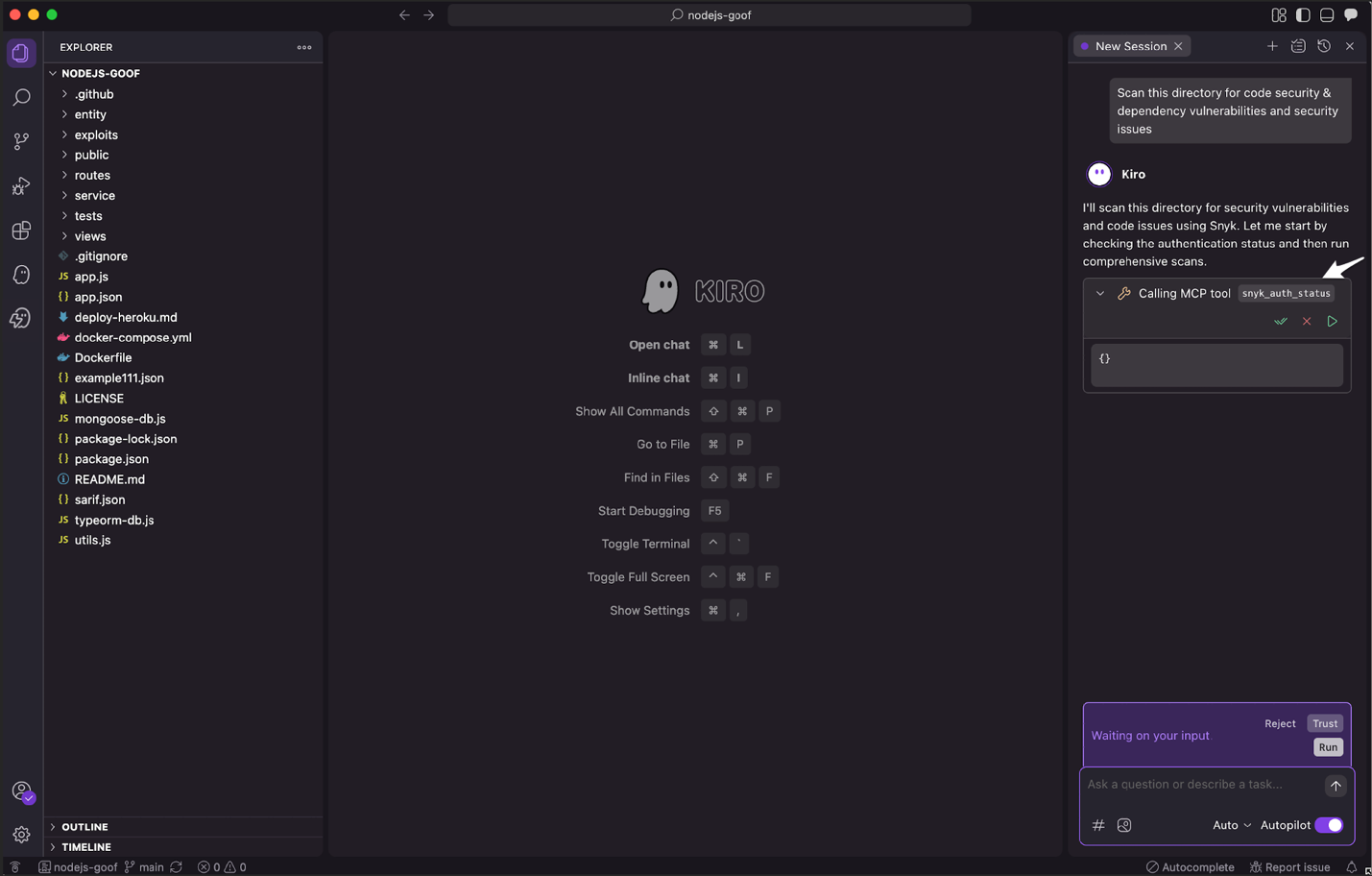
After authenticating to your Snyk account, you should see the Kiro agent starting an MCP call to the Snyk MCP server to scan the code for security and dependency vulnerabilities.
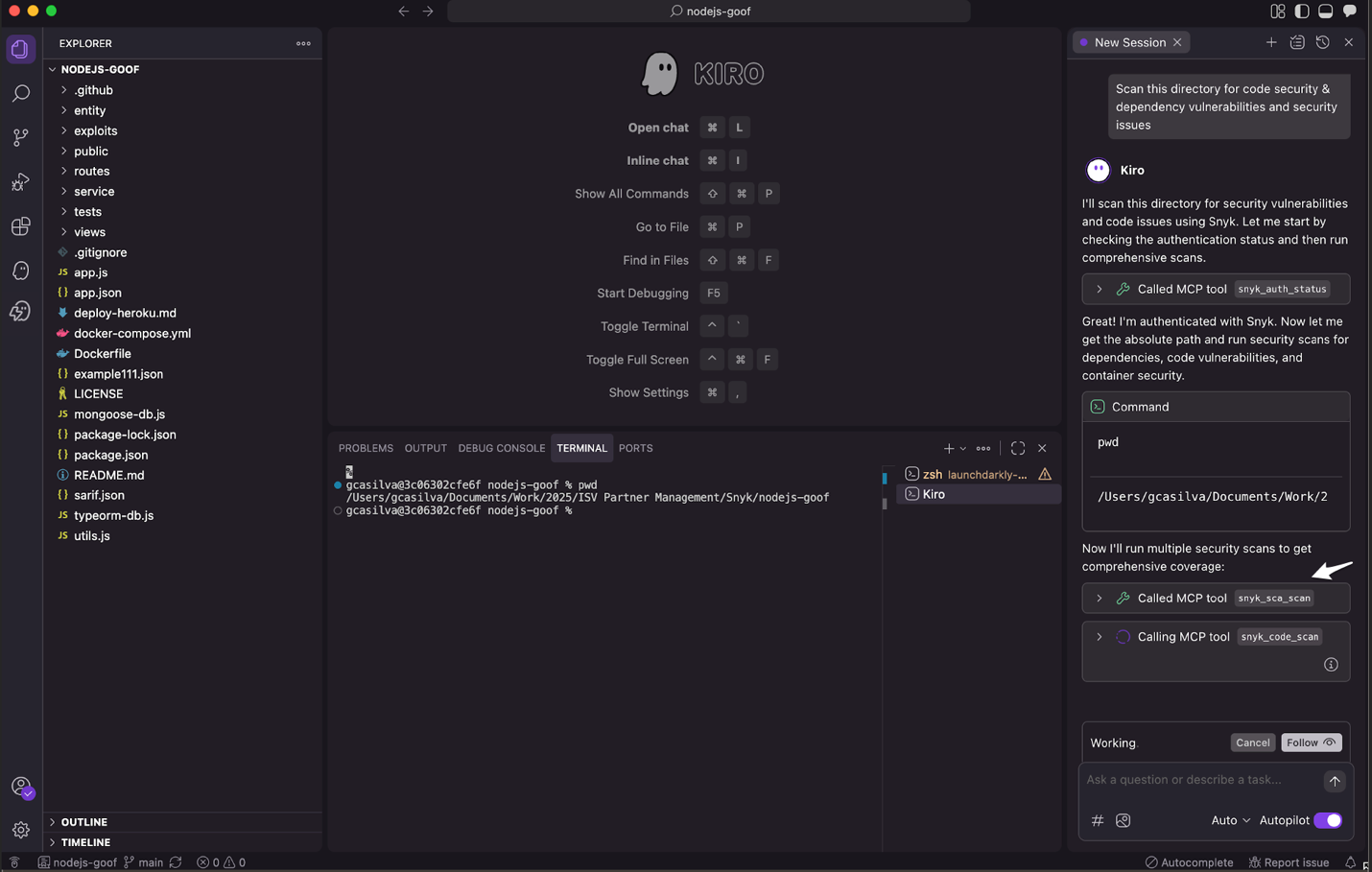
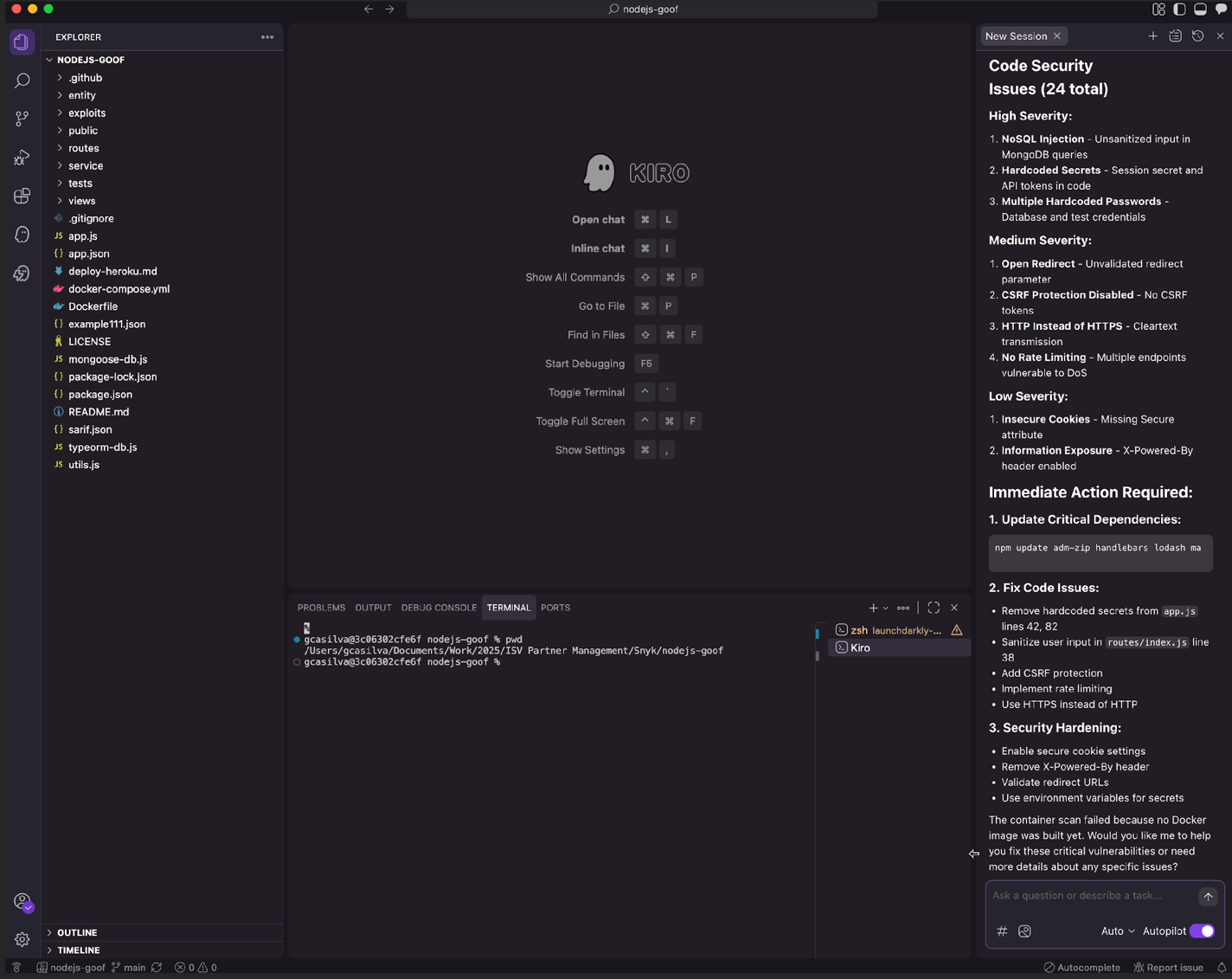
After Kiro completes all the client calls to Snyk MCP server, you should have a summary of all security vulnerabilities the Snyk scanners have found and a summary with each risk level and suggestions on fixes. Like in this sample, we can see there are 3 high severity security vulnerabilities that were found related to NoSQL injection and hardcoded secrets, and we can even ask Kiro to help us remediate them based on the context provided by the Snyk scanners.
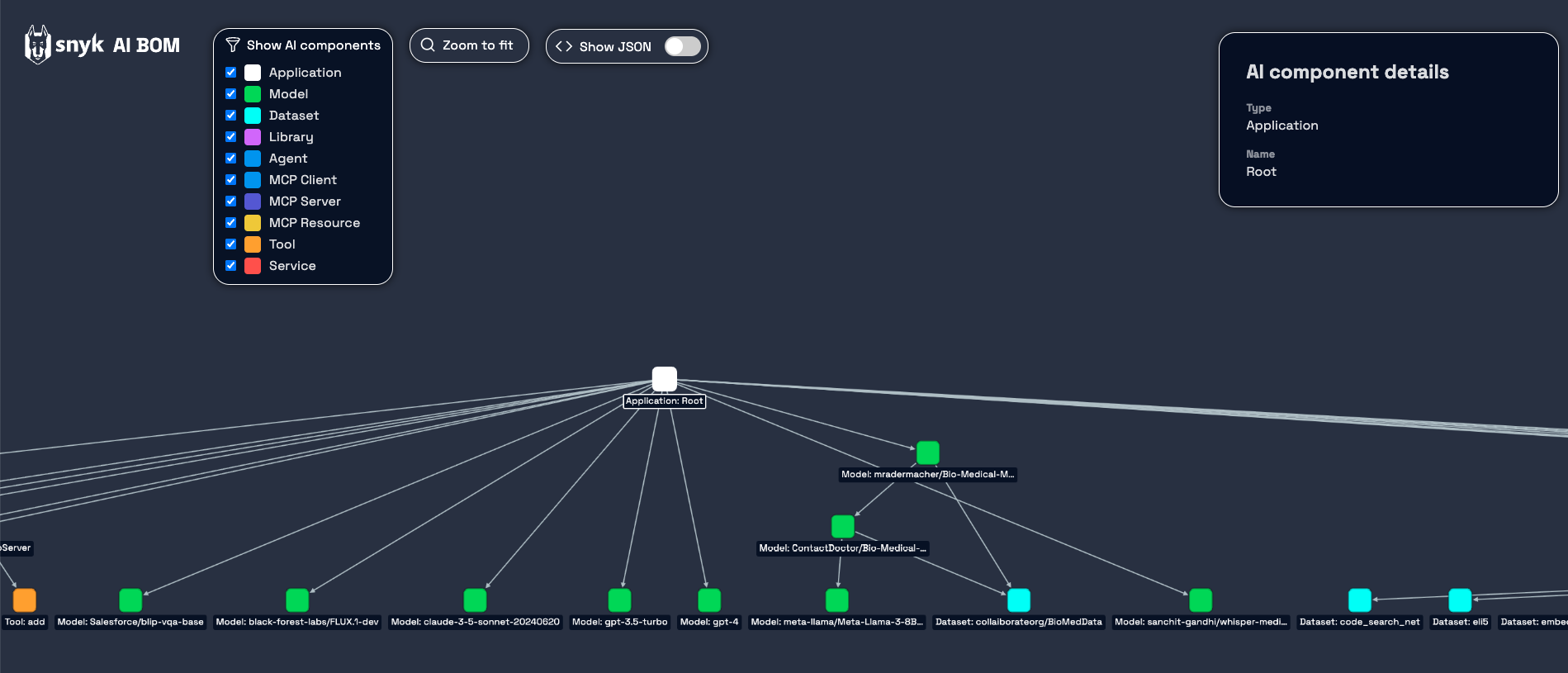
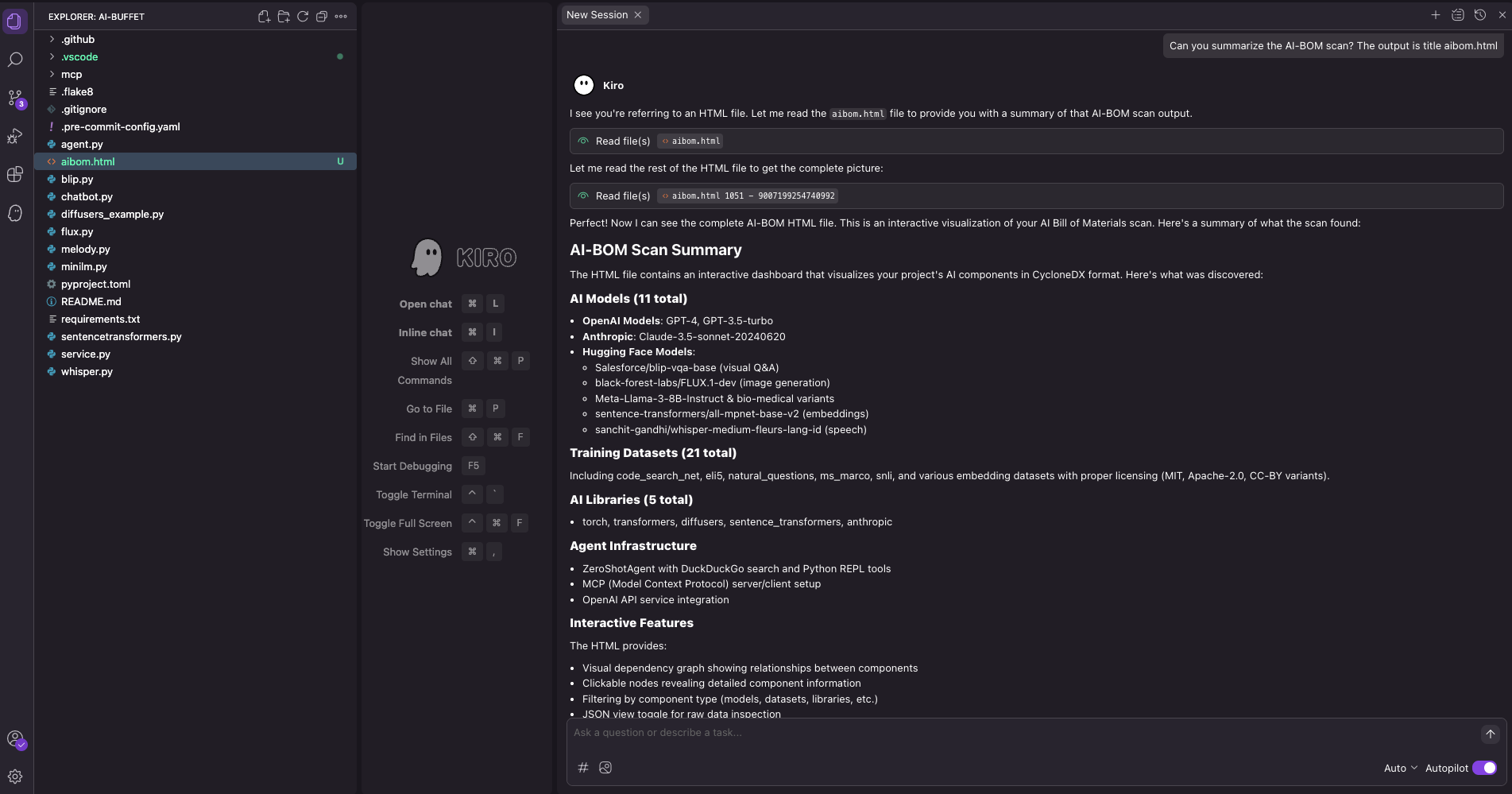
Establishing an AI Bill of Materials (AI-BOM) is crucial for gaining visibility and governance over the AI components used in your projects. Just as a Software Bill of Materials (SBOM) tracks traditional software dependencies, an AIBOM provides a comprehensive inventory of the AI models, data sets, and other AI-specific elements integrated into your applications. This allows you to track their provenance, identify potential vulnerabilities, and verifies compliance with internal policies and external regulations. In the Kiro terminal, you can run the command snyk aibom --html > ~<DESTINATION-HTLM-REPORT-PATH> && open ~<DESTINATION-HTML-REPORT-PATH>
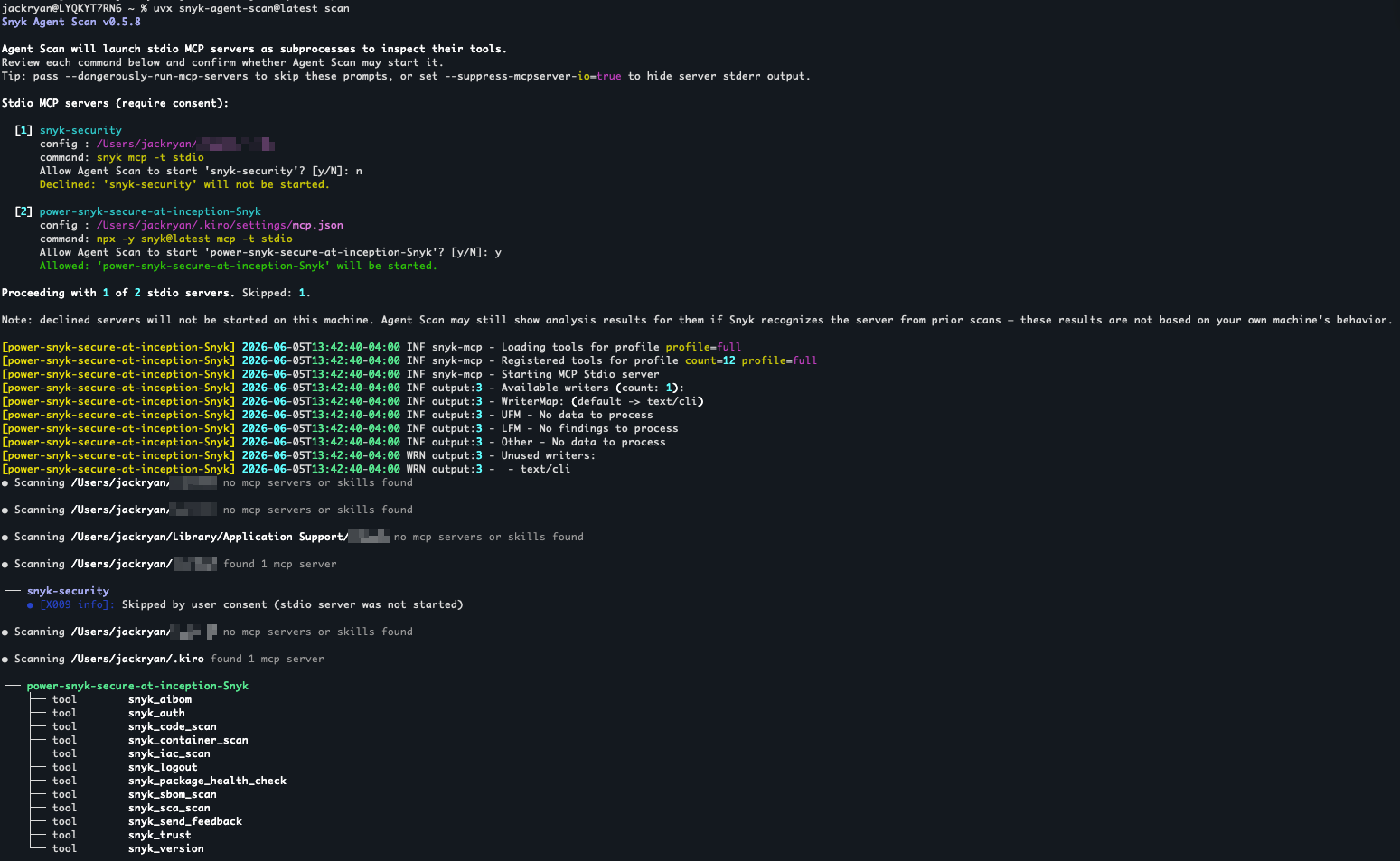
AI-powered development introduces novel threat vectors. Toxic Flow Analysis is a critical security layer designed to detect complex, AI-specific vulnerabilities like prompt injection. By tracking how the user inputs flow through the AI systems, Toxic Flow Analysis identifies points where malicious prompts could influence model behavior, thereby protecting your applications from potential AI-driven threats.
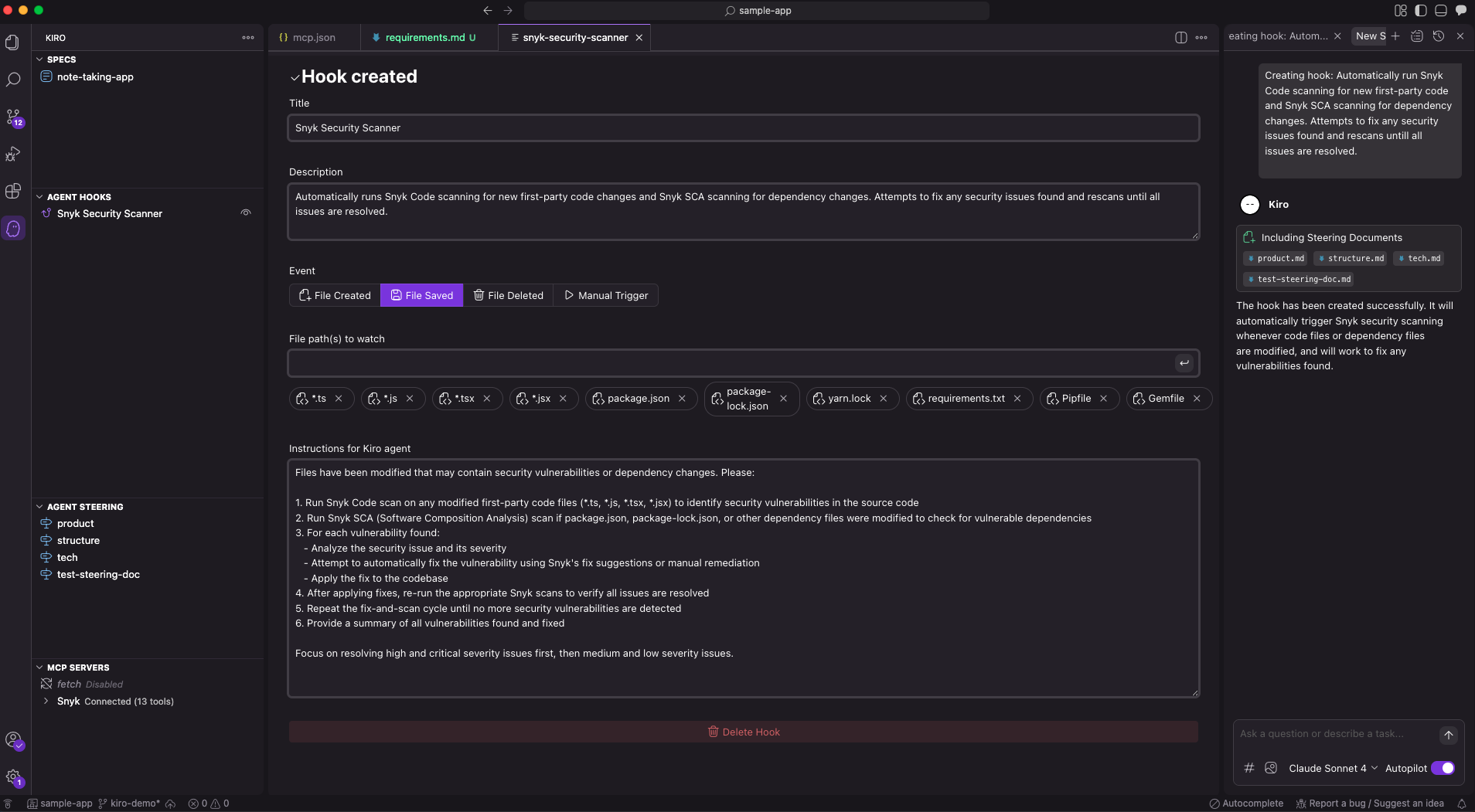
A key aspect of effective security is seamless integration into developer workflows. The Snyk developer-first approach makes sure that security tools are simple to use and provide actionable insights directly within the developer’s environment. With Kiro, you can create Agent Hooks to automatically scan code in the background when an event occurs, such as when a file or directory is created or saved. This minimizes friction and encourages developers to actively participate in the security process, making security an integral part of rapid AI-powered development rather than an afterthought.
Beyond immediate security, the Snyk MCP workflows significantly contribute to meeting audit requirements and regulatory controls across any team or platform. By providing comprehensive logging, detailed vulnerability reports, and auditable security processes, the integration helps organizations demonstrate adherence with industry standards and government regulations.
Consider a rapidly growing tech company that is accelerating its adoption of AI-powered development tools. This company is leveraging Kiro to generate large portions of its codebase, allowing them to bring new features to market at an unprecedented pace. However, the security team recognized the inherent risks of this accelerated development. By integrating the Snyk MCP Server with their Kiro workflows, they established an automated security process that scans every line of code–both human-written and AI-generated–for vulnerabilities. They implemented AIBOM to track their AI components and MCP-Scan to guard against AI-specific risks such as Toxic Flows, Tool Poisoning, and MCP Rug Pulls. This layered approach not only maintained their rapid development speed but also significantly reduced their security risk posture, making sure their innovative products were also secure and conforming.
The integration of modern AI-powered development tools like Kiro and robust security platforms like the Snyk MCP Server is crucial for building the future of software. When Kiro and Snyk are connected, they create a powerful combination that handles the complexities of building applications while also enhancing the security of the final product. By embracing a multi-layered security strategy, development teams can confidently harness the power of AI for innovation, knowing that their applications are protected by automated security features and adherence measures. This approach empowers engineering leaders, DevSecOps teams, and security practitioners with a practical framework to navigate the evolving landscape of AI-powered development securely.
Additional resources:
- Safeguard your generative AI workloads from prompt injections (AWS Security Blog)
Disclaimer. Sample code, software libraries, command line tools, proofs of concept, templates, or other related technology are provided as AWS Content or Third-Party Content under the AWS Customer Agreement, or the relevant written agreement between you and AWS (whichever applies). You should not use this AWS Content or Third-Party Content in your production accounts, or on production or other critical data. You are responsible for testing, securing, and optimizing the AWS Content or Third-Party Content, such as sample code, as appropriate for production grade use based on your specific quality control practices and standards. Deploying AWS Content or Third-Party Content may incur AWS charges for creating or using AWS chargeable resources, such as running Amazon EC2 instances or using Amazon S3 storage.