How we built a software factory with Kiro Crew to merge 1,000 PRs in a week
Last week, the three of us building Kiro Crew full time merged 1,000 pull requests in seven days. Over 120 a day, every one went through CI and review. Kiro Crew is mainly built by those three full-time engineers, with nearly 500 enthusiastic community contributors.
We did not plan that number. We reached it gradually, as our way of building more in parallel hit new limits over time. Each bottleneck led us to a new way of working that let one person run more sessions. Looking back, those changes form five stages. The latest is what we now call Crew Mode. If you run coding agents at all, you are somewhere on this ladder, and the stage you are on tells you what breaks next.
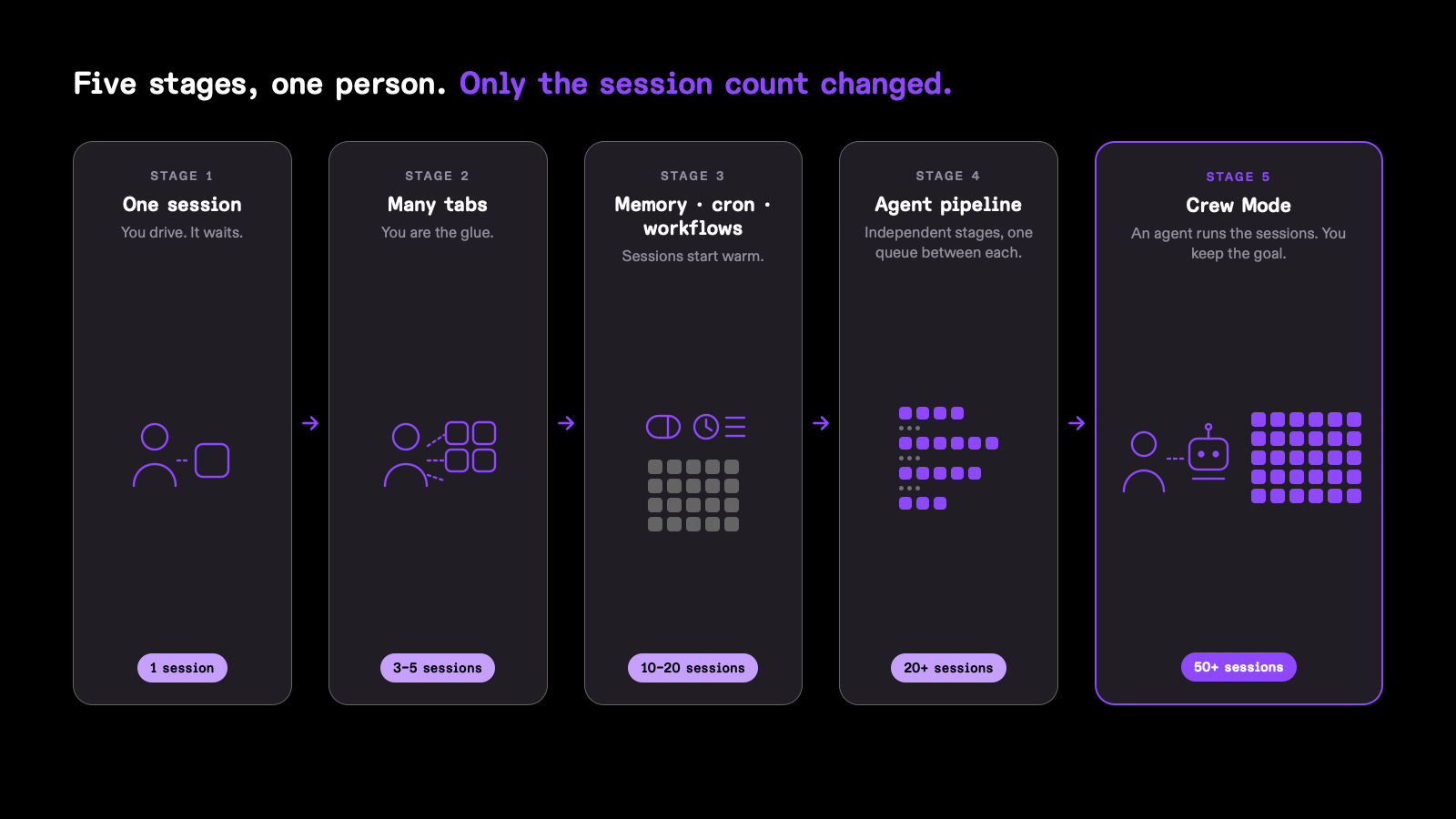
Stage 1: one session, by hand. One developer, one agent, in the CLI or IDE. It works until you notice that your attention is a single thread. The agent waits for you between every step, so you are the bottleneck.
Stage 2: many sessions, by hand. Open a second tab, then a third. It helps for an afternoon. Then you notice you are re-explaining the same project in every tab, and keeping track of which one is doing what in your head. The sessions know nothing about each other, so you are the only one connecting them.
Stage 3: memory, a dashboard, cron, and workflows. This is where Kiro Crew really started. Memory made sessions start warm. A dashboard made multiple sessions easy to track. Cron and monitor loops started sessions without human help. Workflows, fixed or dynamically generated, chained the steps of one job across several sessions so a human did not walk through them manually step by step. This let one person manage roughly 10–20 active sessions, but it did not coordinate all that work. Workflow steps still ran mostly in sequence. Cron woke on a schedule, not when another session finished. The sessions could cover different tasks or projects, but the human still read every update and chose what needed attention next.
Stage 4: the agent pipeline. Not the CI kind, but an assembly line of agent sessions for general work, where triage, implement, review, and merge each run as an independent stage with its own sessions and coordinate only through a message queue. No stage waits for another. Each one picks up the next item the moment it lands in its queue, so every stage is busy at the same time without any of them knowing about the others. A workflow, by contrast, is a chain where step three waits for step two. The pipeline is what pushed one person past 20 concurrent sessions. What remains is that the pipeline is a fixed shape the human designed. It cannot re-plan when a result invalidates the plan, and a human must revise the plan and redirect the affected work.
Stage 5: operate sessions the agentic way. Everything above lets one person manage about 20 concurrent sessions. Push toward 50, and human input becomes the limit. Every session still needs someone to define its goal, start it, watch for problems, judge its result, and decide what happens next. Doing those five tasks across 50 sessions becomes a full-time job.
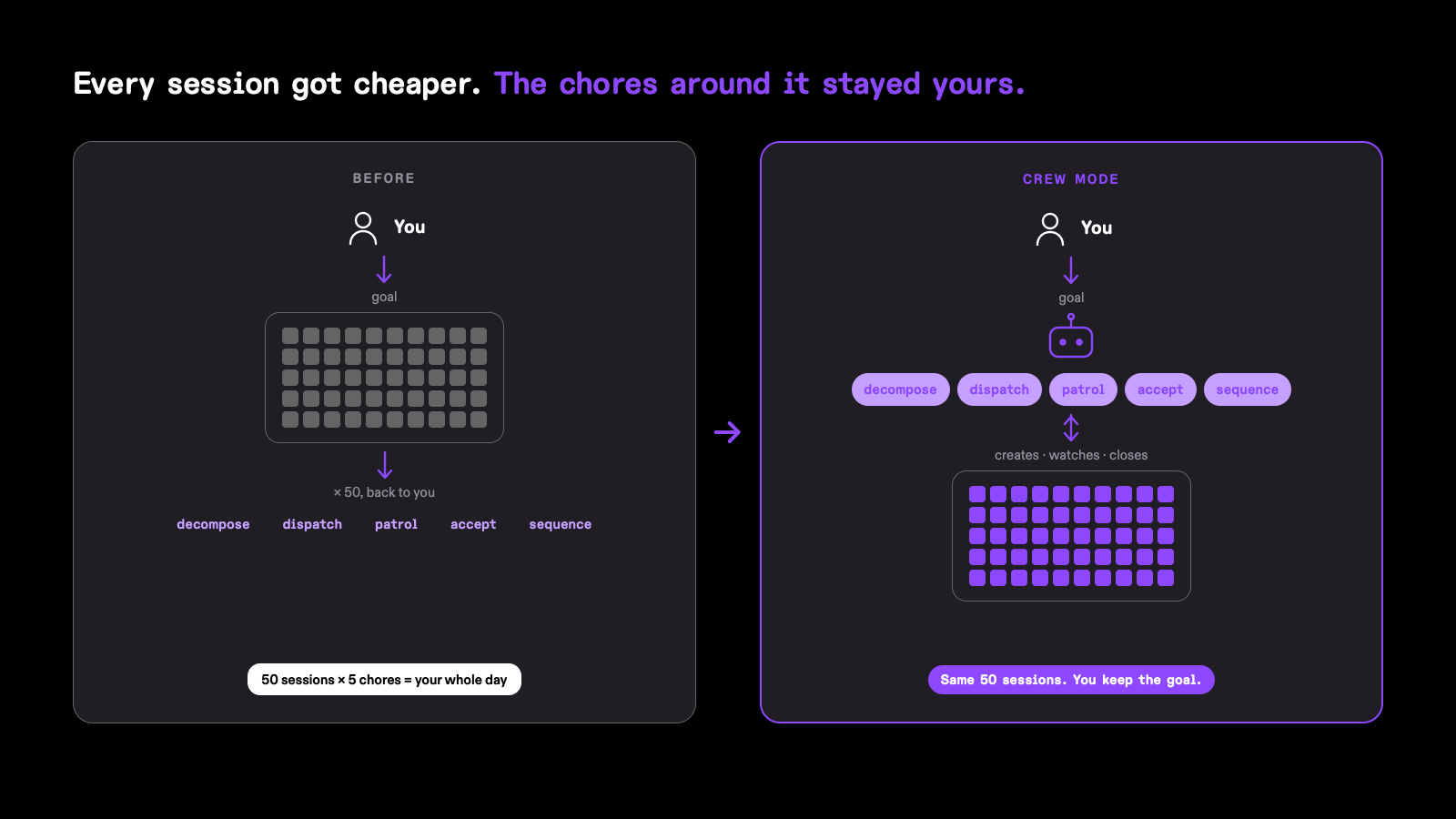
Crew Mode is an agent that lives outside any single session and does these manual works itself, reacting to results across session boundaries rather than following a shape drawn in advance. Sessions become an execution unit it creates, seeds, watches, and closes. The human keeps the goal. Last week’s numbers came from the pipeline working together with an early version of Crew Mode. We are still building it.
Where does all of this run? Anywhere a process can run. A crew is one gateway plus the sessions it owns, and it does not care what machine it sits on. Today our crews run on laptops, on EC2 instances, on cloud dev desktops, and will be in Fargate containers. I actually run six to ten machines at once, all linked from a single dashboard. Together they keep 30 to 50 sessions busy at the same time: triaging issues, writing code for pull requests, reviewing, and merging. The agent jobs a crew hands off also run on GitHub Actions and CodeBuild.
We discussed crew-to-crew collaboration early and filed it under “future”. Crew Mode later made the need concrete. Its coordinating agent patrols every active session to find blocked work, checks results, and updates the plan. At 50+ session scale, one coordinating agent becomes another bottleneck. It can lose context or lack the right expertise. A super manager alone does not solve that problem. Several agents need different roles, scopes, and ways to collaborate. One may plan, another execute, and another review. Crews can then exchange results and route work between them. We could only design this after seeing one supervisor stop scaling.
“Agents operating agents” is exactly the kind of phrase that invites hype, so let us be direct. Our goal is to build capabilities real engineers can trust. Most of current developments now focus on making Crew Mode safe and governable. We are not trying to invent a new fancy solution. Four governance problems move to the center when multiple agents work for you.
- Coordination between agents. Who asked for what, who owns which task, what was tried and rejected. If that lives only in a model’s context, it disappears on the next compaction and nobody can reconstruct what happened. It has to be explicit and durable.
- Memory. What may be remembered, by which agent, for which project, visible to whom. One engineer’s correction should not silently steer a session on another team’s codebase.
- Permission control. What an agent may do, in which repo, against which environment, and what needs a human. Enforced by the host, not requested politely in a prompt.
- A trail for every action. Every command, file change, approval, and denial, recorded where the agent cannot edit it. Trust does not come from an agent saying it did the right thing but can come from history being able to track.
These are the ordinary controls any company needs when agent can push code on its behalf: agent coordination, clear memory boundaries, host-level permissions, and an audit trail agents cannot alter. More sessions only help when engineers can understand, control, and trust their work.
Cost becomes a separate problem when agent fleets reach hundreds of sessions. The main work of agents already has a price. Coordination adds another layer: keeping sessions warm, checking status, routing results, and supporting fan-out. At that scale, this extra bill can become an adoption barrier. We are investigating the way to reduce it with cheaper models for routine supervision, scripts for deterministic checks, minimal-context wakes, session knowledge reuse, and accurate per-task cost accounting.
Engineers can apply these learnings immediately without adopting our tool. Start with your current stage and identify what no longer scales. Make the smallest useful improvement before moving forward. Each stage delivers value while preparing you for the next.
- Count your concurrent sessions. One means stage 1, a few tabs means stage 2, and so on. The number tells you which problem is next, and it is almost never the one that sounds most exciting.
- Stage 1 to 2 is free. Stage 2 to 3 is the one that pays. Before you open more tabs, give your agent memory. The cheapest version is a file in the repo that every session reads, holding your conventions and the corrections you keep repeating. Whatever tool you use, this one step is what turns parallel sessions from a burden into the default.
- Hand one recurring chore to a schedule. Pick a job you do by hand every day, such as triaging new issues or re-running a flaky check, and give it to a session that starts on a timer. You will learn more from one scheduled session than from any amount of reading about them.
- Build a pipeline before you build an orchestrator. When your sessions are doing the same few kinds of work over and over, name the stages and put a queue between them. Labels on a GitHub issue are a perfectly good queue to start with. One session type per label, each picking up whatever carries its label.
- Do not start at stage 5. Write down the five duties and notice which one eats your day. For us it was patrol between 50+ sessions. That is the duty to automate first, and you only know which one it is once you have run enough sessions to feel it.
- Start the governance on day one, not at scale. The audit trail and permission control are the two you can do immediately. Record whatever your agents do somewhere they cannot edit, and decide what they may do at the host level rather than in a prompt. Both are cheap when you have two sessions and nearly impossible to retrofit when you have fifty.
If you want to try the version we run, Kiro Crew ships memory, the dashboard, cron, workflows, and the pipeline today, and the basic Crew Mode is available in the repo by turning on feature preview. The fastest start is to install it on a laptop, point it at one repo, and hand it one scheduled chore. Move it to a cloud instance once you want it running while you sleep.
Today the human still hands the crew a concrete goal, such as ship this feature, get this repo green. Over time that goal should get more abstract, and crews should propose work instead of waiting for it. But that can only happen once the governance and cost control capabilities are in place and fully tested. A capability an enterprise cannot control, audit, or afford is a demo, not a product.
Kiro Crew is open source. The public repository holds the code, architecture documents, and feature specifications behind everything in this post: https://github.com/kirodotdev/KiroCrew. If you want to build a software factory of your own like this, try Crew at kiro.dev/crew.