Introducing Kiro workflows
Romain Dura
Engineering
Doug Clauson
Product Lead
Today, we’re introducing Kiro workflows, allowing you to carry out complex tasks from start to finish with multiple agents and less supervision. We’ve been building Kiro itself with workflows, including the new cloud configuration, cloud sessions, and most of the workflow experience.
Before workflows, we’d ask an agent to implement a change, then come back with “now do a code review of these changes” and later “address the code review findings.” We spend much of the session supervising, prompting again when it skips a step and reminding the agent of earlier decisions. Within a session, the model controls the sequencing, but a model’s attention is limited. Everything we agreed on sits in the same context window that fills with tool output and file contents, so we also step in when it forgets what still needs to be done. We work around this by splitting the job across separate sessions and keeping the plan in a file that persists across those sessions, but we still have to remember what each session is doing and pass results between them. These manual workflows can produce better results, but setting them up takes time, and once we have a process that works, we want to point at the run and say “do that again” without rebuilding it by hand.
Kiro workflows solve this. With workflows, the model defines which agents do the work and in what order, while the Kiro runtime executes that plan so each step runs on time, without reminders. Workflows are graphs composed of agent steps, sequences, loops, and parallel branches in a format that humans and agents can read and create. Each step runs in its own session with fresh context, so a reviewer, for example, evaluates the work without inheriting the coder’s reasoning. Kiro generates a workflow for the task at hand, and you can save it as a recipe to reuse or write your own.
Because workflows run in the background, you can continue working with Kiro in the main conversation while the delegated work progresses. The workflow step sessions remain available for you to pause, resume, or steer during a run, and to revisit with follow-up questions afterward. Delegating even a small investigation keeps its tool output and detailed reasoning out of the main conversation, preserving context for continued work.
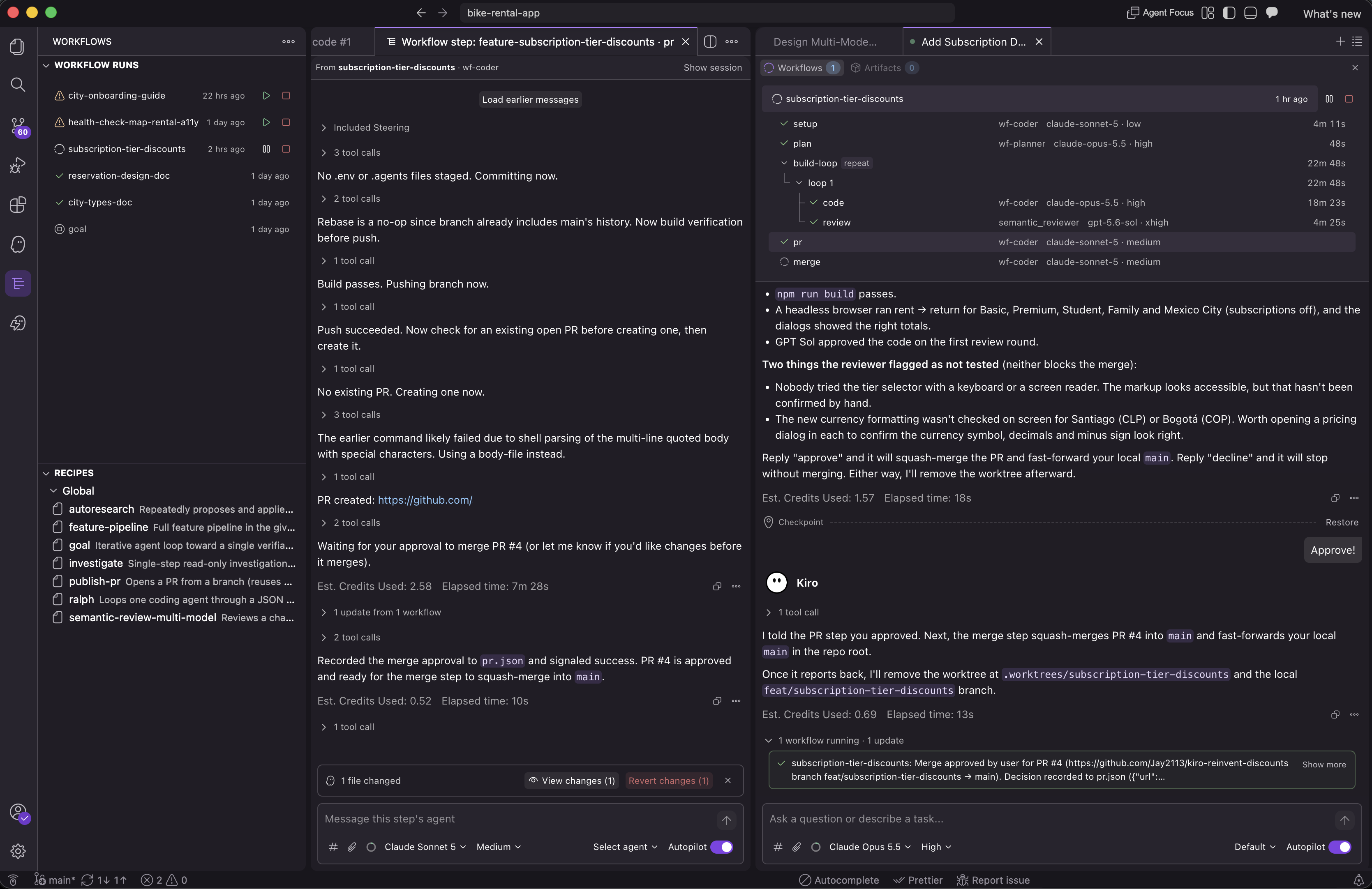
We used workflows to build most of the workflow runtime itself and the full Kiro Web integration, starting as soon as the runtime was functional. This is full-stack work spanning the frontend, API and internal services, and the Kiro agent harness, with separate workflows handling each part in parallel.
Implementation workflows used separate Git worktrees to keep their changes isolated. When an agent found an issue between components, the main session relayed it to the affected workflow agents so they could course-correct. Our steering files require automated tests using the agent-browser CLI to exercise the web UI and capture screenshots for validation.
Agents pushed their changes and opened pull requests using our preferred description style, then worked through review findings in loops, updating the PRs. They also rebased branches and resolved merge conflicts as related changes landed, asking us about changes that would affect the design, expand scope, or alter the user experience.
Our agents often manage dozens of workflows per session in Kiro, and a typical workflow runs five to ten steps with custom agents. Those steps include multi-model code reviews and automatic fixes in loops. Some sessions continue for weeks, building up context about our decisions as the work evolves across features and improvements. Across the team, workflows are running nearly 24/7.
Workflows change how we work. More work executes in parallel within each session, with agents exploring in the background and building features across multiple PRs. Tasks become more asynchronous, and agents work for longer without us prompting every 10 minutes to move forward. Kiro brings us the requests that need our input, and we spend more time on design decisions and what to build next.
Here is a short example of a workflow that plans a change, repeats implementation followed by parallel reviews until approval, then opens a draft pull request. We can represent it as a graph.
The recipe below describes the same workflow.
Each step runs an independent agent session. We define dependencies by placing steps after the work they need and referencing its outputs through {{...}} variables, without separate graph edges to maintain. A parallel node runs independent steps together, while repeat loops over steps with a stop condition, such as review approval. The easiest way to create a workflow is to ask Kiro.
Kiro generates recipes in JSON, but YAML is also supported.
Kiro breaks down the task you describe in your session, so you do not need to author a recipe. You can specify how the work should be organized, including custom agents, preferred models, and thinking effort levels.
Kiro can adapt a workflow as it runs, based on what its agents discover. For example, a planner can split implementation into independent tasks and delegate them to coding agents working in parallel. Changes take effect between steps, leaving completed work intact and the active step unchanged.
For a more involved example, the bundled feature-pipeline recipe coordinates agents to gather requirements, design and review a solution, plan the implementation, and write the code. Independent code reviewers then run in parallel.
In the tree below, the design and code loops each allow up to three attempts to reach approval, then stop the run if still unapproved. Final validation checks the result against the original requirements.
This example launches from a session using Claude Opus 5 at High effort. We have customized the design and review agents to use Extra high. Only model and effort overrides are shown below; omitted settings use the session defaults.
- Node
- setup
- Agent
wf-coder- Thinking effort
- Low
- Node
- requirements
- Agent
wf-design- Thinking effort
- Extra high
- repeat design-loopMax 3 iterations; stop on APPROVED in design-review.json; abort if unmet.
- Node
- design-draft
- Agent
wf-design- Thinking effort
- Extra high
- Node
- design-review
- Agent
wf-design-reviewer- Thinking effort
- Extra high
- Node
- plan
- Agent
wf-planner
- repeat code-loopMax 3 iterations; stop on APPROVED in code-review.json; abort if unmet.
- Node
- implement
- Agent
wf-coder
- parallel code-reviewsRun both reviews in parallel; wait for both.
- Node
- review-claude
- Agent
semantic_reviewer- Model
claude-opus-5.5- Thinking effort
- Extra high
- Node
- review-gpt
- Agent
semantic_reviewer- Model
gpt-5.6-sol- Thinking effort
- Extra high
- Node
- code-aggregate
- Agent
wf-review-aggregator
- Node
- validate
- Agent
wf-coder
We have run thousands of workflows while building Kiro, and it ships with built-in recipes. Among them, investigate and publish-pr are two we use ourselves every day. investigate runs a single-agent, read-only investigation in the background and reports back, helping keep context usage down in our sessions. The publish-pr recipe opens a pull request and follows it through to merge, retrying failed CI checks and addressing review feedback it can resolve safely. It asks you before changing the design, expanding the PR’s scope, or altering the user experience. These recipes are starting points. You can run one as is, describe the task and let Kiro structure the workflow, or author your own.
Workflow steps send messages to the main session to report progress, signal completion or failure, or ask for a decision they cannot make on their own. Those messages arrive in the conversation you are already having with Kiro, so you follow the work from one place instead of opening each step session to check on it.
Messaging works in the other direction too. The main session can message the agent running a step to relay a decision you made in chat. When the answer to a step’s question is already in your conversation, the main session replies on your behalf, so the step keeps going and you only hear about questions that need you. That lets workflows run more autonomously while you drive the work from the main conversation.
Workflows are now available in Kiro IDE, CLI, and Web, with one runtime under all three, so a recipe behaves the same wherever you launch it.
Workflows are launching as opt-in and must be enabled in settings first.
- Open Workspace Configuration for the project.
- Choose Workflows.
- Enable Workflows.
- Start a new chat session. Restart Kiro if you need the change to apply to sessions that are already open.
The backing setting is kiroAgent.workflows.enabled. If Workflows is absent, it is not available for your account yet.
You can store your preferred recipes in cloud configuration on Kiro Web to reuse them across projects and devices. Workflows also run in cloud sessions from Kiro CLI and IDE. To enable workflows in cloud sessions and manage saved workflows, use the workflows configuration page.
Workflows use the same Kiro credit model as other agent work. Credit usage depends on the agent work they run, so more complex workflows can use more credits. Without specific instructions, Kiro creates a workflow based on what it thinks the task needs. Your prompt or steering files guide how Kiro divides the work and how much review it performs.
See the Workflows docs for more detailed information.
Let us know what you build with workflows!