Which Kiro app should I pick?
Massimo Re Ferre
Product
Kiro is not one thing anymore. In July 2025, we launched Kiro as an AI IDE. Since then, it has become much more. Kiro is a software engineering agent available as an IDE, a CLI, a web app, a mobile app, and Kiro Crew. If you’ve been anywhere near the project lately, the question you’ve probably asked (or wanted to ask) is disarmingly simple: which one should I pick?
The honest answer is “it depends”, but stay with me, because there’s an actual framework behind that cop-out, and once you understand it, the choice gets a lot easier. Better yet, you’ll realize you were asking a slightly wrong question. It’s rarely which one, and almost always which one for this.
Before we get there, and for context, let’s quickly point out what has shifted recently that changed the discussion.
Under the hood, Kiro is converging on a single agent harness. Kiro has become one agent that sits behind every surface. That harness is the product: the canonical place where the capabilities live. Everything you actually touch, including the IDE, the CLI, and the web app, is an app: a way to consume that product. The two are intentionally decoupled. The harness defines what Kiro can do; the apps define how you experience it.
It wasn’t always this tidy. Earlier this year each app carried its own agent: the IDE’s written in TypeScript, the CLI’s in Rust, and the web’s in Python. These were three separate brains that stored sessions differently, spoke incompatible permission languages, and forced every new feature to be built three times over. That’s since been consolidated into a single agent harness that runs as a standalone process next to your code and talks to each app over a well-defined protocol (ACP, the Agent Client Protocol). One brain, many faces. The payoff for you is threefold: core capabilities added to the harness show up on every surface at once, behavior stays consistent no matter which app you’re on, and — this is the cool part — a session can start on your laptop, keep running in the cloud, and get checked from your phone, because it’s the same agent the whole way through. Individual apps can still grow capabilities that only make sense on their surface, but the core experience travels with you.
And it isn’t only what the agent can do that carries over: your setup travels with you too. Skills, steering files, custom agents, the preferences you’ve tuned: you set them up around the harness rather than inside any single app, so moving surfaces doesn’t mean rebuilding your environment from scratch. Today that holds for specific app combinations; the trajectory is for it to hold across any of them, so wherever you work, your Kiro comes with you.
If you want the detailed story behind that consolidation and the choices we made (why a standalone process, why we leaned on ACP as the protocol, and what we had to untangle along the way), the Kiro engineering team wrote it up in One agent, every surface. Well worth the detour.
That sounds like an architecture detail, but it’s the whole reason the “which app” question has a sane answer. Because the apps all draw from the same engine, picking one isn’t a bet you can get wrong. You’re not choosing a walled garden. You’re choosing a front door.
We haven’t built any of these apps to replace any of the others. Each app serves a distinct need, and together they cover more ground than any one could alone. They converge downward onto the shared engine, not sideways toward each other. Overlap between them isn’t a bug we’re racing to eliminate; it’s the expected shape of a plural experience layer sitting on one foundation. The IDE and the web app might both let you orchestrate agents. Good. They may do it for different people, in different moments, in different places, with different muscle memory or preferences.
Before we dig deeper into the app portfolio, let’s explore the principles that drive our execution. There are a few we lean on whenever we decide what apps to build, and they’re worth having in mind before we get to the apps themselves.
First, Kiro serves the software delivery lifecycle. We build apps for the people who ship software: developers first, but also the roles right around them: PMs, project managers, architects, QA leads, UX designers, the ops and DevOps folks who keep things running. And it isn’t only about who you are, it’s about what you’re doing: a developer triaging Slack, clearing email, or wrangling a calendar is still doing the work of shipping software, so an app that helps in those moments counts too. What we’re deliberately not building is a generic “AI assistant for everyone”. But this boundary is grey, and intentionally so: the test isn’t “is this person a developer?” or “is this task writing code?”, it’s “does this serve the act of shipping software?”
Second, we meet builders where they are, and then we try to help them move forward. Some of you live in files and functions (“code-first”); others orchestrate agents and treat the code as a byproduct (“agent-first”). Most of the industry is still the former, and that’s where the scale and most of the enterprise seats are; the agent-first crowd, smaller today, is where the industry is heading and where we get our clearest signal. So we build for the agent-first world, but lay simple, contextual on-ramps between the two, so people can move across at their own pace.
That’s the mental model. We are trying to be diligent in complying with our converged architecture, but we also want to be pragmatic in a space that moves at the speed of light if we see an opportunity. Now let’s get to the apps themselves, which is where the “which one” question really gets answered.
The IDE is the one most people mean when they say “Kiro.” It’s the Code OSS-based editor, it’s GA, and it’s the primary surface where most code gets written. If you’re a mainstream developer on an enterprise team, this is home base.
The interesting recent addition is Agent Focus Mode, which we launched as an experimental feature a few weeks ago. The IDE now lets you toggle between Code Focus (familiar, guided, code-centric editing) and Agent Focus (orchestrating multiple sessions in parallel, managing sessions, watching a workflow unfold), all without ever leaving your editor. The experience between the two views today is loosely coupled, and we are eager to get your input on that as we always want to improve and meet your preferences. We consider Agent Focus Mode an on-ramp to the second principle above: you get to peek at the agent-first world from the safety of the environment you already know, and toggle back the moment you want your files and functions again.
Also GA. The CLI serves two very different audiences that happen to want the exact same interface.
The first is developers who prefer the terminal: people who live in a shell, think in flags and pipes, and experience a graphical surface as friction rather than help. It’s not uncommon to see these developers using 4-6 of these sessions running in parallel. They often (or occasionally) peek at the code but they usually do not review every line and they (heavily) bank on tests. The second is automation, where there is no human in the loop at all: Kiro wrapped in shell scripts, embedded as a step in a CI/CD pipeline on GitHub or GitLab, running as a job rather than as a conversation on someone’s laptop. That second case is only possible because the engine is decoupled from the experience: this is Kiro with no UI whatsoever.
The CLI also taught us something I didn’t expect: not everyone is trying to “graduate” to a richer app. We usually frame all of this as forward motion: builders moving from simpler tools to fancier ones. But after we shipped a full TUI (Terminal User Interface), we had to add a lite mode, because for a real chunk of users the TUI was already too much. Some folks are intentionally leaning back and want less surface, not more. Worth remembering that more surface doesn’t always mean more useful.
Kiro on the web is, as of today, in Preview. It’s a cloud-first surface: a place to collaborate, kick off work, and keep an eye on background agents chugging away without you babysitting them. And increasingly that’s its real role: the control plane for your cloud sessions. Now that you can launch a cloud agent straight from the IDE or the CLI, the question stops being how you start one and becomes where you watch and steer all of them once they’re running; Web is fast becoming that single place, no matter where each session began. Its natural audience is frontier developers, teams, and people in adjacent roles, such as PMs and leads, who want to participate in shipping software without living inside an editor all day.
Kiro on the web also makes the decoupling concrete rather than theoretical. Because it rides on the converged harness, capabilities stop being trapped in the app they were born in, and Web is where you first see that pay off. Spec-driven development is the clearest example: it used to be IDE-only, but once the spec workflow moved into the harness, it surfaced in Web with no bespoke rebuild. That’s the real dividend of building a capability once, in the engine: what you can do travels across surfaces instead of being pinned to the editor you happened to start in.
Kiro Mobile is also in Preview. Honestly, this one isn’t a debate, it’s table stakes. Any serious developer tool with cloud-based agent execution needs a phone surface. Today it shines at the remote stuff: monitoring background agents, reviewing results, approving actions, nudging a long-running task. In short, all the things that don’t require you to be at your desk. Reaching your local laptop sessions from your phone is the harder, still-open part; we’re starting where the path is clear and solving the rest as we go.
Kiro Crew bundles things like persistent memory, scheduled jobs, and asynchronous background agents: capabilities that go beyond “run the agent” and into “run a whole crew of agents, on a schedule, while I’m asleep.” And it’s our first open-source app. We still hold it to the quality and support bar you’d expect of a GA product.
So, what does it actually do? It’s where you delegate rather than drive. Hand it a ticket queue and it triages and dispatches; point it at an incident spread across repos and it investigates while you stay on the fix; kick off a migration and it grinds through checkpoints and retries while you’re in a meeting or asleep. It keeps several agents moving at once, picks up your preferences and past corrections from one session to the next so it doesn’t start cold, and you can reach the same work from the desktop app, the web dashboard, a TUI, or piped through Slack.
If the IDE is where you write code and the CLI is where you script it, Crew is where a whole crew of agents keeps things moving while you’ve stepped away, which is why its natural audience is power users and frontier developers who’d rather point a fleet of agents at a problem than pilot one by hand. A bit of history: Kiro Crew didn’t start life with that name. For months it lived inside Amazon as MeshClaw, and that stretch of heavy day-to-day use inside the team is exactly why it could ship straight out into the open. In under six months it had been picked up by more than 39,000 Amazon builders, with nearly 500 of them contributing (597 updates at a clip of around 143 commits a week). By then it had stopped being an experiment and become something a lot of people relied on to get work done.
Which brings me to the honest architectural footnote. Calling Kiro Crew an “app” is a bit reductive. It’s a full system extension built around the Kiro engine, and it ships with its own apps: web, Slack, and a desktop app. A lot of what makes Crew useful (the always-on automation, the multi-agent orchestration, and the memory that persists across sessions) lives in Crew itself rather than down in the shared harness, and some of it overlaps with things the harness already does its own way. That’s not how the tidy version of the story goes. When the moment came to ship, we made an intentional call to deviate from the architectural tenets to accelerate execution, rather than spend months decomposing everything onto the harness before anyone could touch it. That said, we plan to reconcile Kiro Crew with the shared architecture.
Right. That’s why you’re here. Here’s the cheat sheet, by what you’re actually trying to do:
| The job to be done | Reach for | Maturity |
|---|---|---|
| Write code in your editor with AI woven in, and dip into agent-first via Agent Focus Mode when you’re curious | IDE | GA |
| Work in the terminal, or run Kiro with no human in the loop: scripts, CI/CD, pipelines | CLI | GA |
| Sit down and actually work with your agents: start, review, and steer all your cloud sessions from one place, wherever you launched them | Web | Preview |
| Transactional touches on the move: launch, approve, check, or nudge a session from your phone | Mobile | Preview |
| Delegate the fullest, most autonomous work: memory, schedules, async agents, and a crew that keeps going while you’re away | Crew | Open source |
But notice what just happened. Every one of those answers is a task, not an identity. And that’s the real point: while we know people gravitate toward specific tools they elect, you do not necessarily have to pick one. Same engine underneath, remember? Use the IDE at your desk, the CLI in your pipeline, Mobile on the train, and Crew for the always-on stuff. You can use them all at once, all drawing from the same harness. The right question was never “which app, forever?” It’s “which app for this: this task, this moment, this mood?”
And if you’re a visual person like I am, I’ve tried to capture these concepts in a diagram, in case that’s easier to grasp:
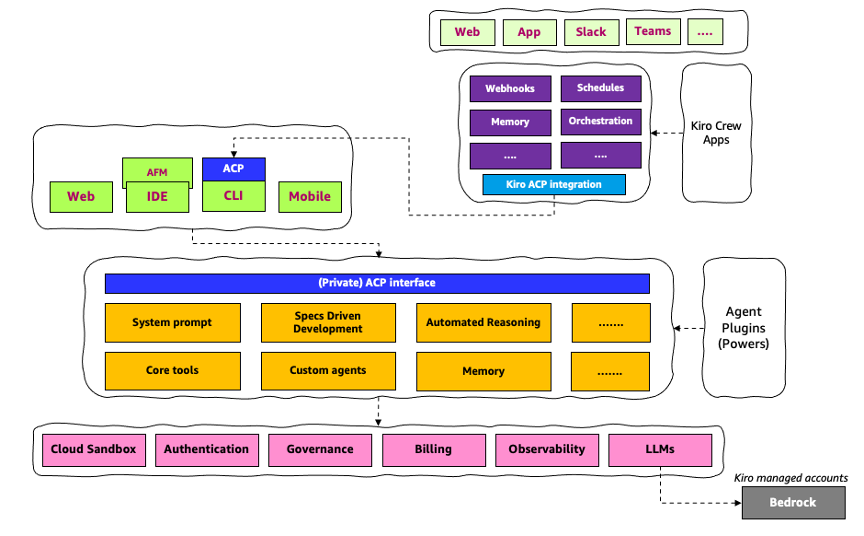
So if you came looking for the one true app, sorry: that’s not the world we’re building. We’re building a family of front doors onto one increasingly capable engine, each shaped for a different person and a different moment, none of them trying to eat the others. (Kiro Crew is less of a door and more of an entire house, but it still opens onto the same engine.) Pick the door that fits what you’re doing today. Tomorrow you might walk through a different one, and that’s rather the whole idea.
Exciting times for sure.