Your agents run for days: now Kiro CLI keeps up
I spend a lot of my day as a developer working with CLI agents.
The convenience is hard to beat. I can open any workspace, type kiro-cli, and start working with an agent that understands the project’s skills, AGENTS.md, documentation, and team knowledge. The context is right there next to the code.
Sessions run much longer than they used to. Models have gotten better at long-running tasks, and features like /goal let an agent iterate toward an objective and validate its progress before I review the result. My agents work for hours at a time, and I keep the same sessions open for days, sometimes weeks. Add a few parallel sessions and the CLI’s own performance starts to matter.
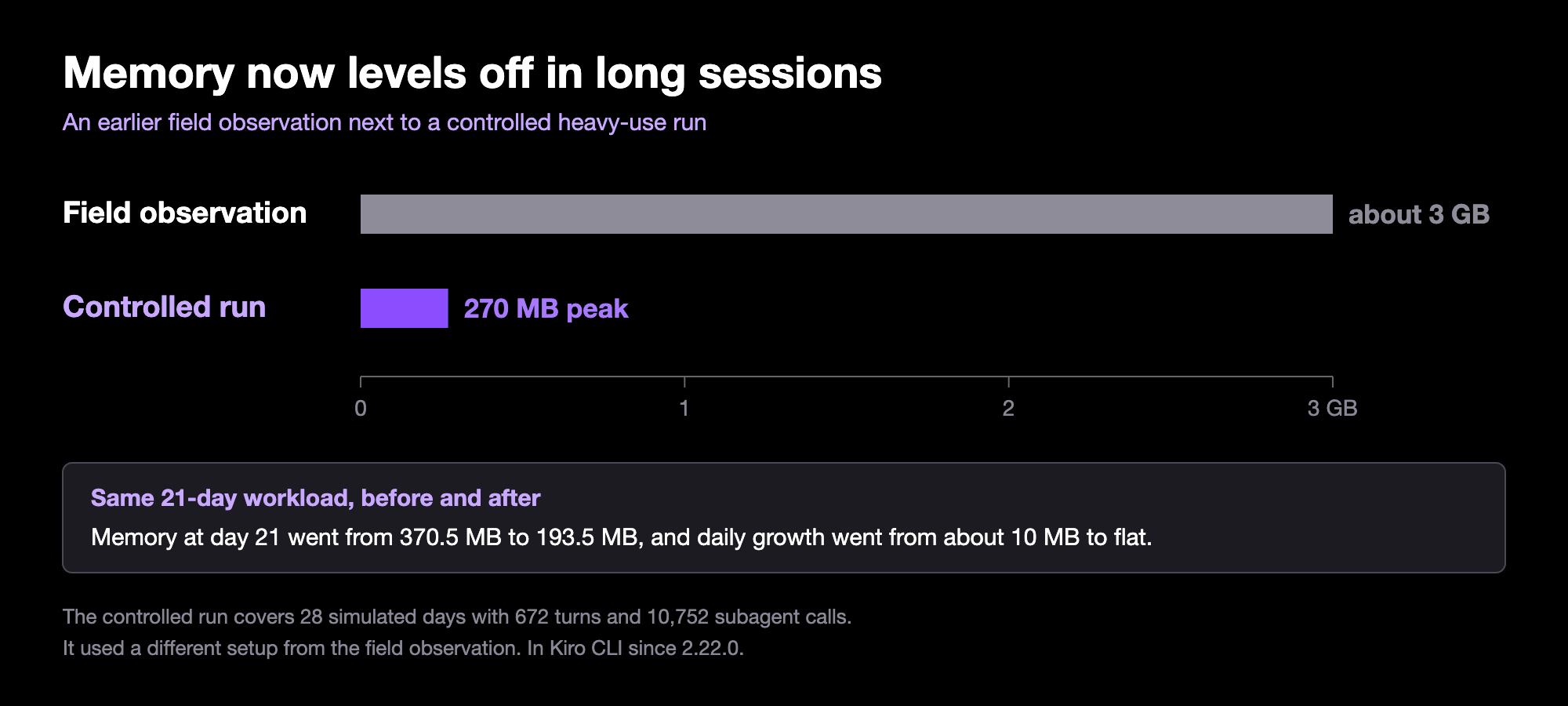
Kiro CLI runs on Bun, a JavaScript runtime that ships with the CLI. A while ago, I watched the kiro-cli Bun process reach about 3 GB during a long-running session. I was doing real work, and my laptop was definitely feeling it.
None of this showed up in a five-minute session. It showed up when one session ran for a few days. Memory kept climbing, and typing fell behind after a long response.
I ran into it more and more often, which is what made the performance work feel urgent.
The last thing I want is to play session Tetris, deciding which session to close so I can make room for another one. Restarting an agent should be my choice. It should not be how I manage memory. This matters more as Kiro makes it easier to run several sessions side by side, because the easier they are to manage, the more of them stay open.
Making a fresh session use less memory was not enough. Memory needed to stop climbing after hours or days of work, so we built a repeatable workload around that behavior.
To get there, we changed what the CLI keeps in memory. Recent turns stay, and older completed turns move to an archive on disk. Subagents with finished tasks stop leaving state behind. /transcript and /rewind still read the archive when you need it, so you keep the whole conversation without holding all of it in memory.
We tested this with a workload that simulates 21 days of use. By day 21, memory sat at 193.5 MB instead of 370.5 MB. The bigger win is that it stopped growing. In the last week it used to add about 10 MB a day, and now it stays flat. A heavier four-week run, with 672 turns and 10,752 subagent calls, peaked at 270.0 MB and finished at 174.9 MB.
The 3 GB session is one example, not a ratio to expect in every session, but it’s exactly the kind of growth this change prevents. It has been available since Kiro CLI 2.22.0.
Memory was half the problem. The other half showed up at the prompt, where typing fell behind after a long response.
The biggest typing improvement shipped in Kiro CLI 2.16.1. Our macOS signing step had been stripping the JIT entitlement from the embedded Bun runtime, so JavaScript ran far slower than it should. We replayed the same 1,118-line response and typed the same 20 keystrokes against both builds. Restoring the entitlement moved p95 repaint time from 276.9 milliseconds to 35.4 milliseconds, about 7.8× faster.
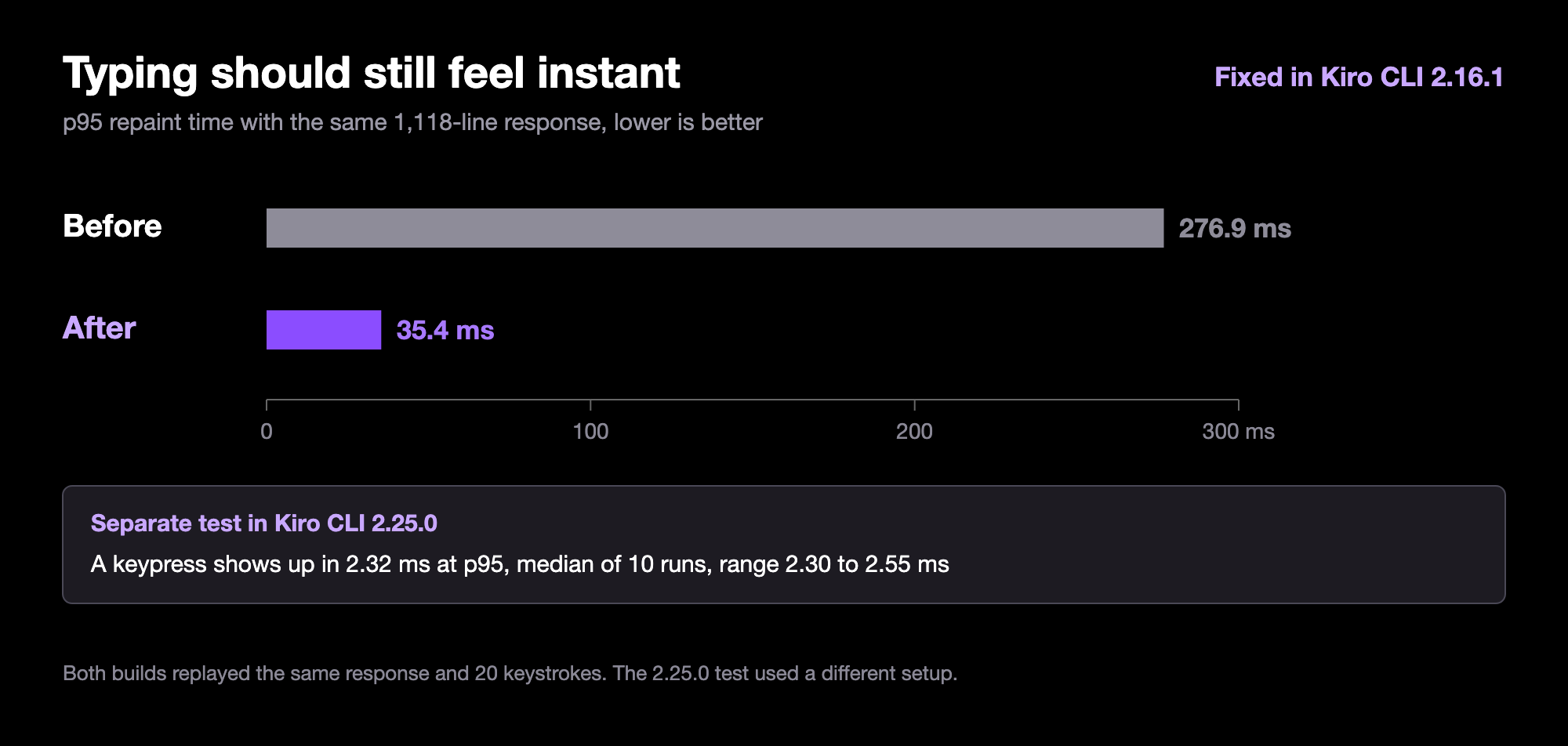
We kept cutting the work done on every keystroke. In a separate test with 1,118 lines of history on screen, a keypress now shows up in 2.32 milliseconds at p95, the median of 10 runs. Every run landed between 2.30 and 2.55 milliseconds.
In practice, keystrokes appear as you type them, even with a long response already on screen. That measurement comes from Kiro CLI 2.25.0.
Memory per session matters because it decides the number I care about most, which is how many useful sessions I can leave running while I do the rest of my work.
I kept 15 long-running sessions open together on a 24 GB MacBook Pro without closing or restarting them to reclaim memory. That count comes from my own daily use. In a separate test, 20 CLI processes each ran a simulated day of work and used a median of 251.6 MB, 261.1 MB at most.
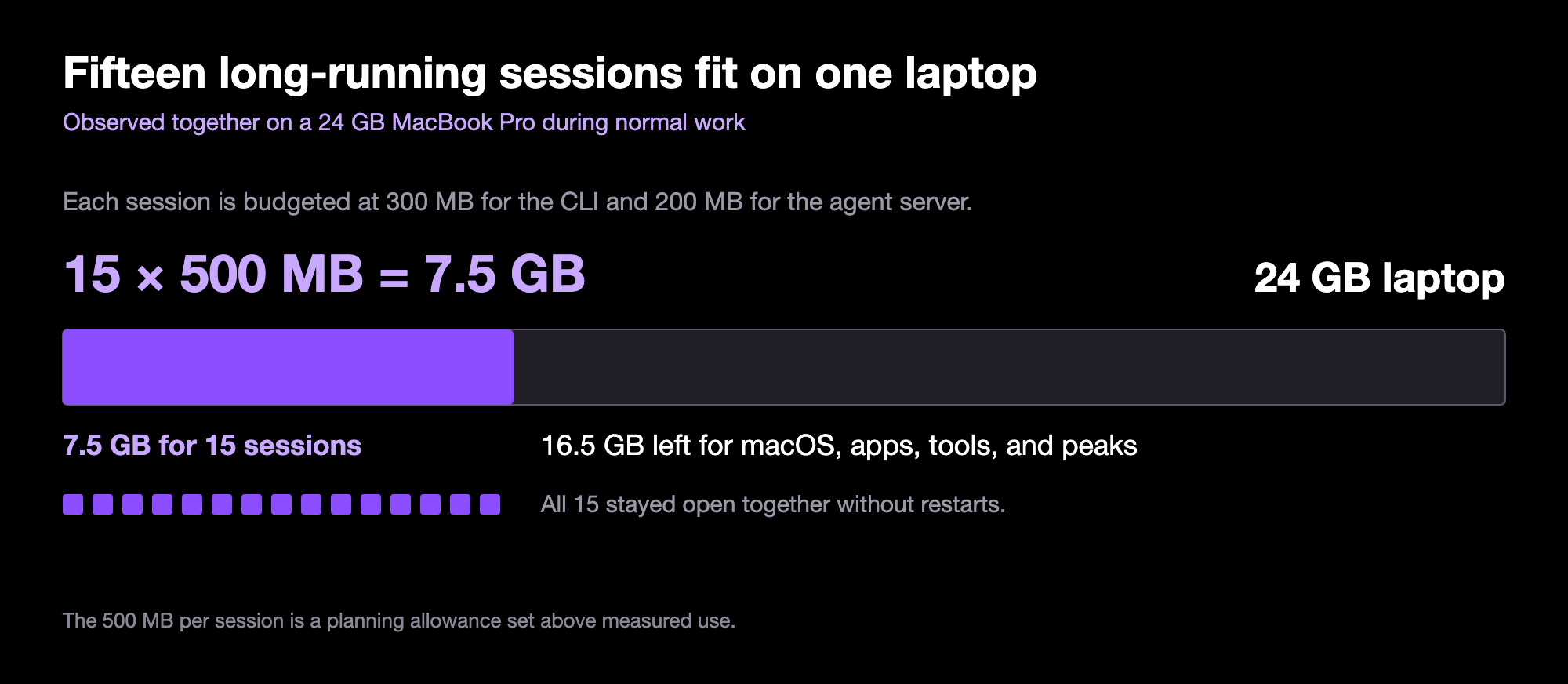
For planning, I budget 500 MB per session, 300 MB for the CLI and 200 MB for the agent server behind it. That’s more than the CLI measured in testing, and 15 sessions still fit in 7.5 GB of a 24 GB laptop.
My laptop still has room for macOS, my editor, a browser, tools, and the completely reasonable number of tabs I refuse to count. And I do not have to close a useful agent session just to get its memory back. If you want dozens running at once, cloud sessions are the better fit. Plenty of work still belongs next to the code on your laptop, and those sessions shouldn’t fight over memory.
Kiro also runs in CI/CD environments, pull-request reviews, and other automations. A smaller download means less time waiting before the useful work begins.
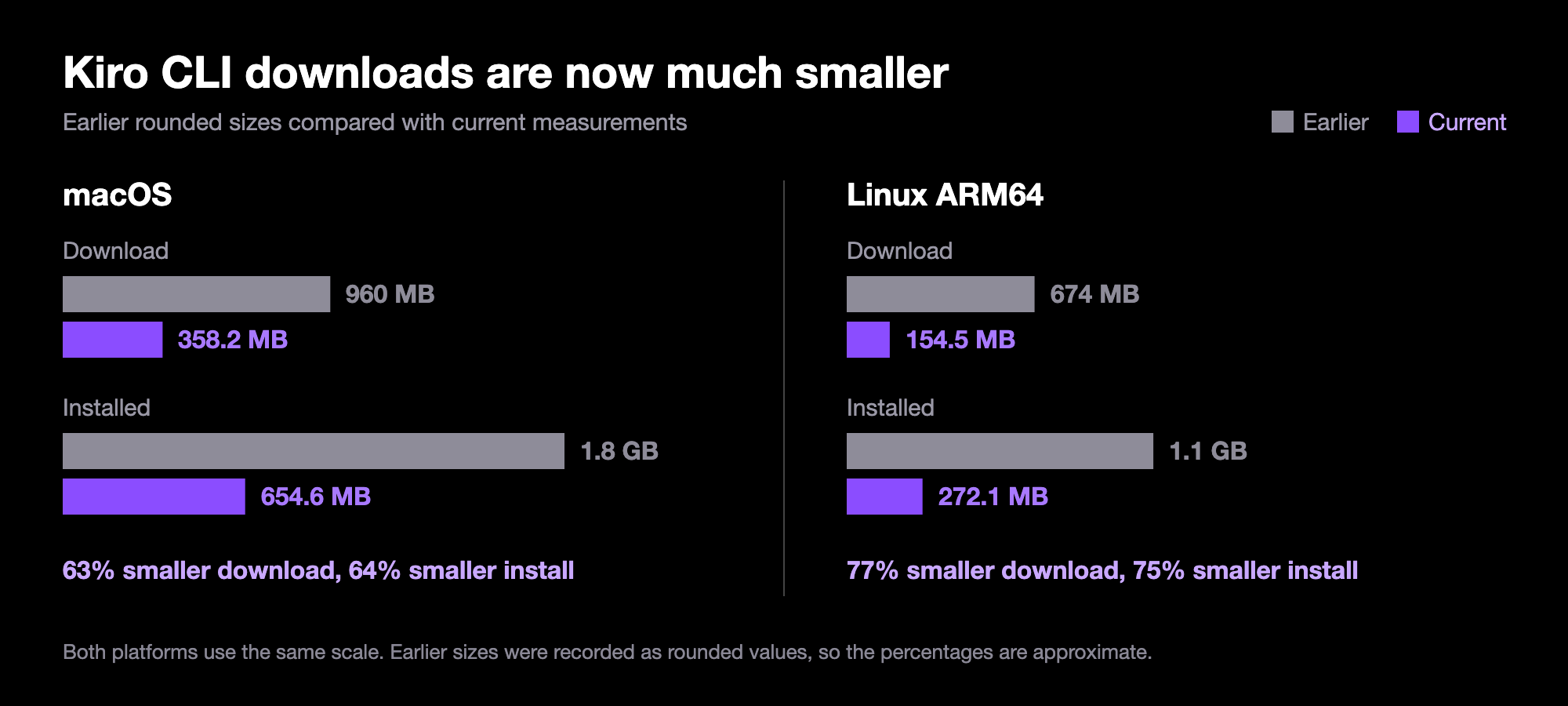
In package measurements collected during this work, the earlier macOS download was recorded as about 960 MB and the installed footprint as about 1.8 GB. The current macOS universal DMG is 358.2 MB to download and 654.6 MB installed. That’s about 63% smaller to download and 64% smaller once installed.
Linux ARM64 improved too. Its download went from about 674 MB to 154.5 MB, and its installed size from about 1.1 GB to 272.1 MB. That’s 77% and 75% smaller. We didn’t keep exact sizes for the old builds, so these percentages use rounded numbers.
Part of this work compressed the embedded runtimes and TUI. We also found the CLI reading and hashing two roughly 1.55 GB executable files during startup. Hashing that pair took 5.77 seconds, which is quite a workout before the first prompt.
Sometimes performance work is about the little things. This was a pretty big little thing.
When I open the CLI, I want to type.
Measured from launch to the moment you can type, median warm startup went from 6.785 seconds to 0.414 seconds. The optimized build met our under-half-second p95 target.
The earlier measurement included the repeated 5.77-second hashing work described above, and removing that regression is part of the improvement. The two numbers come from different builds, so read them as progress over time.
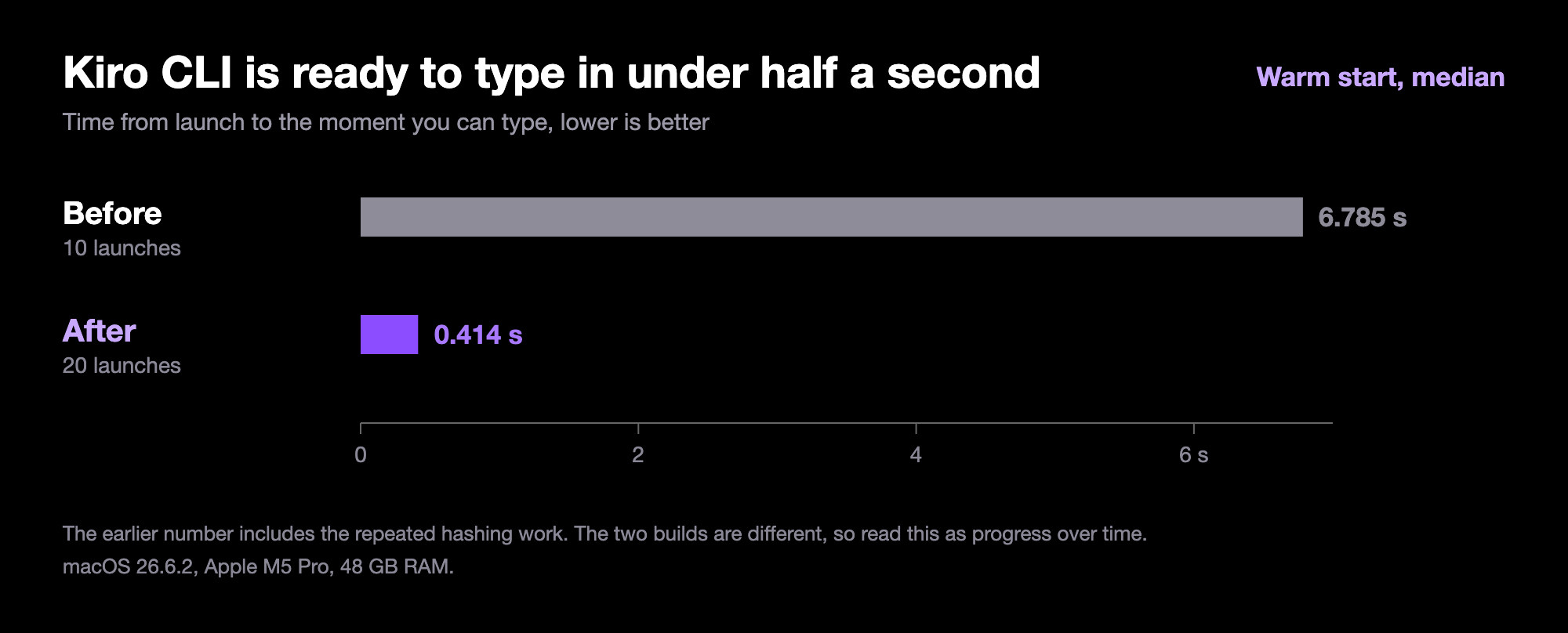
We removed repeated work from startup and let you start typing while the rest loads in the background. Now the CLI feels ready when I am, not several sips of coffee later.
Together, these changes mean a smaller download, a faster start, a prompt that keeps up with your typing, and sessions you can leave open without watching memory.
If you want to try it, install or update Kiro CLI.
Thank you to everyone using Kiro, pushing it through long sessions, and telling us where it gets in the way. This work is about giving you more room to keep building.