Introducing Agent Focus
Sharanya Balaji
Product
Phill Shaffer
Design Lead
The way developers work with AI is shifting. Models can now plan and carry out multi-step work, so more developers spend their day guiding an agent rather than typing or directly editing every line of code.
The IDE was built for a different moment. It puts code front and center, which is exactly what you want when you are editing. But it is not always what you want when your main job is to define, refine, and direct work that an agent will execute.
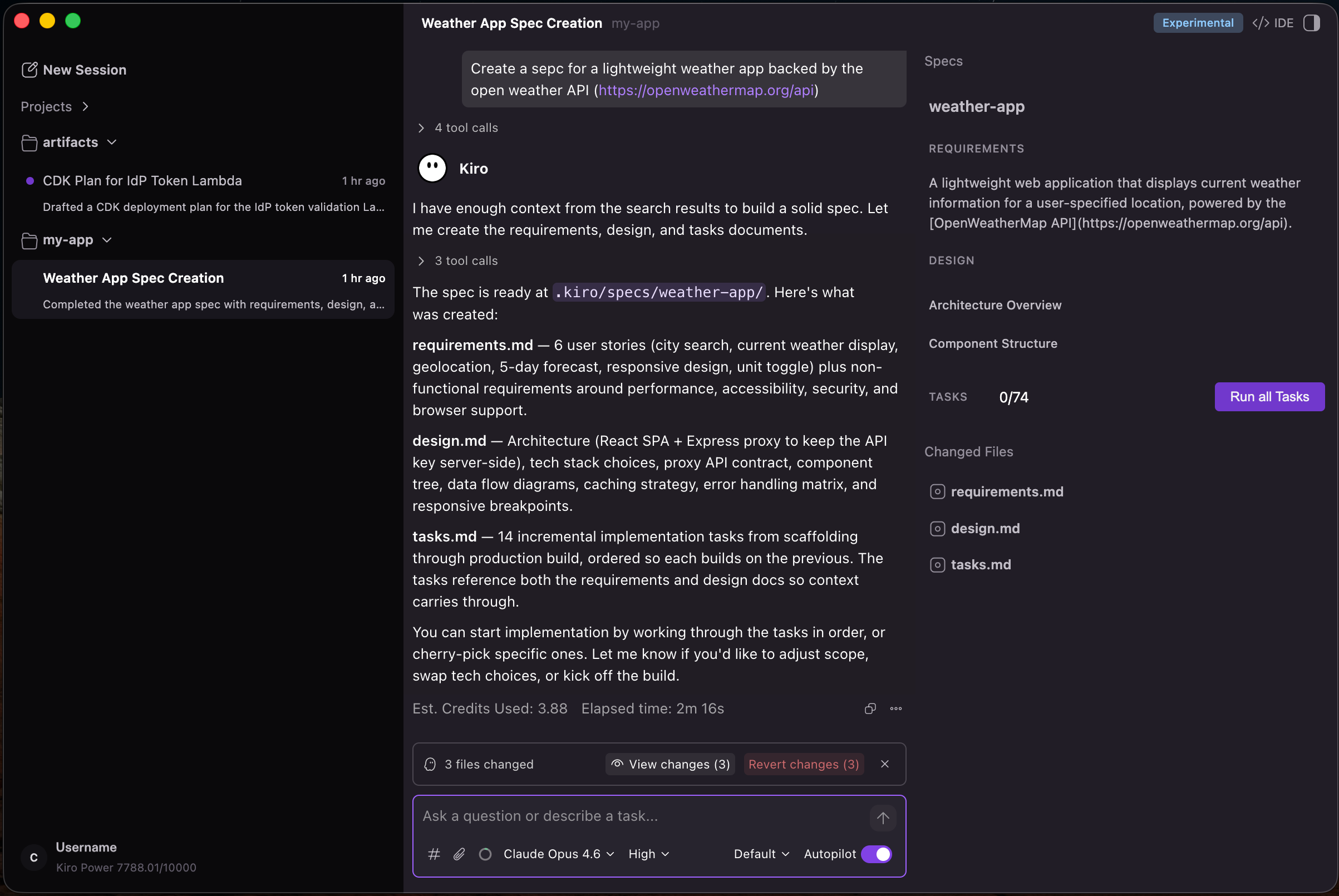
Today, we’re introducing Agent Focus, an experimental new view in the Kiro IDE that puts your interaction with agents front and center. It sets a foundation for a chat-first way of working: you describe what you want, refine it through conversation, kick off the work, and check in as the agent makes progress. Your IDE experience does not go anywhere. Agent Focus sits alongside it, and you can move between the two whenever you like.
Inside the view you can launch multiple sessions that work independently and in parallel across multiple workspaces. Chat with an agent to write code, explore ideas, or work through a problem—or define and refine specs when you need more structure. Get a high-level read on what is happening in each session and step in when one needs you. When a task calls for a closer look, switch back to the code-focused view and edit directly.
The view is built around three panels:
- Agents panel (left). Create new sessions, browse them grouped by workspace, and see each session’s status at a glance, whether it is working, blocked on your input, or paused. Clear the ones you are done with.
- Chat panel (center). A new and revamped chat experience that allows you to guide the agent, refine your intent, and watch work unfold. File changes show up as inline code diffs so you can follow along without switching views.
- Auxiliary panel (right). Hidden until you need it. The agent surfaces it to show changed files and spec summary, or you open it yourself when you want a closer look.
Because some capabilities are not yet native to the view, Agent Focus keeps clear paths back to IDE for things like settings, powers, skills, MCP, the terminal, full git, and direct file editing.
Agent Focus is an experimental launch. We want you to try it and tell us what works and what does not using the "Report issue" button in the interface, via GitHub issues, or in Discord. But the core IDE experience is not changing. IDE remains the default, everything you do today keeps working exactly as it does now, and you can stay in it as long as you want. Agent Focus is an additional way to work that we are putting in your hands early.
Switching is meant to be effortless. Agent Focus is always one click away in the top-right corner of the window, labeled "Agent Focus." When you want to head back, the control lives in the same spot and is labeled "IDE." You can move between the two at any time, in either direction, without losing your place.
Agent Focus ships in the latest version of Kiro 1.0. Update your version of Kiro via the Kiro downloads page and once you are on the new build, Agent Focus shows up in the top-right corner of the window.
Agent Focus is our first step toward a chat-first, agent-centric way of building in Kiro, and it will grow from here. The best version of it is the one shaped by how you actually use it. Download Kiro. Open Agent Focus from the top-right corner, run a few sessions, and let us know what you find.