Changelog

Stay up to date with the latest updates and improvements to Kiro.

Follow us:Bluesky,X,Discord,andLinkedIn
General
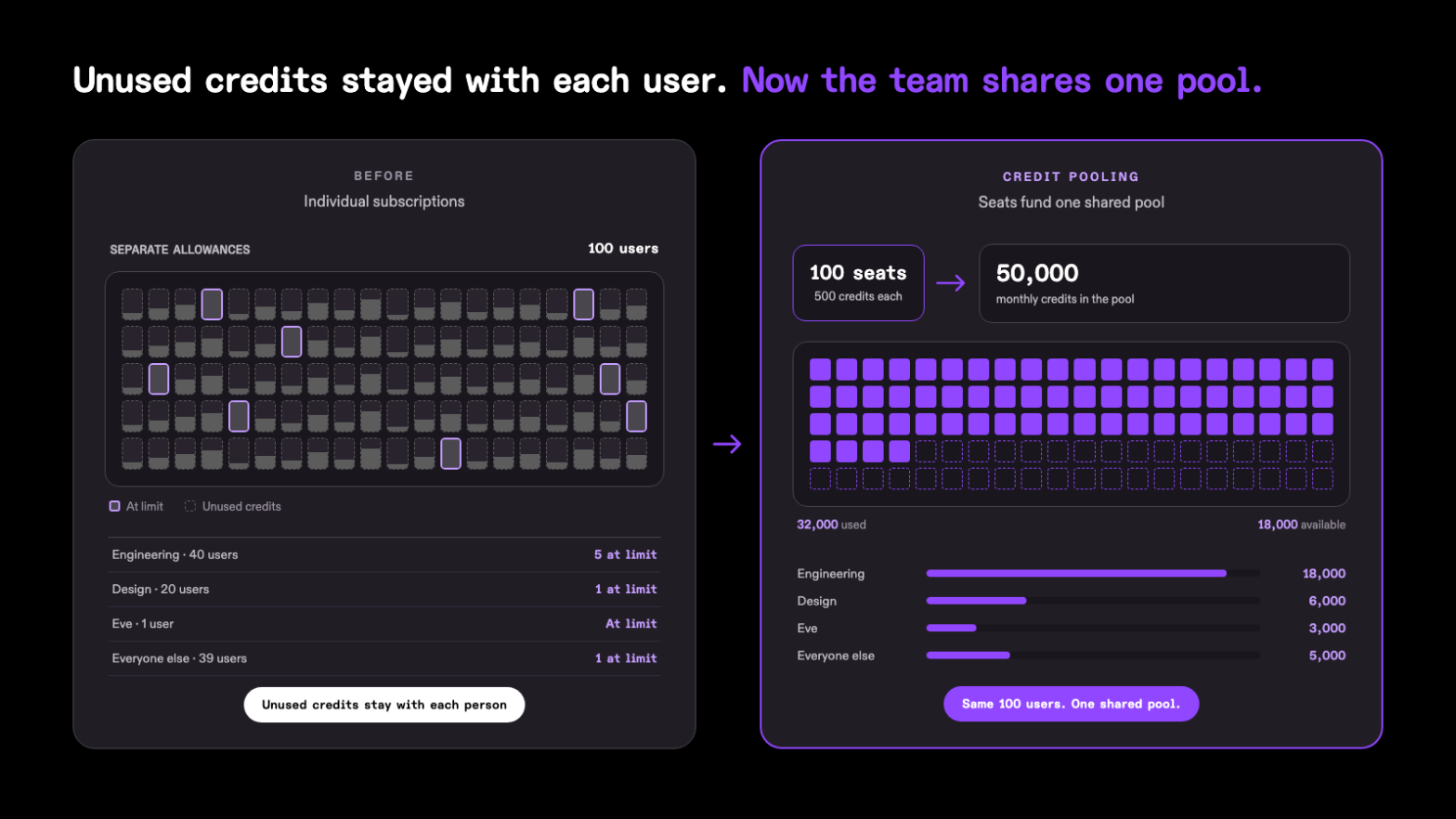
Loading image...Comparison of 100 individual Kiro subscriptions with credit pooling. Before, eight users reach their individual limits while unused credits remain with other users. After, 100 seats contribute 50,000 monthly credits to a shared pool, with 32,000 used and 18,000 available across Engineering, Design, Eve, and other users.

Enterprise administrators can now share Kiro credits across seated users with credit pooling. In the Kiro console, the feature is labeled Credit sharing. Each seat costs $20 per month and adds 500 monthly credits to one shared pool, so credits one user doesn't use stay available to the rest of the team. Seat price and credits are prorated for the first month.

Admins can add users or groups, set per-user, per-group, and per-profile usage limits, monitor pool usage, and buy additional credits that are good for one year from purchase. Credit pooling is the only option for new Kiro profiles. Existing customers can move users from individual subscriptions with the Switch to credit sharing wizard. You can't undo the switch. Learn more ->

3.0.0CLI

This release makes V3 the default agent harness for interactive Kiro CLI sessions on hosts that can run it. Existing V2 users are asked before the default applies, and Kiro upgrades custom agents still in the V2 format unless you turn that off. Kiro CLI is now a single standalone kiro-cli binary that retires the Classic interface, the desktop app, and inline autocomplete.

V3 brings capabilities V2 does not have. Cloud sessions let you disconnect and resume later from /sessions. Memory, once enabled, carries repository context forward. Approve for me, once enabled, approves routine actions, blocks unsafe ones, and asks about the rest while your deny, ask, and allow rules still decide first. /sandbox isolates shell commands, /autonomous on runs tasks without per-command approval with sandboxing on, and Workflows show their plan before starting. Turn on Workflows under /settings > Features.

Breaking changes

  • Classic interface: The Classic (V1) interactive experience no longer runs. If your command, alias, or settings still select it, Kiro offers Continue with V3 when you start a chat, and scripts ignore the selection. To keep the V2 agent, run kiro-cli --v2. Learn more ->
  • Desktop app: Kiro CLI no longer ships the desktop app. Existing macOS desktop app installs switch to the standalone kiro-cli on their next update check. To reinstall or change how Kiro CLI is installed, see Moving from the Kiro CLI desktop app.
  • Autocomplete and inline suggestions: Inline shell autocomplete and inline suggestions are retired with the desktop app and have no standalone replacement. The autocomplete, inline, translate, theme, and dashboard commands are unavailable; remove them from your scripts. Running kiro-cli doctor now directs you to kiro-cli diagnostic or kiro-cli issue.

Start on V3 by default

V3 is now the default. You no longer need --v3.

  • Interactive: New sessions start on V3. If you already use V2, you'll be asked first.
  • Headless: By default, scripts using --trust-all-tools start on V3. Other scripts stay on V2.
  • ACP: By default, new clients start on V3. Existing clients stay on V2 unless already supported.

Learn more ->

Models

Claude Opus 5.5 and GPT-5.6 Sol are generally available with full Kiro support. Expanded capacity supports more dependable access for production workloads. Their current plans, regions, surfaces, context windows, credit multipliers, and inference scopes remain unchanged.

Both models' Experimental labels no longer apply. The Kiro Excluded Models indemnity exception also no longer applies to these models. To load the latest model list, restart the IDE or CLI, run kirocrew restart for Crew, or refresh Web in your browser. Learn more ->

2.37.0CLI

This release turns on automatic V2 agent upgrades by default when a V3 session starts and lets ACP clients that declare terminal authentication sign in to Kiro from a terminal. Custom agents built for V2 keep working on V3 without a manual upgrade run, and a capable client opens a terminal sign-in flow. It also draws Mermaid node shapes and nested subgraphs, adds a KIRO_RUNTIME_DIR override for the bundled runtime, and tidies V3 approval prompts. Fixes cover fullscreen scrolling, click targeting in fullscreen, and the Homebrew upgrade hint.

Upgrade V2 agents by default when V3 starts

Kiro CLI can upgrade V2-format agents to the V3 format when a V3 session starts. That upgrade now runs unless you turned it off: an unset chat.enableAutoAgentUpgrade preference enables launch migration, while an explicit false stays off. It covers your workspace and global agent directories, or the KIRO_AGENT_CONFIG_DIR directory when set, and rewrites each agent file in place after saving a .json.bak backup. To keep agents in V2, run kiro-cli settings chat.enableAutoAgentUpgrade false; interactive V3 launches then show a notice naming how many agents still need upgrading. Learn more ->

Sign in to Kiro from an ACP client

If kiro-cli acp starts while you are signed out, ACP clients that declare terminal authentication now offer a Log in to Kiro method that runs kiro-cli login in a terminal. Complete the sign-in and reconnect, and the agent starts with your credentials. If your client does not declare terminal authentication, Kiro asks you to run kiro-cli login. Until you sign in, every other request returns an authentication-required error. Learn more ->

2.36.0CLI

This release adds Approve for me to interactive V3 sessions. Kiro approves routine actions for you, blocks risky ones, and asks when unsure, so work no longer stops at every routine prompt. Existing deny, ask, and allow rules decide first; Approve for me handles only unsettled actions and marks each action it approves Approved for you. Turn it on under /permissions when available.

Let Kiro approve routine actions for you

In an interactive V3 session, run /permissions and choose Policies. When the page offers approve for me, choose it. The choice you make here is stored per workspace: Kiro adds the approve-for-me policy preset to the workspace permissions file, so it stays with that repository and does not follow you to others. When the page says instead that Approve for me is unavailable in your session, Kiro keeps asking. Choose ask for approval to go back to prompts for every action your rules do not cover. Learn more

Web

Kiro Web can now keep a short recap for each session and separates agent settings from account settings. Workflows now ask for input during planning and review. Schedule replaces Automations, and reopened sessions stay usable while their sandbox starts.

Agent Config and Settings, Side by Side

The sidebar now separates Agent Config for choices that shape the agent from Settings for your account and environment. Agent Config includes Cloud Config, Steering, Skills, Workflows, Powers & MCP, Model fallback, and Memory; Settings includes Account & plan, Appearance, Integrations, AWS access, Sandbox, API keys, Privacy & data, and Help & support. MCP servers are under Powers & MCP, the IAM role under AWS access, themes under Appearance, and model fallback under Agent Config > Model fallback. Learn more ->

Workflows That Check In With You

With Workflows turned on, a workflow created from a prompt starts with a create-workflow step you can open and guide. If details are missing, it asks instead of guessing. Its plan shows each step's agent, model, effort, and first task. Changes requested after a rejected plan carry into approved steps. Review loops that used to run three to five passes and fail now pause after two rejected passes by default. A workflow's own pass limit still wins. Active runs stay pinned above chat. Learn more ->

1.4.62IDE
1.4.51IDE

This release adds a faster way to reconnect when an IAM Identity Center or AWS Builder ID session expires, without choosing a sign-in method or re-entering your Start URL. Markdown Review now lets you copy selected text and send comments from the keyboard. Kiro also now tells you when a file edit fails to save.

2.35.0CLI

This release warns you when Kiro CLI starts as root or Administrator and makes V3 sessions follow your organization's MCP and web tools settings. It also lets you jump back to the prompt from a long answer in fullscreen, shows which MCP servers your registry hid in V3, and fixes model fallback, session resume, dictation, and MCP connection issues.

Know when Kiro CLI runs with elevated privileges

Kiro CLI now warns you when a session starts as root on macOS and Linux or as Administrator on Windows. Tools, shell commands, Hooks, and MCP servers can run with those privileges and create root-owned files or change system settings. The warning does not block anything. If you intentionally run Kiro CLI with elevated privileges, turn the warning off with kiro-cli settings app.warnOnElevatedPrivileges false. Learn more

Follow your organization's MCP and web tools settings in V3

V3 sessions now turn MCP servers and the web_search and web_fetch tools on or off according to your organization's Kiro settings. Learn more

Models

Claude Haiku 5.5 is now available with experimental support across the Kiro IDE, CLI, Crew, and Web for Pro, Pro+, Pro Max, and Power customers in us-east-1 (N. Virginia) and eu-central-1 (Frankfurt). Haiku 5.5 is designed for high-volume work requiring quick responses. It has a 1M-token context window. Requests up to 100K tokens have a 0.06x credit multiplier; requests that exceed 100K tokens are billed at 0.3x. To load the latest model list, restart the IDE or CLI, run kirocrew restart for Crew, or refresh Web in your browser. Learn more ->