This version supports Powers packaged in the open Agent Plugin format and reworks the Agent Focus Mode session rail with pinning, Kiro CLI hand-off, and in-app updates. It also moves Kiro to Code OSS v1.109.5, improves how spec hovers and MCP installs handle untrusted workspace content, and adds bulk session migration and steadier error recovery.
Agent Plugin support for Powers
Install powers aligned with the open Agent Plugin format from a local folder or GitHub URL. Kiro now supports plugins that bundle skills and MCP making powers easier to share across compatible agent tools.
Pin and manage sessions in Agent Focus Mode
Pin a session with Pin Session to keep it at the top of its section. Resume an existing session in Kiro CLI with Open with Kiro CLI. When a new version of Kiro is available, an update row appears in the rail footer, and the settings pane gains a Check for Updates button. Spec documents and task rows in the context panel now open directly in the editor. Learn more ->
This version adds a Kiro submenu to the editor context menu and an Ask Kiro to Fix quick fix on errors and warnings, plus a guided form for creating hooks. Kiro moves to Code OSS v1.108.2, and now replies in your IDE display language. Chat history also survives workspace folder changes, and several sign-in, trust, and approval issues are fixed.
This release adds user-level global hooks, a searchable session history panel, and stronger reliability for corporate proxy environments. The agent now recovers automatically from interrupted responses and refreshes MCP tools dynamically.
Update (August 18, 2026): IDE auto-updates are enabled again. Updates download automatically in the background; see Upgrading Kiro to check manually.
Note: To get the latest 1.0.x release, download it directly from kiro.dev/downloads. Auto-updates are being rolled out gradually to users.
This release delivers faster session startup, fixes the compaction loop that caused repeated Context limit exceeded errors on large sessions, and adds full PowerShell trust support on Windows. MCP tools now also recover from transient network failures instead of failing silently.
Update (August 18, 2026): IDE auto-updates are enabled again. Updates download automatically in the background; see Upgrading Kiro to check manually.
Note: To get the latest 1.0.x release, download it directly from kiro.dev/downloads. Auto-updates are being rolled out gradually to users.
This release brings hooks to agent-driven file changes, automatic OAuth for MCP servers that require sign-in, multi-window settings sync, and several trust and connectivity fixes.
Update (August 18, 2026): IDE auto-updates are enabled again. Updates download automatically in the background; see Upgrading Kiro to check manually.
Note: To get the latest 1.0.x release (1.0.89 or later), download it directly from kiro.dev/downloads. Auto-updates are paused at this time and we are working on re-enabling them.
This release brings performance improvements and Agent Focus Mode polish. Sessions restore automatically on launch, idle resource consumption is lower, prepaid credit packs appear in the account dashboard, and several fixes ensure permissions, hooks, and steering behave correctly across windows and custom agent profiles.
Update (August 18, 2026): IDE auto-updates are enabled again. Updates download automatically in the background; see Upgrading Kiro to check manually.
Note: To get the latest 1.0.x release, download it directly from kiro.dev/downloads. Auto-updates are being rolled out gradually to users.
This release resolves context compaction issues that caused premature summarization and fatal crashes on long sessions. Session migration becomes a user-initiated action with file checkpoints preserved, hooks auto-migrate from the legacy format, and several permissions and MCP reliability issues are fixed.
Update (August 18, 2026): IDE auto-updates are enabled again. Updates download automatically in the background; see Upgrading Kiro to check manually.
Note: To get the latest 1.0.x release (1.0.52 or later), download it directly from kiro.dev/downloads. Auto-updates are paused at this time and we are working on re-enabling them.
IDE 1.0 puts you in control of what the agent can access, lets you build and switch between specialized agents, and introduces an experimental agent focus mode for directing parallel agents. This release also brings natural language hook creation, dockable chat tabs, and session export.
Agent Focus (Experimental)
Direct multiple agents from a chat-first layout designed for developers who spend their day guiding agents. Launch sessions that work independently and in parallel, see status at a glance, and watch file changes appear as inline diffs. Start with structured workflows (Spec, Plan, Bug Fix, Quick Spec) or freeform chat. Toggle between Agent Focus and the traditional IDE from the top-right corner — your work carries over in both directions. Learn more ->
Permissions
Define exactly what the agent can and cannot do. A capability-based permissions system evaluates every file read, command execution, and MCP call against your rules. The IDE prompts for consent on anything you haven't pre-approved, and you can persist decisions as rules scoped to a workspace or globally. No configuration required to start — defaults apply, and your policy grows as you make consent decisions. Learn more ->
Custom Agents
Build specialized agents in minutes. Write a Markdown file, declare tool access with simple tags (read, write, shell, web), embed MCP servers and permission rules inline, and share the file with your team via version control. Your agent appears in the selector the moment you save it. Switch agents mid-session without losing conversation history. Learn more ->
Hooks
Describe the automation you want in natural language and Kiro generates the hook configuration. Hooks use a structured v1 JSON format stored in .kiro/hooks/ with triggers for file events, tool use interception, spec tasks, and prompt submission. Legacy hooks from 0.x can be migrated directly from the Agent Hooks panel. Manual hooks have been replaced by manual steering files. Learn more ->
Dockable Chat
Open any chat session as a full-width editor tab for more space to read and review long conversations. Right-click a chat tab and select Open in Editor to dock it. Split horizontally or vertically alongside source files, drag between editor groups, or use a multi-monitor setup with chat on a separate screen. The editor tab and panel stay in sync — messages sent from either reach the same session. Learn more ->
Agent Selection
Switch between agents within a chat session without losing conversation history. The selector sits in the chat input bar alongside the model picker — go from Default to a custom code reviewer to Spec mode in a single conversation. Set a preferred default agent that persists across restarts so new sessions always start the way you want. Learn more ->
Breaking Changes
Trusted Commands Replaced by Permissions
IDE 1.0 replaces Trusted Commands and Command Denylist with permissions.yaml shell rules. To preserve your existing behavior, translate trusted command prefixes to allow rules and denylist entries to deny rules. Without custom rules, read-only Git commands run automatically and other shell commands prompt for approval. Learn more ->
Inline Chat replaced by Ask Kiro workflow
Select code and press Cmd+L on macOS (Ctrl+L on Windows/Linux) to bring it into your current chat, or Cmd+Shift+L on macOS (Ctrl+Shift+L on Windows/Linux) to start a new session with it. You can also right-click the selection and choose Kiro > Ask Kiro, along with quick actions like Fix Grammar / Spelling, Write Comments for this Code, and Optimize this Code. The selection adds it to your current chat, where the agent already has your project context, your history, and its full set of tools. Inline chat is retired in IDE 1.0.
This release makes Kiro Specs faster to start, faster to finish, and harder to get wrong. Run independent tasks concurrently for faster execution, skip approval gates with Quick Plan when you already know the scope, and catch logical inconsistencies in your requirements before they become implementation problems.
Parallel Task Execution
Run all Tasks now runs independent tasks concurrently instead of one at a time. No configuration needed - click Run all Tasks and Kiro handles the rest. It analyzes your task list for dependencies and groups independent tasks into parallel waves, each running in its own isolated context. For specs with 4+ independent tasks, this can cut execution time by up to 4x. Learn more ->
Quick Plan
A new Spec session mode for when you already know what you want to build. Kiro generates requirements, design, and tasks in a single pass without approval gates between phases. It asks clarifying questions up front (scope, constraints, edge cases) then produces all three artifacts. You land directly on the task list, ready to build. Same traceability and correctness that Specs provide, with a tighter feedback loop. Learn more ->
Analyze Requirements
A deep analysis pass that catches logical inconsistencies, ambiguities, conflicting constraints, and gaps in your requirements before you move to design. Kiro uses automated reasoning to find issues that are hard to catch in a read-through - ambiguous language, conflicting constraints, and logical gaps. Results appear in chat as clarifying questions you can resolve in seconds. Learn more ->
This release gives enterprise teams centralized control over MCP server access and model availability, and adds document attachment support to chat.
MCP Registry Governance
Loading image...
Enterprise administrators using IAM Identity Center can now control which MCP servers their organization is allowed to use. Create a JSON registry file listing approved servers, host it over HTTPS, and configure the URL in the Kiro console. The registry supports remote (HTTP) and local (stdio) servers across npm, PyPI, and OCI package types, with ${VAR} placeholders for user-specific values like auth tokens. Kiro syncs with the registry every 24 hours, enforces version-pinned access, and works alongside the existing MCP on/off toggle to give you full control at the org or account level.
Model Governance
Loading image...
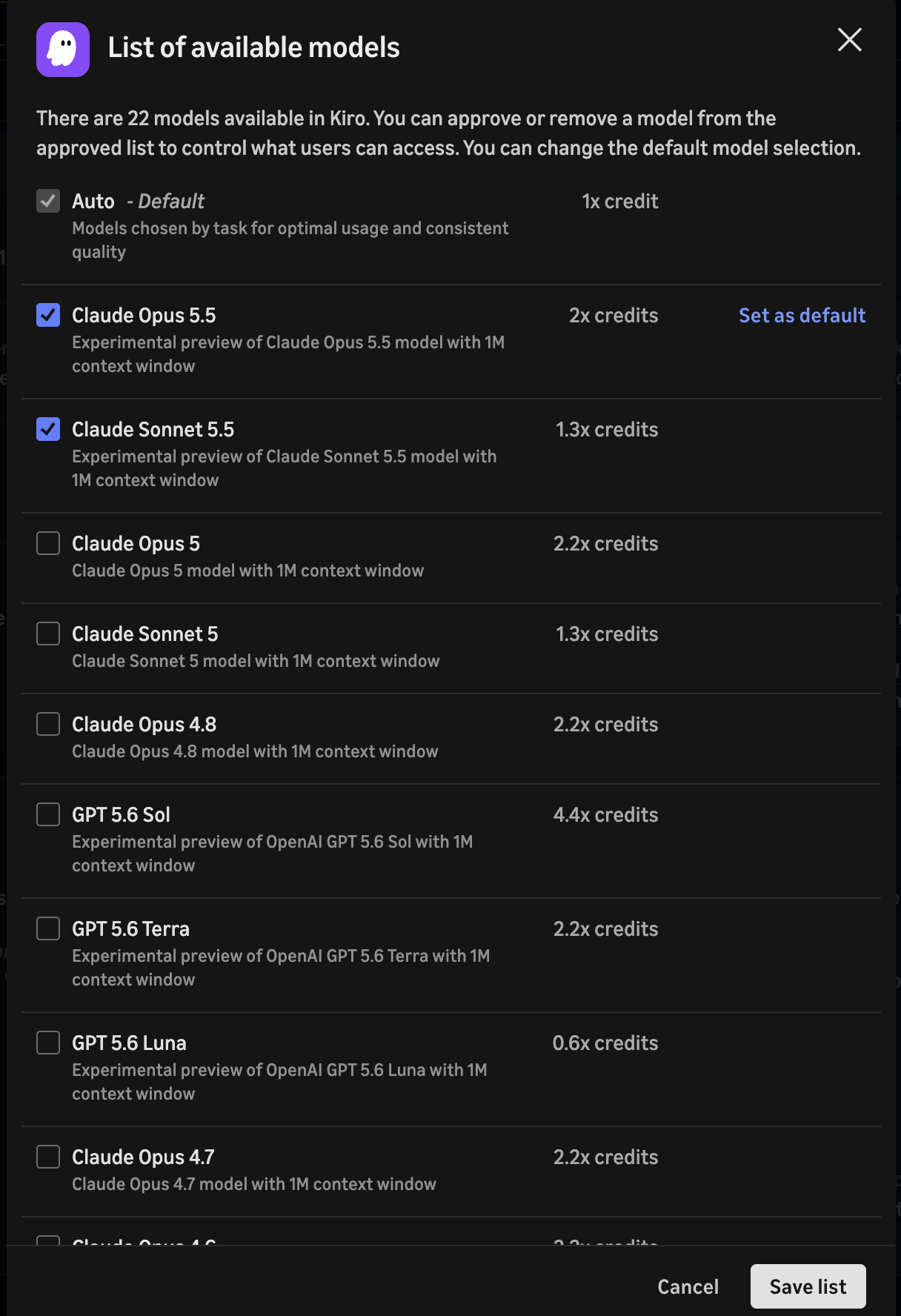
Enterprise administrators can now control which AI models are available to users in their organization. Toggle on model access management in the Kiro console under Settings > Shared settings > Model availability, then curate an approved list of models. You can also set a default model that auto-applies across all clients. Before approving a model, review its row in the inference endpoint regions table for its inference scope and endpoint location against your data residency requirements. Lifecycle status does not determine routing, so check each model's row rather than treating Experimental as a proxy for global inference. Once enabled, only approved models appear in the model selector across both the IDE and CLI.
Document Attachments
You can now attach documents directly to chat messages by pasting or dragging files into the input. Supported formats include PDF, CSV, DOC, DOCX, XLS, XLSX, HTML, TXT, and Markdown. Documents are sent to the model as native document blocks, so the agent can read and reason over their contents. You can attach up to 5 documents per message and mix them with text and images in the same prompt.