GPT 6 Luna is beginning to roll out in Preview across Kiro clients for Kiro Enterprise organizations. It has a 1M context window and a 0.2x credit multiplier, which rises to 0.4x for requests over 272K tokens. Inference runs only in the US geography.
GPT 6.2 Astra is beginning to roll out in Preview across Kiro clients for Kiro Enterprise organizations. It is OpenAI's frontier model for complex, multistep projects, such as implementing and testing changes in existing codebases. It has a 1M context window and a 7.2x credit multiplier, which rises to 14.4x for requests over 272K tokens. Inference runs only in the US geography.
Kiro is included in the scope of the AWS SOC 2 Type II report. This gives security, procurement, and vendor-risk teams independently audited evidence they can use when evaluating Kiro.
SOC 2 reports describe how a service organization's controls are designed and evaluated against the AICPA Trust Services Criteria. A Type II report also tests whether those controls operated effectively over a period of time.
Organizations can consider this evidence alongside their own policies, intended use, data requirements, and governance controls.
For details about Kiro's compliance programs and access to available third-party reports, see Compliance validation. To learn how Kiro stores, processes, and protects customer data, see Data protection.
Enterprise administrators can now set credit pooling usage limits and overages in Controls. Use credit_pool.usage_limit to cap the pooled credits each user can use in a billing cycle. Set it in the control on the profile as the default limit for each user, or in a control assigned to a group or a user. A user's own limit wins, then the highest limit among the user's groups, then the profile's. Use overages in the control on the profile to turn overages on or off for the whole account.
Enterprise Management is in preview in US East (N. Virginia) (us-east-1) and Europe (Frankfurt) (eu-central-1). Profiles that have not moved to Controls keep setting usage limits on the Credit sharing page of the Kiro console.
Kiro Enterprise is now on the App Store. It's the Kiro Mobile app for organization accounts. You can start cloud sessions from your iPhone, follow the agent while it works, review its changes, and reply when it needs your input. Sessions sync with Kiro Web, so you can start a session on your phone and pick it up on the web.
Kiro Enterprise works with AWS IAM Identity Center and external identity providers such as Okta and Microsoft Entra ID. See supported identity providers. Enter your work email or your organization's start URL, then finish signing in through your organization.
Kiro Enterprise doesn't support social login or AWS Builder ID. If you sign in with Google, GitHub, or AWS Builder ID, use the Kiro app through TestFlight instead. For installation and organization sign-in steps, see Setup & First Run.
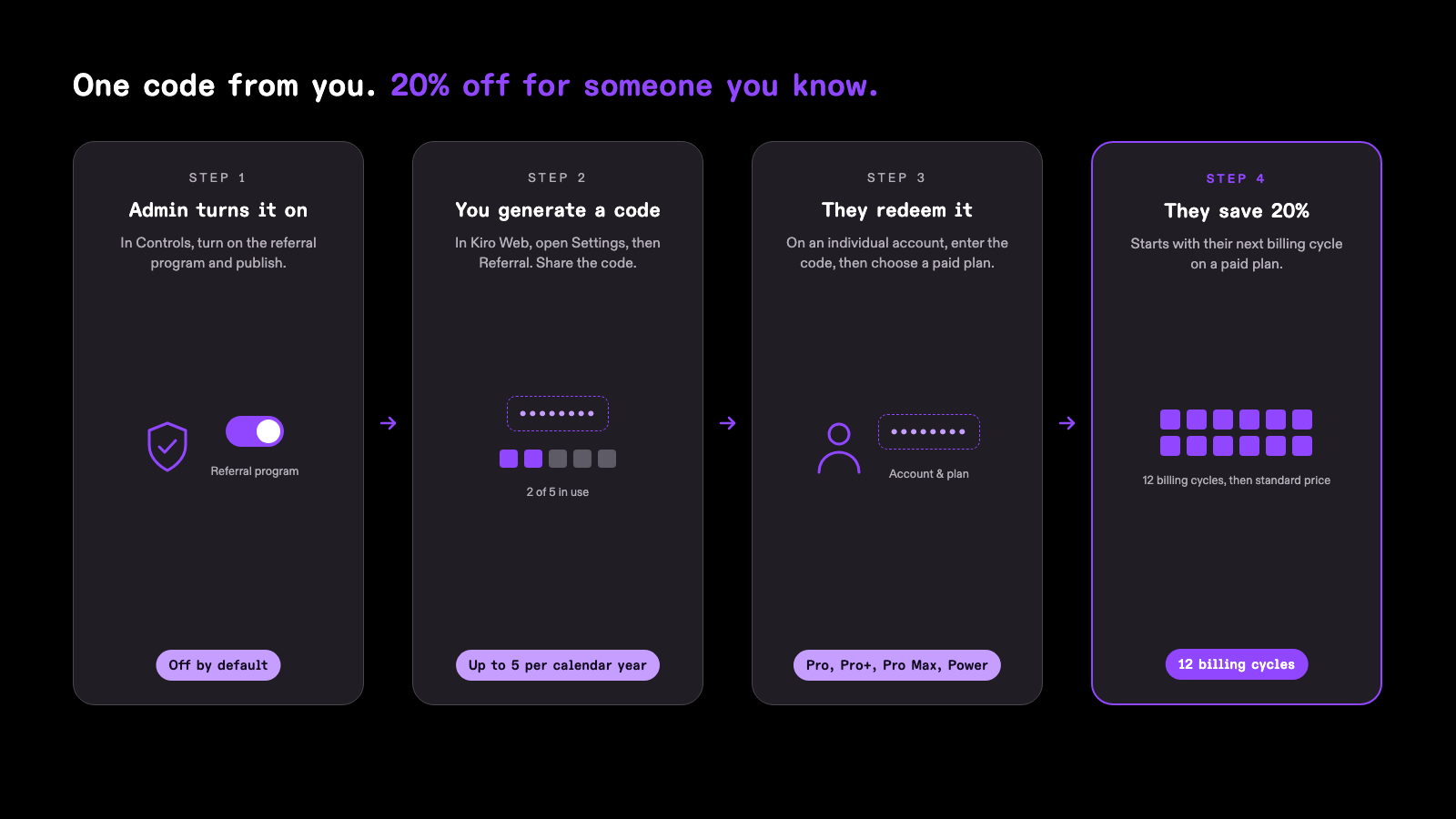
Enterprise users can now generate referral codes in Kiro Web and share them with friends and family. Each code gives 20% off any paid individual plan (Pro, Pro+, Pro Max, or Power) for 12 billing cycles.
Referrals are off by default. Administrators can turn them on for their organization in Controls.
Claude Fable 5.2 is beginning to roll out in Preview across Kiro clients for Kiro Enterprise organizations. Anthropic's most capable model for hard technical work takes on large, loosely defined problems across repositories, tests its own work as it goes, and coordinates subagents on long runs. It has a 1M context window and a 6x credit multiplier. Inference runs only in the US geography.
Access is limited during Preview. Organizations with access can enable Fable 5.2 through model governance. To load the latest model list, users restart the IDE or CLI, run kirocrew restart for Crew, or refresh Web in their browser.
All Fable 5.2 traffic is retained for up to 30 days (unless otherwise required by law) for automated offline abuse detection. Classifier-flagged traffic will be subject to potential human review performed by AWS, and we may review flagged traffic for abuse. Learn more ->
This release adds SubagentStop hooks, full saved Hook output, and instructions for /compact summaries. It also adds conversation recaps, notification controls, managed V2 controls, and an all-users Windows installer.
Send a subagent one more instruction from a hook
In a V3 session, a SubagentStop Hook runs when a dispatched subagent finishes and can send it one more instruction before its result returns. For any Hook, when its output exceeds 3,000 characters, Kiro CLI saves the full output and gives the agent its beginning with the saved file's path. The conversation stays readable while the complete output remains available. Learn more ->
Tell /compact what the summary should keep
In a V3 session, add instructions after /compact, such as /compact Keep the migration decisions and remaining validation steps, and Kiro uses them for that summary. The instructions apply only to the compaction you request. Later compactions without instructions use the standard summary. Learn more ->
This release lets you work in a remote environment from Kiro IDE. Connect to your own Linux machine over SSH, open a project in its Dev Container, or open a cloud session in its own Kiro window.
Connect to a Linux machine over SSH
Video transcript
The video shows a local Kiro IDE window. The user adds an SSH host, then opens Connect to Host, which lists the configured host my-remote, Enter SSH Destination…, and Add New SSH Host…. After the user selects my-remote, a new Kiro window opens on the host, shows its files, and opens index.ts in the editor.
Connect a Kiro window to your own Linux machine with Connect to Host. The editor stays on your computer, while files, terminals, and the agent run on the remote machine, so the agent can keep working after you disconnect. Learn more ->
Work inside a Dev Container
Video transcript
The video shows a Kiro IDE window with a project that has a .devcontainer folder. The user opens the remote menu and selects Reopen in Container. A notice reads "Opening Dev Container: Starting the Kiro server." Kiro then opens a window titled Dev Container: Todo API, where a terminal runs npm start and chat is ready in the side panel.
Use the tools and dependencies a repository defines without installing them on your computer. Reopen in Container builds the repository's dev container with Docker and opens your project inside it, on your computer or on an SSH host. Learn more ->
Open a cloud session in the IDE
Video transcript
The video shows the Sessions view listing a cloud session named Hello Remote. The user opens it in the IDE, and a new Kiro window opens on the cloud session's files, under Projects [Kiro Cloud], with index.ts open in the editor and chat in the side panel.
Review and continue a cloud session's work without copying the repository to your computer. Open in IDE opens an editor on the cloud session in a new Kiro window, with chat attached to the agent already running there. Learn more ->
Enterprise administrators can now use the Enterprise Management preview with Kiro profiles in Europe (Frankfurt) (eu-central-1), in addition to US East (N. Virginia) (us-east-1). Newly created Kiro profiles in Europe (Frankfurt) have Controls on from the start. Existing profiles there with IAM Identity Center or an external identity provider can move to Controls when Migrate to the new experience appears on the Kiro Settings page. The move is one-way.