CLI changelog

Stay up to date with the latest updates and improvements to Kiro.

Follow us:Bluesky,X,Discord,andLinkedIn
2.24.0CLI

Use session-wide tool approval in V3, combine session dashboard filters, and control which environment variables your chats and tools inherit.

This release adds session-wide tool approval to V3 and makes /sessions controls easier to discover and combine. Project .env files no longer load automatically into chat sessions, MCP servers, or tools. In V2, image handling now recovers when images exceed supported dimensions. Terminal rendering, settings, and agent config upgrades also receive reliability updates.

Session-wide tool approval (V3)

Run /tools trust-all to automatically approve tool calls for the rest of the current V3 session. By default, Kiro shows a safety warning and asks you to confirm before enabling it, so enable trust-all only in an environment you trust. Learn more ->

Session dashboard controls (V3)

In /sessions, open the Filter, Sort, or Group control to see its options inline. You can combine the current workspace, main sessions, and bookmarked filters; includes empty reveals empty sessions, which are hidden by default. Learn more ->

Environment isolation

Project .env files no longer load automatically into chat sessions, MCP servers, or tools. Kiro starts with the environment inherited from your terminal. If your workflow relies on variables from a project .env, export them in your shell before starting Kiro. For MCP servers, reference the exported values in the server configuration. Learn more ->

More resilient image handling (V2)

In V2, Kiro resizes images that exceed supported dimensions while preserving their aspect ratio, and scales down oversized images in saved history when a session loads. If the model provider still rejects an image, Kiro retries automatically, then replaces the rejected images with a placeholder and shows a notice so the conversation can continue. Learn more ->
2.23.0CLI

Configure thinking and effort from /model and start V3 cloud sessions before connecting a repository.

This release brings reasoning controls into /model and lets V3 cloud sessions start before you connect a repository. Improvements add clearer live progress, smoother streaming, and more efficient fullscreen scrolling. Reliability fixes cover models, sessions, tools, and non-interactive runs.

Reasoning controls in /model

Open /model to switch models and configure the selected model's thinking and effort in one place. The panel shows only the options supported by that model and saves your choices for future sessions. /model is now the primary interface for reasoning settings. In V2, bare /effort is a legacy command: it shows a deprecation warning and opens the Effort setting in /model; /effort <level> remains supported. In V3, /effort continues to open its own picker. Learn more ->

Cloud sessions before repository connection (V3)

You can start a cloud session before connecting a repository. Run /repo when you're ready to attach one. If no source provider is connected, Kiro opens the connection screen, where the repository is marked as optional. Learn more ->

2.22.0CLI

Expand chat to a dedicated terminal screen, browse a streamlined V3 session dashboard, and keep long sessions running reliably.

This release adds fullscreen chat for interactive TUI and Lite sessions, streamlines the V3 session dashboard, and improves reliability during long-running work.

Fullscreen chat

Type /fullscreen to move the current conversation to a dedicated terminal screen with its own scrollable view, independent of your shell history. Type /fullscreen again to return inline. Fullscreen is available in interactive TUI and Lite sessions on both V2 and V3.

Scroll with your mouse, touchpad, or keyboard, and click and drag to copy selected text. To start future interactive TUI sessions in fullscreen, open /settings, choose Display, and turn on Start fullscreen. Learn more ->

Streamlined session dashboard (V3)

/sessions has been redesigned: search, filter, sort, and grouping controls are now separated from the session list. It opens as a flat list ordered by last use, supports sorting by last use, session name, or message count, and remembers your selection. Use Tab to move between the controls and results. Learn more ->

2.21.4CLI

Choose whether session search covers agent responses, run a single session on the V2 harness, and move through every settings menu with the same keys.

This version lets you choose what session search covers, adds a flag that selects the V2 agent harness for a single run, and gives every settings menu the same keyboard behavior.

Choose what session search covers

In V3, /sessions search indexes session titles, your prompts, and agent responses, so you can find a session by what Kiro answered rather than only by what you asked. Open /settings and choose Session search to switch between Prompts only and Prompts and agent responses. Tool output is not indexed in either mode. If your local index currently covers prompts only, /sessions asks once before rebuilding it. Learn more ->

Select the agent harness for a single run

Pass --v2 to run one session on the V2 agent harness. It works on both kiro-cli and kiro-cli chat, and it takes precedence over a saved chat.agentEngine value without overwriting it, so your default stays as you set it. Learn more ->

Browse and manage local and cloud sessions, inspect configured resources, and apply cloud configuration to new local V3 sessions.

This release adds a V3 dashboard for browsing, searching, resuming, and cleaning up local and cloud sessions. A new configuration panel brings your configured resources together in one terminal view. Configuration Sync can also apply your uploaded cloud configuration to new local CLI sessions.

Session dashboard (V3)

In V3, open /sessions or run kiro-cli chat --sessions to browse, search, resume, and clean up past sessions stored locally or in the cloud. Learn more ->

Configuration panel (V3)

In a local or cloud V3 session, run /config to view configured agents, MCP servers, Powers, Steering, Skills, and Hooks in one place. When source information is available, the panel identifies items as local, cloud, or both. Learn more ->

Cloud configuration in local sessions (V3)

Upload your personal .kiro configuration with Configuration Sync in Kiro Web. Cloud sessions use the uploaded configuration automatically; enable Apply your cloud configuration to local sessions to load cloud Steering, custom agents, Skills, Powers, and Hooks in new local CLI sessions without writing those files to your local .kiro directory. Learn more ->

2.20.0CLI

This release gives V3 spec runs a full-screen task execution view with real-time progress and task scope selection. The new Preserve scrollback toggle keeps terminal history available through overflow and resize redraws.

Full-screen spec task execution (V3)

Run a spec with /spec run to open the dedicated full-screen task execution view. Follow progress in real time and choose the task scope before execution begins. Learn more ->

2.19.0CLI

This release brings mouse support to the spec review screen. Under the hood, a stream idle watchdog, automatic retries with backoff, and a 60-minute streaming timeout mean a dropped connection or a throttled request no longer hangs or ends your turn.

Mouse support in spec review

The spec review screen now supports the mouse: scroll to navigate the document and click to position the cursor. Press m to toggle mouse support on or off. Learn more ->

Automatic recovery from stream and network failures

Turns no longer hang on a stalled response stream: an idle watchdog warns after 60 seconds of silence and cancels at 300, while throttling, 5xx errors, and connection drops are retried automatically with backoff. Streaming responses also get a 60-minute timeout by default, so long responses are no longer cut off. Tune all of it with the api.streamIdleSoftTimeout, api.streamIdleHardTimeout, and api.timeout settings. Learn more ->

2.18.0CLI

This release lets you talk to Kiro instead of typing: /voice dictates your prompts with on-device transcription. Spec runs gain a review screen for reading phase documents and staging line comments, and AGENTS.md files now load as steering context from anywhere in your workspace tree. Enterprise administrators should note that cloud sessions are now opt-in, so organizations that never set the toggle will find them disabled.

/voice dictation

Speak your prompts instead of typing them. Start a recording with /voice or by holding Space, and partial text streams into the prompt as you talk until you press Enter or it auto-stops on silence. By default your speech is transcribed on your own machine with Whisper, so no audio leaves your computer and no cloud API key is required. The model downloads once, behind an explicit confirmation, on first use. Learn more ->

Cloud sessions are now opt-in (v3)

Cloud sessions are now disabled unless an administrator explicitly turns on Cloud Sessions in the Kiro console. Because an unset toggle now resolves to disabled, organizations that never configured it will find cloud sessions unavailable until an admin opts in. Learn more ->

Spec review screen (v3)

Press Ctrl+X at a spec phase checkpoint to read the phase document in place and stage line comments on the parts you want changed. When you answer the checkpoint question, every staged comment goes to the agent as one revision request, so reading a document and asking for changes stays in a single screen. Learn more ->

Nested AGENTS.md steering (v3)

AGENTS.md files now load as steering context from anywhere in your workspace tree, not just the workspace root and ~/.kiro/steering/. Put an AGENTS.md next to the code it describes, and the agent picks it up alongside your other steering files. Learn more ->

2.17.0CLI

This release introduces cloud sessions in preview: run your session in a managed cloud sandbox with --cloud, disconnect while the agent keeps working, and resume from any machine. The slash command menu also gains substring matching, and typing in the TUI stays smoother during rapid input.

Cloud sessions (preview)

Cloud sessions let you run Kiro CLI in a managed cloud sandbox instead of on your machine. Start one with kiro-cli --cloud (or kiro-cli chat --cloud), attach repositories with --repo or the /repo picker, then disconnect while the agent keeps working and resume later from any machine with --resume-id. Cloud and local sessions appear together in the session picker. Learn more ->

For organizations using IAM Identity Center, administrators manage Cloud Sessions with the Cloud Sessions (Preview) setting, formerly Kiro Web (Preview). Organizations that enabled the prior setting remain enabled; new organizations must opt in before users can start Kiro Web sessions.

2.16.0CLI

This release introduces tangents: branch into side-conversations that inherit your full conversation history, explore freely, then jump back exactly where you left off. /context also gains a per-tool token breakdown so you can see what's consuming your context window.

/tangent side-conversations (v3)

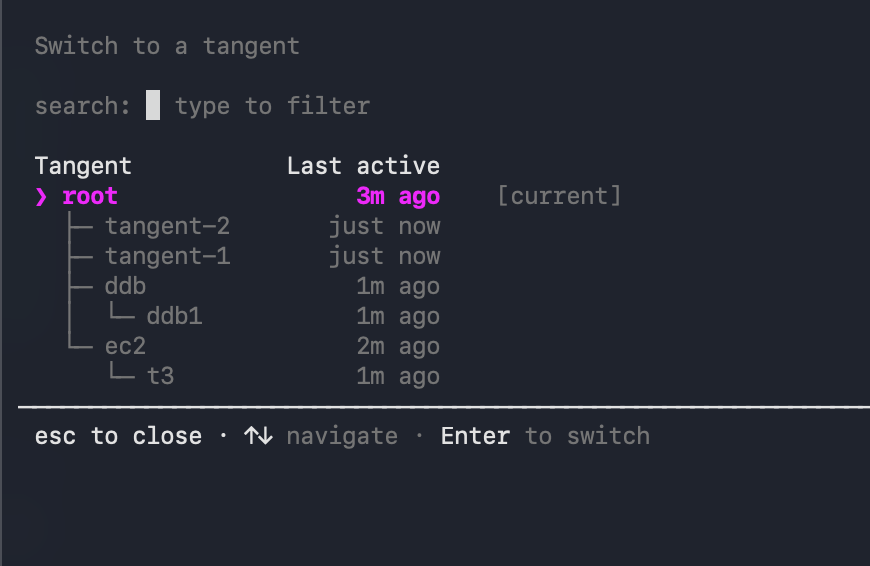
Loading image...The tangent picker opened by /tangent ls, titled "Switch to a tangent" with a search filter. It shows a conversation tree: root marked as current, with branches tangent-2, tangent-1, ddb (containing ddb1), and ec2 (containing t3), each showing when it was last active. A footer lists esc to close, arrow keys to navigate, and Enter to switch.

Need to look something up mid-task without polluting your main thread? /tangent branches into a side-conversation that inherits everything discussed so far — explore freely, then jump back to exactly where you left off. Create named tangents with /tangent <name>, browse your whole conversation tree in a visual picker with /tangent ls, and jump straight back to the main conversation from any depth with /tangent root. Available in V3 mode (kiro-cli --v3). Learn more ->