General changelog

Stay up to date with the latest updates and improvements to Kiro.

Follow us:Bluesky,X,Discord,andLinkedIn
General

Kiro is included in the defined scope of AWS's ISO/IEC 27001:2022 certification. This gives security, procurement, and vendor-risk teams independently verified evidence they can use when evaluating Kiro.

ISO/IEC 27001 sets requirements for an information security management system: the policies, processes, responsibilities, and controls an organization uses to identify and manage information security risks. AWS's certification is verified by EY CertifyPoint, an ISO certification body accredited by the Dutch Accreditation Council.

Organizations can consider this evidence alongside their own policies, intended use, data requirements, and governance controls.

For details about Kiro's compliance programs and access to available third-party reports, see Compliance validation. To learn how Kiro stores, processes, and protects customer data, see Data protection.

General

Account administrators can now send per-user Kiro usage metrics to their OpenTelemetry-compatible observability platform. Monitor adoption, engagement, and credit consumption by user and model without configuring individual developer environments. Use OTLP alongside the existing daily CSV report to integrate Kiro metrics directly into dashboards and monitoring workflows.

Connect Amazon CloudWatch, Datadog, Dynatrace, Elastic, Honeycomb, OpenSearch through an OTLP receiver, or your own collector using OTLP/gRPC or HTTP/protobuf. Set up one account-level export in the Kiro console with an AWS Secrets Manager secret and a publicly reachable OTLP endpoint. Kiro delivers metrics server-side every day at 02:00 UTC. Learn more ->

General

Enterprise administrators can now set custom caps for overages using AWS Service Quotas. The quota field Maximum allowed overage per Kiro profile controls the maximum allowed overage for every user in the profile, preventing unexpected costs while keeping users productive. Admins can manage overage caps directly in the Service Quotas console, or navigate there from the Manage link in the Overages setting in the Kiro console. Learn more ->

General
Loading image...Image

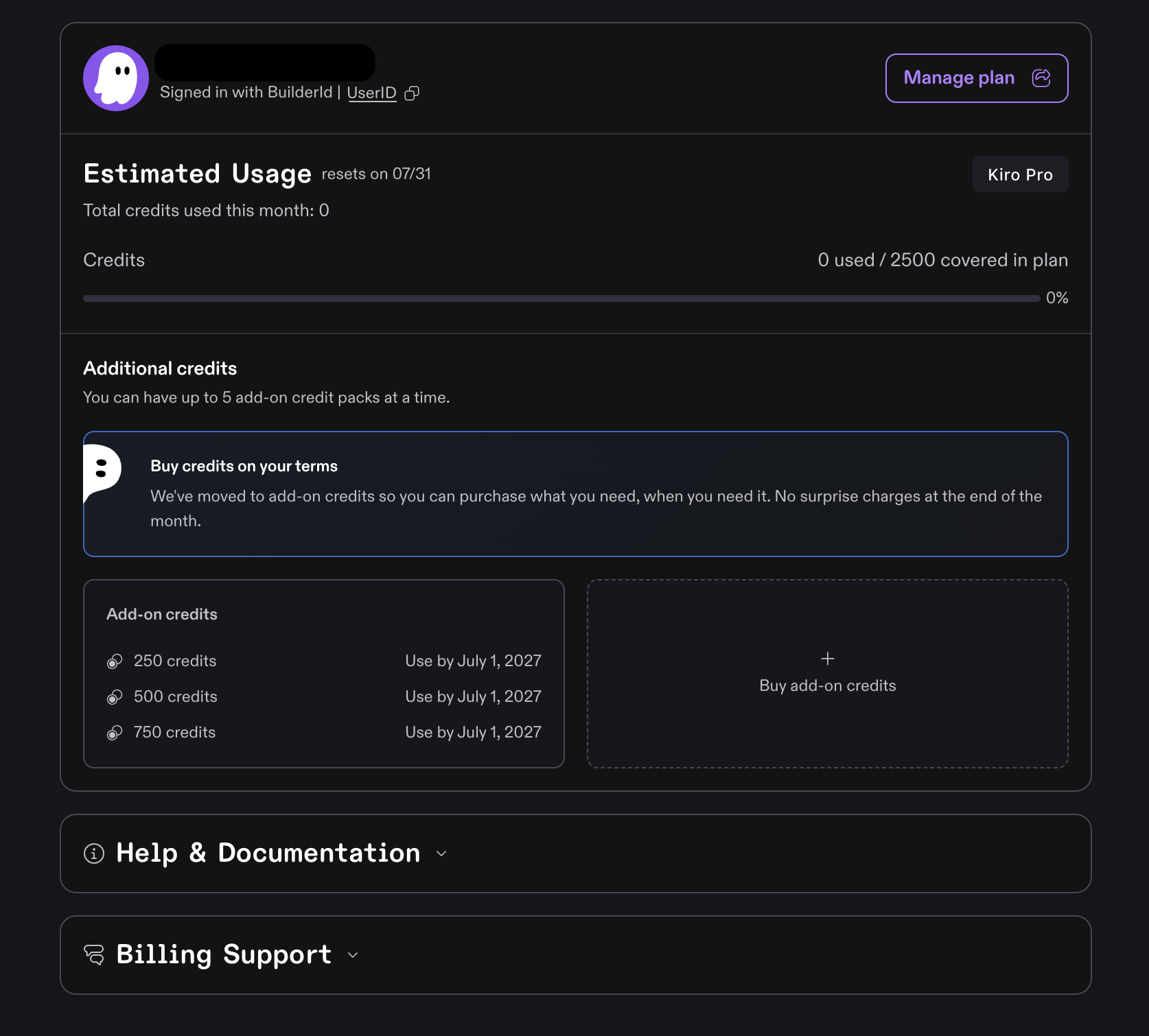
Individual users on paid plans (Pro, Pro+, Pro Max, and Power) can now purchase add-on credits to continue working after exhausting their monthly allocation. Add-on credits replace the previous overage model with a prepaid approach that gives you full control over spending.

Here's how it works:

  • $0.04 per credit, billed immediately when you buy a pack
  • Pack sizes range from $5 (125 credits) to $100 per pack
  • Up to 5 packs at a time - earliest-expiring pack is consumed first
  • 12-month expiry - unused credits roll over month to month until used or expired
  • Plan credits first - Kiro uses your monthly allocation before touching add-on credits

Purchase from the Kiro portal via the Buy add-on credits button. Learn more ->

General

Kiro Pro Max is a new $100/month tier that fills the gap between Pro+ ($40/month) and Power ($200/month) — for developers who consistently use more than their Pro+ allocation but don't need everything in Power. You get 5,000 credits per month (2.5x Pro+), all premium models, and the full feature set including specs, custom subagents, powers, and hooks. Switch to Pro Max from your account settings, mid-cycle charges are prorated and your new credit allocation takes effect immediately. Try it now ->

General

The daily user activity report now includes a User_Email column containing each user's email address. Enterprise admins no longer need to cross-reference user IDs with a separate directory to identify who generated specific activity. The email appears alongside existing fields like UserId, Subscription_Tier, and Total_Messages in the CSV delivered to your S3 bucket. Learn more ->

General
General

The daily user activity report now breaks down message counts by AI model, so enterprise admins can track model adoption and understand how usage maps to specific models. Each model used during the reporting period gets its own column (e.g., Auto_messages, Claude_Opus_4.6_messages). Learn more ->

General

The Users and Subscriptions tabs in the Kiro console now display an Email column for teams using IAM Identity Center, making it easier to identify and manage team members. Admins can see each user's email address alongside their username and plan details. The email field is also included when downloading the subscriptions CSV file. Learn more ->

General

Administrators can now export Kiro subscription data as a CSV file directly from the Kiro Console. The new "Download CSV" button on the Users & Groups page's Subscriptions table exports user name, subscription plan, status, type, and activation date.