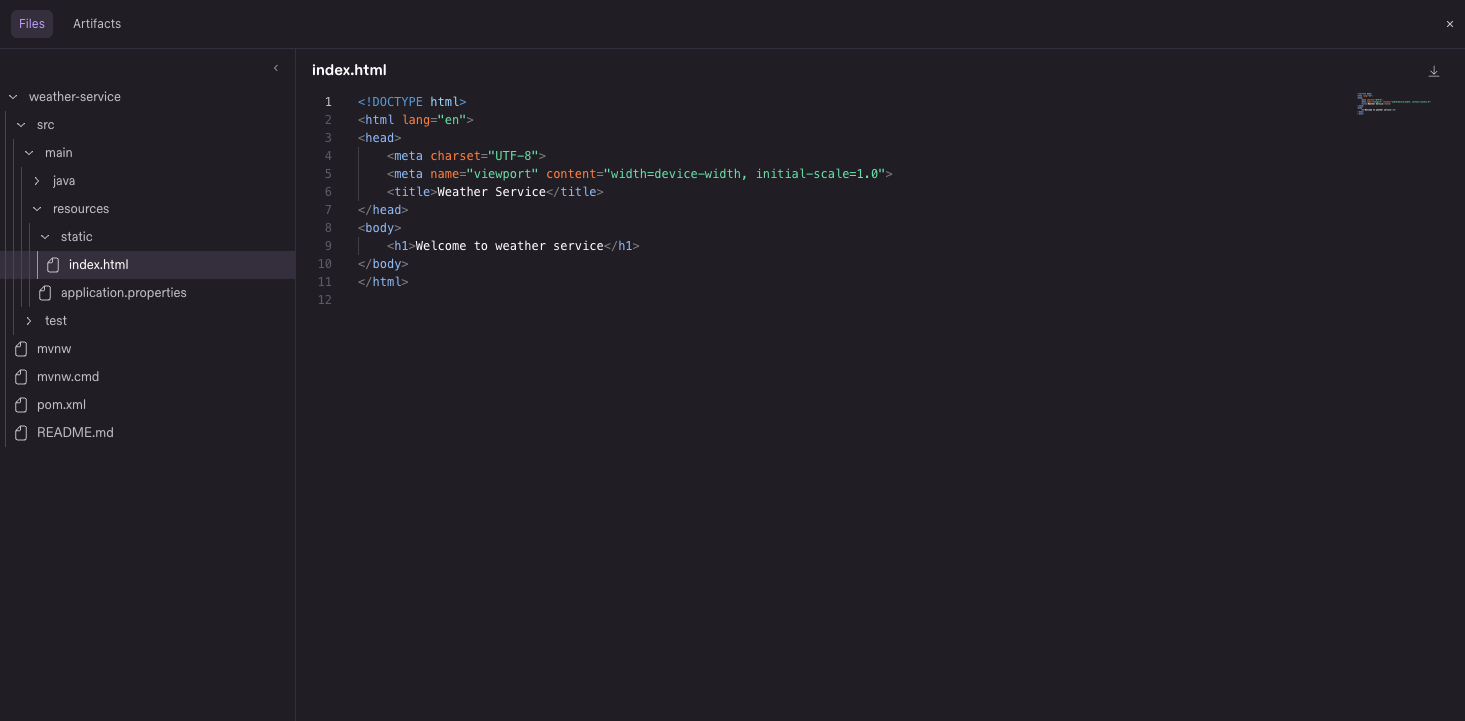
Your agent just built something in its cloud sandbox. Now you can look around. Browse the session's workspace right in Kiro Web, open any file the agent creates or edits in a syntax-highlighted viewer, preview markdown and images, and download what you need. File paths in agent responses are links, so you can jump from "I updated the forecast page" to the actual file in one click. Learn more ->
Update (August 18, 2026): IDE auto-updates are enabled again. Updates download automatically in the background; see Upgrading Kiro to check manually.
Note: To get the latest 1.0.x release, download it directly from kiro.dev/downloads. Auto-updates are being rolled out gradually to users.
This release brings hooks to agent-driven file changes, automatic OAuth for MCP servers that require sign-in, multi-window settings sync, and several trust and connectivity fixes.
MCP OAuth now supports servers with strict requirements, like Figma. Configure a client secret for servers that require one, point the redirect URI at a custom callback path, and skip Dynamic Client Registration when you bring your own client ID. This release also brings more accurate approval prompts for commands with combined flags, and full ASCII mode coverage for terminals without Unicode support.
MCP OAuth for Pre-Registered Apps
Connect to remote MCP servers that require a pre-registered OAuth app. Add clientSecret alongside clientId in your server's OAuth config for servers that require a client secret. When a custom clientId is set, Kiro skips Dynamic Client Registration and authenticates as your app. The redirectUri field now accepts full URLs with custom paths (like http://localhost:7778/oauth/callback), so your callback URL can match exactly what your app registered. Callback hosts are limited to localhost for safety. Learn more ->
Update (August 18, 2026): IDE auto-updates are enabled again. Updates download automatically in the background; see Upgrading Kiro to check manually.
Note: To get the latest 1.0.x release (1.0.89 or later), download it directly from kiro.dev/downloads. Auto-updates are paused at this time and we are working on re-enabling them.
This release brings performance improvements and Agent Focus Mode polish. Sessions restore automatically on launch, idle resource consumption is lower, prepaid credit packs appear in the account dashboard, and several fixes ensure permissions, hooks, and steering behave correctly across windows and custom agent profiles.
Enterprise administrators can now set custom caps for overages using AWS Service Quotas. The quota field Maximum allowed overage per Kiro profile controls the maximum allowed overage for every user in the profile, preventing unexpected costs while keeping users productive. Admins can manage overage caps directly in the Service Quotas console, or navigate there from the Manage link in the Overages setting in the Kiro console. Learn more ->
This release adds dedicated commands for managing OAuth authentication on remote MCP servers, so you no longer need to restart sessions or manually clear credentials when auth flows get stuck. The /usage display also gets a refresh to reflect the new prepaid credits model.
MCP Authentication Management
Three new commands give you full control over OAuth credentials for remote MCP servers. /mcp auth forces re-authentication when a token has expired or become invalid, /mcp cancel-auth aborts a pending auth flow that's stuck waiting for browser confirmation, and /mcp logout removes stored credentials entirely. Keyboard shortcuts are also available in the MCP panel status view: ^A to force auth, ^X to abort, and ^R to remove credentials. Learn more ->
Update (August 18, 2026): IDE auto-updates are enabled again. Updates download automatically in the background; see Upgrading Kiro to check manually.
Note: To get the latest 1.0.x release, download it directly from kiro.dev/downloads. Auto-updates are being rolled out gradually to users.
This release resolves context compaction issues that caused premature summarization and fatal crashes on long sessions. Session migration becomes a user-initiated action with file checkpoints preserved, hooks auto-migrate from the legacy format, and several permissions and MCP reliability issues are fixed.
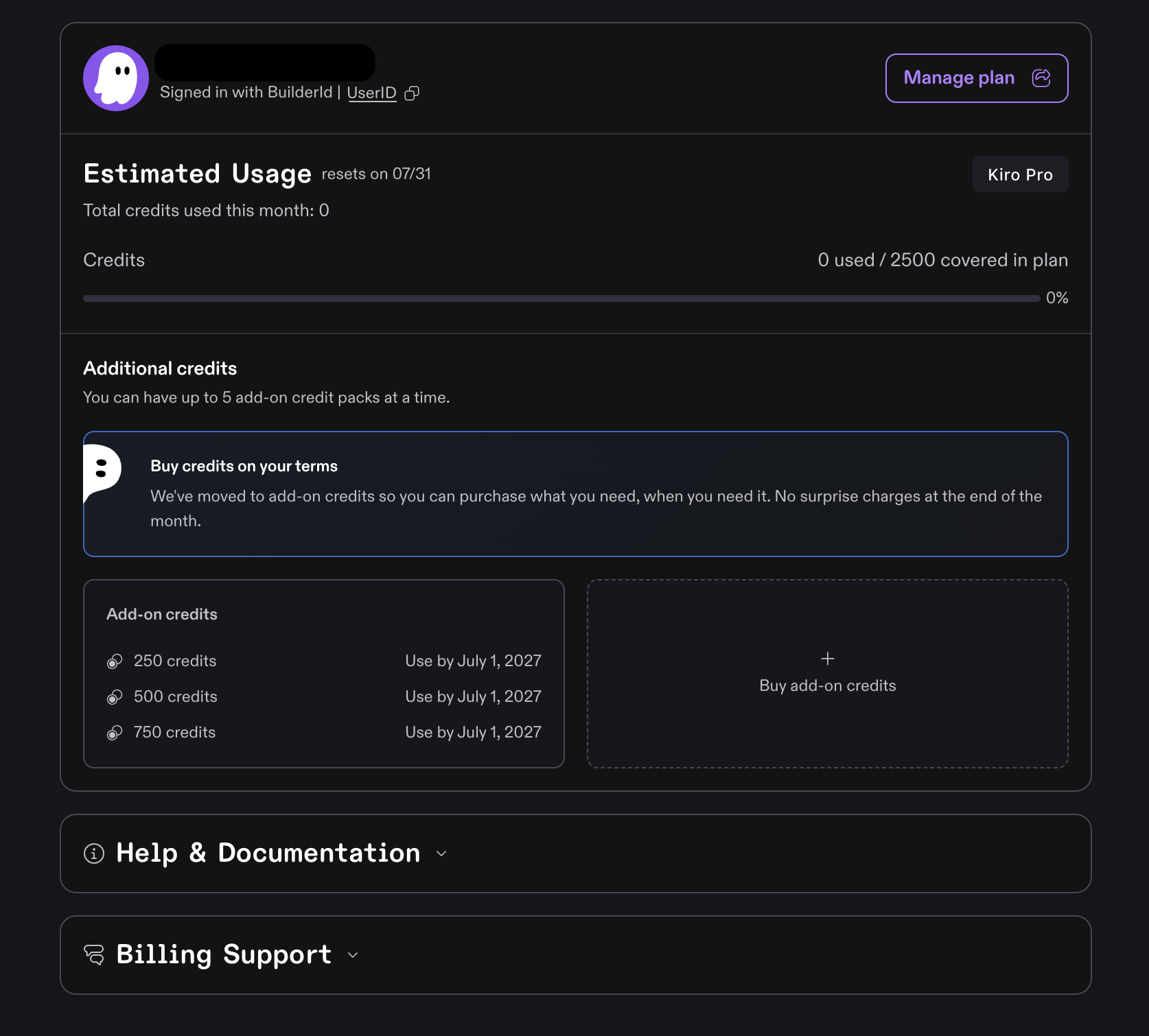
Individual users on paid plans (Pro, Pro+, Pro Max, and Power) can now purchase add-on credits to continue working after exhausting their monthly allocation. Add-on credits replace the previous overage model with a prepaid approach that gives you full control over spending.
Here's how it works:
$0.04 per credit, billed immediately when you buy a pack
Pack sizes range from $5 (125 credits) to $100 per pack
Up to 5 packs at a time - earliest-expiring pack is consumed first
12-month expiry - unused credits roll over month to month until used or expired
Plan credits first - Kiro uses your monthly allocation before touching add-on credits
This release gives the sandbox direct access to your AWS resources and streamlines connecting Powers to services like Figma, Stripe, and Supabase.
IAM Role For Sandbox
Configure an IAM role that Kiro Web assumes on your behalf when running tasks. The sandbox receives short-lived credentials that the agent, CLI tools, and MCP servers can all use to interact with your AWS resources. Credentials refresh automatically while the task runs and are removed when it completes. Set up the role in Settings > Agent > Sandbox > AWS Credentials. Learn more ->
Authorize Powers for Third-Party services
Powers that connect to third-party services now use a standard authorization flow. Authorize once from Manage Powers in your Agent settings, and the agent uses the connection for all future tasks without prompting again. Disconnect at any time to immediately revoke access. Tokens are encrypted at rest and never exposed to the sandbox or the agent. Learn more ->
Claude Sonnet 5 is now available in the Kiro IDE, CLI, and Web. It's Anthropic's most agentic Sonnet model yet, a substantial upgrade from Sonnet 4.6 with stronger reasoning, tool use, and coding that approaches Opus 4.8 performance at Sonnet-class pricing. Plans before it edits, runs longer without supervision, and checks its own output without being asked. Sonnet 5 is rolling out gradually with experimental support to Kiro Pro, Pro+, Pro Max, and Power customers in the AWS US-East-1 (Northern Virginia) and AWS Europe (Frankfurt) regions, with cross-region inference support. It ships with the full 1M context window, 1.3x credit multiplier, the same as Sonnet 4.6. Restart your IDE or CLI to access it from the model selector. Learn more ->