A Kiro bot is a persistent agent that coordinates work toward a goal. Unlike a regular chat session, it keeps a dedicated conversation, memory, and workspace, and can resume work through delegated tasks or scheduled check-ins.
This page explains what happens after you give a bot work, how that work continues, and what remains under your control. To set up your first bot, see the Set up a bot.
Each bot has one conversation, called its thread. Opening the bot from Bots returns you to that thread. bot threads are separate from the regular Sessions list.
The thread is where you define goals, review proposals, and receive results. The bot also has:
- Memory: Facts, preferences, and lessons it retains for future work.
- Workspace: Files and other working material associated with the bot.
- Goals and milestones: The outcomes it is tracking and the measures of progress.
- Workers: Separate sessions it uses to carry out delegated tasks.
A new bot starts with its own empty memory store. It does not inherit conversation history or saved memories from your previous chat sessions.
The bot and its workers share the same memory and workspace, so workers can use the context the bot has collected and save what they learn.
Each bot has a separate memory store, which means information learned by one bot is not available to another.
Memory isolation is not a filesystem permission boundary. A bot's access to files and tools still depends on its configured permissions and your security policy.
You can review what a bot has learned under Profile card → Profile → Memory or Notes.
Select your bot's name in the thread header to open its Profile card.
| Tab | What you can review or configure |
|---|---|
| Sessions | Worker sessions the bot is driving. Open a session to review its conversation and progress. |
| Schedules | Heartbeat and custom scheduled tasks for this bot. |
| Goals | Goals, milestone readings, and daily, weekly, and monthly goal check-ins. |
| Profile | The bot's identity and access to its memory, workspace, notes, and settings. |
The pencil opens the bot editor. Fresh start clears the current conversation context on the same thread; it does not delete the saved transcript. It stops a running turn before clearing and refuses while queued messages or pending steering remain. It does not erase the bot's saved memory, workspace, or goals, and it is not a way to stop all workers or schedules. See Start with fresh conversation context.
The bot you talk to in the thread is the conductor. It handles questions and small actions directly, and delegates longer tasks to workers, which run in separate sessions.
Loading image...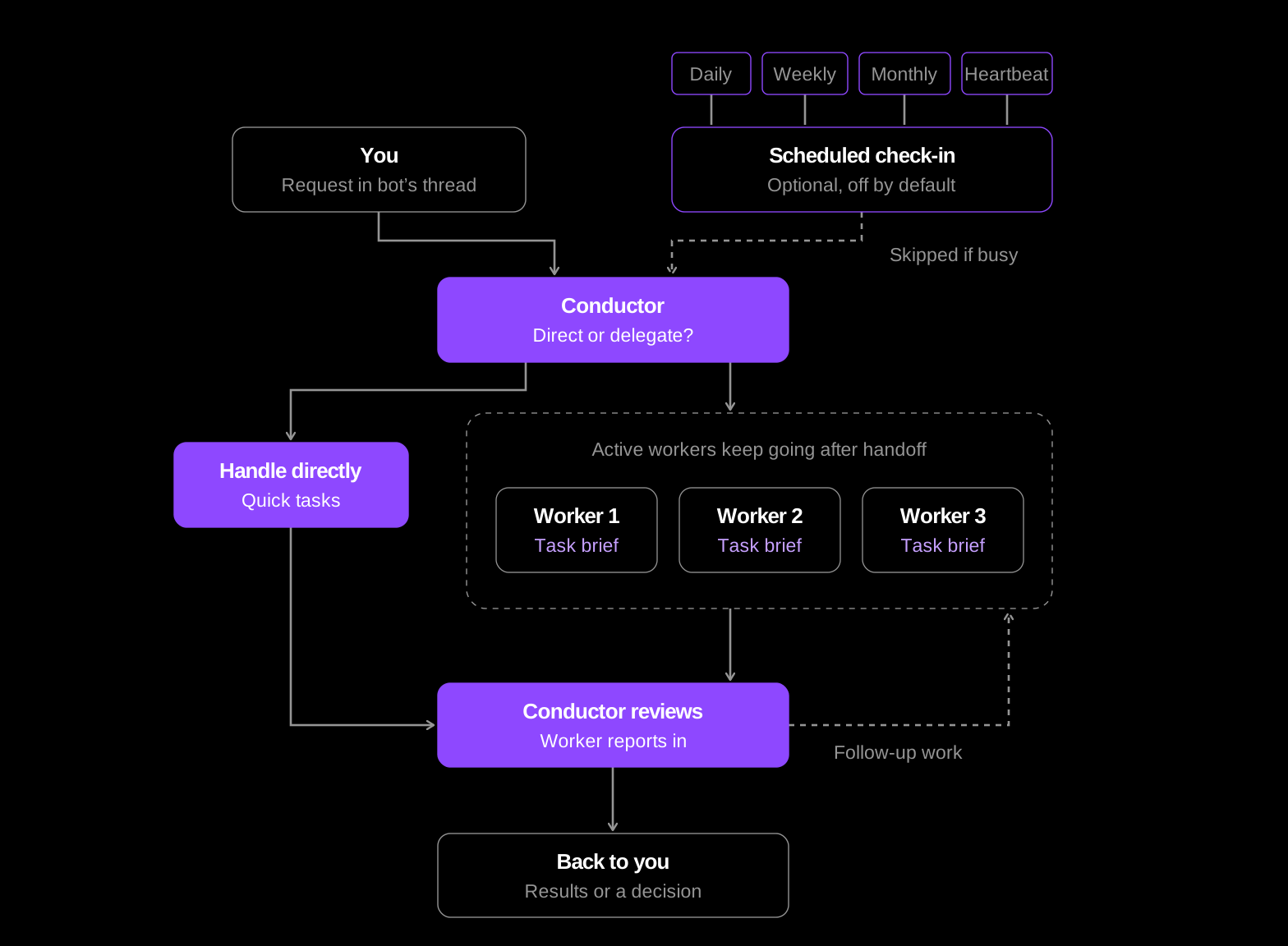
-
The conductor receives a request from your bot's chat or an enabled check-in. It handles short tasks directly and delegates longer tasks to workers.
-
Workers start working. Each worker receives a task brief from the conductor and works independently on its assigned task. Workers share the bot's memory and workspace. You can continue chatting with your bot while workers run in the background.
-
Workers report back. Once a worker completes its assigned task, it sends a report to the conductor with its results.
-
The conductor coordinates next steps. Based on the results, it can delegate follow-up tasks, share progress with you, or ask for your input when a decision is needed.
Bots can continue working without a new message from you in two ways:
-
Complete delegated tasks: Once the conductor assigns a task to a worker, the worker continues independently until it finishes and reports its results.
-
Proactively advance goals: With scheduled activity enabled, your bot can wake up at regular intervals to review progress, identify what needs to happen next, and continue working toward its goals.
Heartbeat, custom schedules, and goal check-ins serve different purposes:
| Activity | Purpose | Where to configure it |
|---|---|---|
| Heartbeat | Wakes the bot to choose work that advances its goals. | Profile card → Schedules, first row. |
| Custom schedule | Runs a prompt you define at a chosen time or interval, such as checking a nightly build. | Schedules → New schedule. |
| Daily Goal Reminder | Takes fresh milestone readings and continues the next task. | Profile card → Goals. |
| Weekly report | Summarizes progress and completed work on a chosen weekday. | Profile card → Goals. |
| Monthly review | Reviews progress and may propose changes to goals or milestones. | Profile card → Goals. |
Heartbeat is off by default and requires a goal. Choose 30 minutes, 1 hour (the default interval), 2 hours, or 4 hours. An enabled Heartbeat wakes in the bot's thread and is skipped while that thread is busy or a monitor loop is running. It generally works quietly and reports when your attention is needed. The setup guide's goal card may offer to enable it; review that checkbox before approving.
Custom schedules have their own prompts and timing. They are listed under Your schedules; All schedules opens the wider schedule list. They do not replace Heartbeat or the goal check-ins. See Create a custom schedule.
Daily, weekly, and monthly goal check-ins are off by default and require a goal. Their switches live under Goals, not in the custom schedule list. Enabled scheduled activity can run when the bot's chat is closed, while the Kiro Crew gateway is running. Agent runs consume credits, including worker activity and scheduled model calls.
A bot's permission mode determines when it asks before taking actions. Workers follow the same mode.
| Mode | Behavior |
|---|---|
| Normal | Requests approval for actions, with exceptions for specified built-in operations. |
| Reads | Allows reads without approval; requests approval for other changes, with the same built-in exceptions. |
| Trust | Acts without per-action approval, subject to security policies. |
New bots start in Trust. Security policies and blocked commands apply in every mode.
A bot asks for your approval before changing its model, permissions, goals, milestones, check-in schedules, or worker abilities. It presents the proposed change in an approval card, where you can review and approve it.
See Manage bots for configuration steps.
Bots are independent. One bot cannot read another bot's memory, send messages to another bot's thread, or control its workers.
- Set up a bot: Name your bot, set a goal, and approve its first milestones.
- Manage bots: Configure models, permissions, abilities, schedules, and workers.
How bots work