By default, Kiro sends OpenTelemetry data to your collector over the public internet. If your network rules don't allow that, Kiro can send it through AWS PrivateLink or Amazon VPC Lattice instead.
Loading image...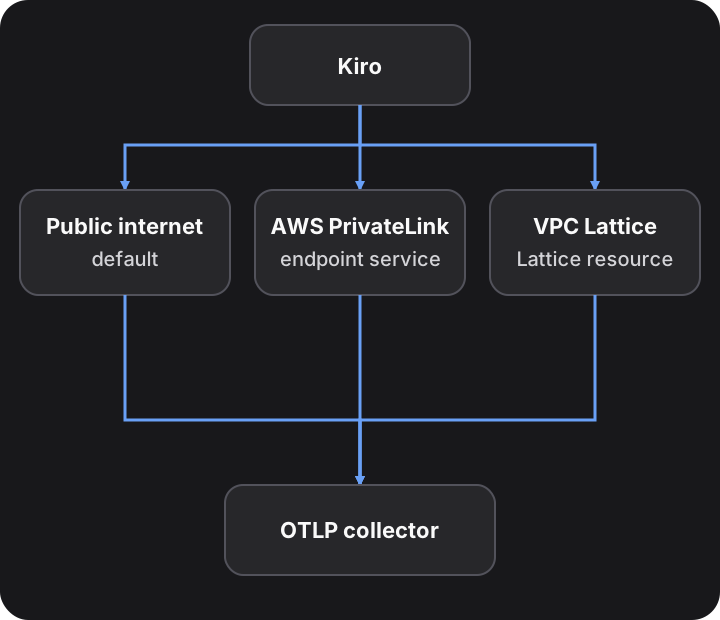
Private connectivity changes only how Kiro reaches your collector. The data, the schedule, the AWS Key Management Service (AWS KMS) key, and the secret format stay the same. Set it separately for OpenTelemetry metrics and for real-time events. The two exports can use different modes, or the same endpoint service or resource configuration.
Private connectivity is available for Kiro profiles in US East (N. Virginia) and Europe (Frankfurt). It is not available in AWS GovCloud (US).
| AWS PrivateLink | Amazon VPC Lattice | |
|---|---|---|
| Choose it when | An endpoint service with a verified private DNS name fronts your collector. It can be a vendor's, such as Grafana Cloud, or your own | You run the collector in your own VPC and don't want to own a DNS domain and verify it with AWS |
| What you create | With a vendor, nothing: the vendor allows Kiro's AWS account. With your own collector, an endpoint service with a verified private DNS name | A resource gateway, a resource configuration, and an AWS RAM resource share |
| What you enter in the Kiro console | Endpoint service name and Endpoint service Region | Lattice resource configuration and Collector hostname |
| Host in the secret's endpoint | The endpoint service's private DNS name | Your collector hostname |
| Collector port | Set by the endpoint service owner | 443, 4317, or 4318 |
| Region of the endpoint service or collector | Any Region in your Kiro profile's AWS partition, if the endpoint service supports it | Your Kiro profile's Region |
| Time to become ready after you publish | Up to about 10 minutes | Up to about 15 minutes |
- Create the KMS key and the secret. You change only the endpoint in the secret, described in Set the endpoint in the secret.
- Your collector must present a TLS certificate from a publicly trusted certificate authority. Kiro rejects self-signed certificates and certificates from a private certificate authority. For a workaround, see Use a private certificate authority.
Kiro sends private traffic from a Kiro-owned AWS account in your Kiro profile's Region. Use the account for your Region. An account from another Region doesn't work.
| Kiro profile Region | Region code | Kiro AWS account ID |
|---|---|---|
| US East (N. Virginia) | us-east-1 | 615299732016 |
| Europe (Frankfurt) | eu-central-1 | 474504477851 |
Allowing Kiro's account gives Kiro network access to one endpoint, and nothing else:
- AWS PrivateLink. As an allowed principal, Kiro's account can create a VPC endpoint to that one endpoint service. The endpoint lives in Kiro's VPC. Kiro can't reach any other service, and it gets no IAM permissions in the endpoint service owner's account.
- Amazon VPC Lattice. When you share the resource configuration with Kiro's account through AWS RAM, Kiro can connect only to the collector that the resource configuration points to. Kiro can't change the resource configuration or see other resources in your account.
Kiro uses this access only to send OTLP data to your collector over TLS. You can remove Kiro's access at any time: remove the principal or delete the share. Kiro can then no longer send over the private path.
Use this mode with any endpoint service that has a verified private DNS name: a collector vendor's, or one you run in front of your own collector. Kiro creates the VPC endpoint in Kiro's own VPC. This section uses Grafana Cloud as the example. For your own collector, see Use your own endpoint service.
Ask your vendor to do these three things, or do them yourself for your own endpoint service:
- Add Kiro's account for your Region to the allowed principals of the endpoint service. For US East (N. Virginia), this is
arn:aws:iam::615299732016:root. For Europe (Frankfurt), this isarn:aws:iam::474504477851:root. - If the endpoint service requires acceptance, accept the connection request from Kiro's account.
- Turn on a private DNS name for the endpoint service, and verify the domain with AWS.
Do this before you publish. If Kiro can't see the endpoint service when you publish, publish again after Kiro is allowed.
| Value | Where you enter it | Grafana Cloud example |
|---|---|---|
| Endpoint service name | Kiro console, Endpoint service name | com.amazonaws.vpce.us-east-1.vpce-svc-0123456789abcdef0 |
| Endpoint service Region | Kiro console, Endpoint service Region | us-east-1 |
| Private DNS name | The host in the secret's OTEL_EXPORTER_OTLP_ENDPOINT | prod-us-east-3-otlp-gateway.us-east-1.vpce.grafana.net |
Use the private DNS name exactly as the endpoint service shows it. Don't use the collector's public hostname, such as otlp-gateway-prod-us-east-0.grafana.net, or a name that ends in vpce.amazonaws.com. Those names fail certificate validation or don't reach the private endpoint.
You can put your own collector behind AWS PrivateLink. You then do the vendor's part yourself:
- Put the collector behind a Network Load Balancer, and create an endpoint service for it.
- Add Kiro's account for your Region to the allowed principals.
- Turn on a private DNS name in a domain you own, such as
otel.example.com. Add the TXT record that AWS gives you, and start the domain verification. - Serve a TLS certificate for that name from a publicly trusted certificate authority.
- In the secret, use that name as the host.
If you don't want to own and verify a domain, use Amazon VPC Lattice instead.
Use this mode when you run the collector yourself. You make the collector reachable through a VPC Lattice resource configuration, and you share the resource configuration with Kiro. Kiro accepts the share and resolves your collector hostname inside Kiro's network.
Create all resources in your Kiro profile's Region, in the AWS account that owns the collector's VPC.
Kiro sends Lattice traffic only to TCP port 443, 4317, or 4318. Use the same port in all of these places:
- The port range of the resource configuration
- The port in the secret's endpoint. Without a port,
https://uses 443 - The listener of the collector, or of the load balancer in front of it
- The security group rules in Security groups
- Open the Amazon VPC console. Under PrivateLink and Lattice, choose Resource gateways, and then choose Create resource gateway.
- Enter a name, and choose the IP address type that your subnets and collector support.
- For VPC, choose the collector's VPC and its subnets. Don't choose a subnet in an Availability Zone that VPC Lattice doesn't support, such as
use1-az3. See Quotas for VPC Lattice. - For Security groups, choose a group that meets Security groups.
- If only a private DNS server or a Route 53 private hosted zone can resolve the resource's domain name, set Resource Config DNS Resolution to IN_VPC.
- Choose Create resource gateway.
aws vpc-lattice create-resource-gateway --region <profile-region> \
  --name kiro-otel-gateway --vpc-identifier <vpc-id> \
  --subnet-ids <subnet-id-1> <subnet-id-2> \
  --security-group-ids <gateway-security-group-id> --ip-address-type IPV4
- Under PrivateLink and Lattice, choose Resource configurations, and then choose Create resource configuration.
- Enter a name. For Configuration type, choose Resource, and choose the resource gateway from Step 1.
- For the resource, enter the private IP address of the collector, or of the load balancer in front of it.
- For the port range, enter your port, and choose Create resource configuration.
- Copy the resource configuration Amazon Resource Name (ARN). It looks like
arn:aws:vpc-lattice:<region>:<account-id>:resourceconfiguration/rcfg-<id>.
aws vpc-lattice create-resource-configuration --region <profile-region> \
  --name kiro-otel-collector --type SINGLE \
  --resource-gateway-identifier <resource-gateway-id> \
  --resource-configuration-definition 'ipResource={ipAddress=<collector-private-ip>}' \
  --port-ranges 4318
- Open the AWS RAM console in your Kiro profile's Region, and choose Create resource share.
- Enter a name. For Select resource type, choose the VPC Lattice resource configuration type, and select your resource configuration. Choose Next.
- Keep the default managed permission, and choose Next.
- Keep Allow sharing with anyone, because Kiro's account is outside your organization.
- For the principal type, choose AWS account, enter Kiro's account ID for your Region, and choose Add. Choose Next.
- Choose Create resource share.
aws ram create-resource-share --region <profile-region> \
  --name kiro-otel-collector-share \
  --resource-arns <resource-configuration-arn> \
  --principals <kiro-account-id> --allow-external-principals
You don't accept anything. Kiro accepts the invitation when you publish.
The collector hostname is the name that Kiro dials. It must meet all of these rules:
- Your collector's TLS certificate covers it.
- It is the host in the secret's endpoint. Kiro compares the two before each delivery, and sends nothing when they differ.
- It has at least two labels, such as
otel-collector.monitoring.example.com. Each label has 1 to 63 letters, digits, or hyphens, and doesn't start or end with a hyphen. It has no underscore, scheme, port, or trailing dot. - It is in your own DNS domain. Kiro rejects names under Amazon-owned domains, such as
amazonaws.com, and names with avpcelabel. - It is unique to your collector. Kiro rejects a hostname that another Kiro customer already uses, so don't use a generic name such as
otel-collector.monitoring.svc.cluster.local.
If metrics and events use the same resource configuration, they must use the same collector hostname.
Only Amazon VPC Lattice needs a security group rule. Add one inbound rule to the security group of your load balancer, or of your collector if there is no load balancer.
| Type | Port | Source |
|---|---|---|
| Custom TCP | Your port, such as 4318 | The resource gateway's security group |
aws ec2 authorize-security-group-ingress --region <profile-region> \
  --group-id <collector-or-load-balancer-sg> \
  --protocol tcp --port 4318 --source-group <resource-gateway-sg>
The resource gateway's security group needs outbound TCP on the same port. A new security group allows all outbound traffic, so add this rule only if you removed the default rule.
Kiro trusts public certificate authorities only. If your collector uses a self-signed or private certificate, put an internal Application Load Balancer in front of it:
- Get a public certificate for your collector hostname in AWS Certificate Manager (ACM).
- Create an internal Application Load Balancer in the collector's VPC, with an HTTPS listener on your port and the ACM certificate.
- Create a target group that forwards to the collector over HTTPS. For gRPC, set the protocol version to gRPC. For HTTP, use HTTP1 or HTTP2.
- Point the resource configuration at the load balancer.
Use the secret format from Prepare credentials. Change only the host in OTEL_EXPORTER_OTLP_ENDPOINT.
AWS PrivateLink with Grafana Cloud uses the private DNS name and the /otlp base path:
{
  "OTEL_EXPORTER_OTLP_ENDPOINT": "https://prod-us-east-3-otlp-gateway.us-east-1.vpce.grafana.net/otlp",
  "OTEL_EXPORTER_OTLP_HEADERS": "Authorization=Basic <base64-of-instance-id:token>"
}
Amazon VPC Lattice uses your collector hostname and port:
{
  "OTEL_EXPORTER_OTLP_ENDPOINT": "https://otel-collector.monitoring.example.com:4318",
  "OTEL_EXPORTER_OTLP_HEADERS": "Authorization=Bearer <your-collector-token>"
}
| Check | AWS PrivateLink | Amazon VPC Lattice |
|---|---|---|
| Host | The endpoint service's private DNS name | Exactly the Collector hostname in the Kiro console |
| Port | The endpoint service's port. Omit it for 443 | 443, 4317, or 4318, as in the resource configuration |
| Path | The endpoint service's base path, such as /otlp. Kiro adds /v1/metrics or /v1/logs | None |
| Scheme | https:// | https:// |
| Header | The endpoint service's token | Your collector's token |
Always send a token, and configure your collector to reject requests without it. Kiro sends traffic for many customers from the same Kiro account, so a request that arrives over the private connection doesn't prove that it comes from your Kiro profile.
Choose the mode in the Kiro console. See Choose private connectivity.
After you publish, Kiro builds the private connection. Then test the connection. A test right after you publish reports that the connection is not ready. That is expected for up to about 10 minutes with AWS PrivateLink, and for up to about 15 minutes with Amazon VPC Lattice.
- No public fallback. After you choose a private mode, Kiro never sends that export over the public internet. If the private connection is not ready, delivery fails.
- Publish well before the daily export at 00:30 UTC (02:00 UTC before November 26, 2026). The daily metrics export fails if it runs before the connection is ready.
- Publish again after a fix. If Kiro can't see the endpoint service or the resource share when you publish, publish again after Kiro is allowed on the endpoint service or after you create the share.
- Turning it off. When you switch to Public internet or turn off the export, Kiro releases its VPC endpoint or Lattice association within about 5 minutes. Kiro keeps your saved values, so you can turn the export on again.
- Changing the collector hostname. You can't change the hostname while Kiro still holds a connection for the resource configuration. Turn off the export, publish, wait about 5 minutes, and then turn the export on again with the new hostname and publish. Switch to Public internet instead only if your network rules allow Kiro to send this export over the public internet. During the switch, Kiro drops real-time events, and a daily metrics export that runs in that window fails.
- Changing modes. Kiro builds the new connection and then releases the old one. Until the new one is ready, delivery in a private mode fails.
- Region. The secret and the Lattice resource configuration must be in your Kiro profile's Region. Kiro rejects them when you publish.
For errors, see Troubleshooting.
Set up private connectivity