Kiro sends two real-time events that describe what your users do: kiro.chat.message for each LLM request, and kiro.tool.call for each tool call. Join them to answer questions that the daily exports can't, such as cost per session, p95 response time, or which MCP servers fail. The CSV report and OpenTelemetry metrics total the same usage for each user and day, without request, conversation, or tool call IDs.
To receive these events, turn on real-time events. For every attribute and its presence rules, see OpenTelemetry real-time events.
Within one user's activity, events nest in four levels:
- A conversation is one chat session.
- A turn is one prompt from the user and all the work that it starts.
- An LLM request is one call to the model. Kiro sends one
kiro.chat.messageevent for each request. - A tool call is one tool that the agent runs. Kiro sends one
kiro.tool.callevent for each tool call.
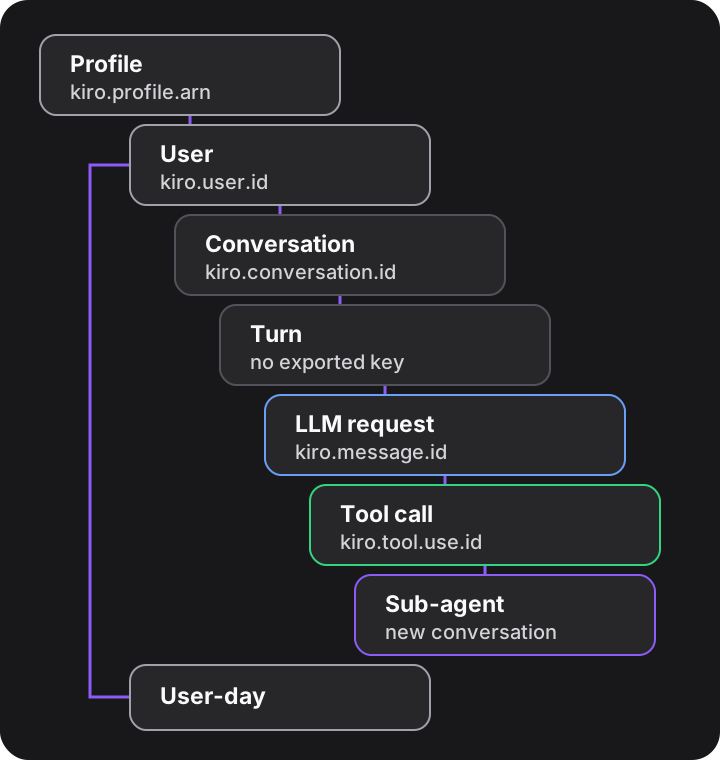
| Level | Description | Event | Key | How to count |
|---|---|---|---|---|
| Profile | Your Kiro profile | Resource attribute of every event | kiro.profile.arn | One for each export destination |
| User | One person | Both events | kiro.user.id | Distinct kiro.user.id |
| Conversation | One chat session | Both events | kiro.conversation.id; kiro.root_conversation_id for the session, including sub-agents | Distinct kiro.conversation.id. For sessions, distinct kiro.root_conversation_id |
| Turn | One user prompt and the requests and tool calls that it starts | None | None | Not available. For more information, see Limitations. |
| LLM request | One call to the model | kiro.chat.message | kiro.message.id | Number of kiro.chat.message events |
| Tool call | One tool that the agent ran | kiro.tool.call | kiro.tool.use.id | Number of kiro.tool.call events |
| User-day | One user on one day | CSV report row and kiro.daily.* metrics | User and date | One CSV report row |
One user prompt usually results in two or more LLM requests. In the first request, the model asks for a tool. The client runs the tool, and the model reads the result in the next request. A request that asks for no tool is usually the final answer of the turn.
In this Kiro CLI conversation, the user sends two prompts. The first prompt asks the agent to read a file. The second prompt asks the agent to use a sub-agent.
Loading image...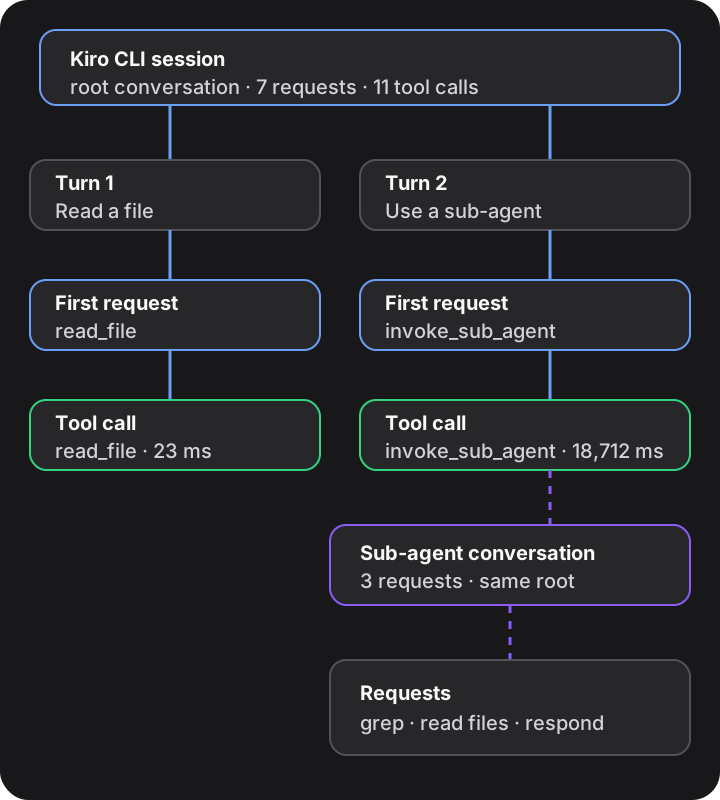
This example shows the following:
- Two prompts result in seven LLM requests and eleven tool calls.
- The sub-agent uses 0.281 of the 0.566 credits. The sub-agent's requests have their own
kiro.conversation.id. To include them in the cost of the session, sumkiro.credits.usedbykiro.root_conversation_id. - The duration of the
invoke_sub_agenttool call, 18,712 ms, includes all of the sub-agent's work.
Kiro sends one kiro.chat.message event for request 6b7d77cd, and one kiro.tool.call event for the read_file call that the request asked for. Both events have the same kiro.message.id and kiro.conversation.id.
Every record has the following resource attributes.
{
  "service.name": "kiro-enterprise",
  "kiro.profile.arn": "arn:aws:codewhisperer:us-east-1:111122223333:profile/EXAMPLEPROFILE",
  "kiro.profile.id": "EXAMPLEPROFILE",
  "kiro.account.id": "111122223333"
}
The kiro.chat.message event for the request:
{
  "kiro.event.name": "kiro.chat.message",
  "kiro.user.id": "user-0001",
  "kiro.user.email": "user@example.com",
  "kiro.message.id": "6b7d77cd-6d6f-49b4-871a-800f5a9860fe",
  "kiro.conversation.id": "15b089f2-4183-4cff-80e9-58693758f931",
  "kiro.root_conversation_id": "15b089f2-4183-4cff-80e9-58693758f931",
  "kiro.client.type": "KIRO_CLI",
  "kiro.model.name": "auto",
  "kiro.credits.used": 0.09051340049751244,
  "kiro.credits.overage": 0.0,
  "kiro.subscription.tier": "POWER",
  "kiro.overage.enabled": false,
  "kiro.overage.cap": 10000.0,
  "kiro.usage.limit": 10000,
  "kiro.client.version": "3.1.0",
  "kiro.tool_call_count": 1,
  "kiro.tool_calls": "{\"read_file\":1}",
  "kiro.request.subagent": false,
  "kiro.answer.cut_off": false,
  "kiro.response.duration_ms": 2120,
  "kiro.agent_mode": "VIBE"
}
The kiro.tool.call event for the tool call:
{
  "kiro.event.name": "kiro.tool.call",
  "kiro.user.id": "user-0001",
  "kiro.message.id": "6b7d77cd-6d6f-49b4-871a-800f5a9860fe",
  "kiro.conversation.id": "15b089f2-4183-4cff-80e9-58693758f931",
  "kiro.tool.use.id": "toolu_bdrk_01AtD5hruZYFg5eZDP9jostw",
  "kiro.tool.name": "read_file",
  "kiro.tool.kind": "BUILTIN",
  "kiro.tool.agent_mode": "VIBE",
  "kiro.tool.outcome": "COMPLETED",
  "kiro.tool.duration_ms": 23,
  "kiro.client.type": "KIRO_CLI",
  "kiro.source": "CLIENT"
}
A sub-agent request has kiro.request.subagent set to true. In the example, request 4cb19c4f asked for seven tools. Its event has kiro.tool_call_count set to 7 and kiro.tool_calls set to {"read_file":7}. Seven kiro.tool.call events have kiro.message.id set to 4cb19c4f-9493-4ade-ada4-8fa57f1aaf82.
In this Kiro CLI conversation, the user sends two prompts. The first prompt asks the agent to use the find_city tool from an MCP server named my-mcp-server. The second prompt asks the agent to use a workspace skill named word-count.
| Prompt | Request | kiro.tool_calls | Credits | kiro.tool.call events |
|---|---|---|---|---|
| 1 (MCP) | deb2deec | {"tool_load":1} | 0.054 | tool_load, BUILTIN, 2 ms |
| 1 (MCP) | 4939e050 | {"tool_call":1} | 0.062 | mcp_my_mcp_server_find_city, MCP, server my-mcp-server, 14 ms |
| 1 (MCP) | e6f917b8 | None | 0.050 | None (final answer) |
| 2 (skill) | 3144bcf6 | {"disclose_context":1} | 0.055 | disclose_context, SKILL, skill word-count, 12 ms |
| 2 (skill) | d5325d0f | {"read_file":1} | 0.059 | read_file, BUILTIN, 8 ms |
| 2 (skill) | f028dd4f | None | 0.052 | None (final answer) |
The MCP tool was not loaded when the conversation started. The model first calls tool_load to load the tool, and then calls the tool through tool_call. The request's kiro.tool_calls lists the call as tool_call. The kiro.tool.call event has the MCP tool name in kiro.tool.name and the server name in kiro.mcp.server.
{
  "kiro.event.name": "kiro.tool.call",
  "kiro.user.id": "user-0001",
  "kiro.message.id": "4939e050-c0f9-4920-8bb3-3bbebd00875b",
  "kiro.conversation.id": "ea84e0db-dfd2-425f-8105-4bedd84f4dc4",
  "kiro.tool.use.id": "toolu_bdrk_01EuDAFzpJQN4najZSrMqFf8",
  "kiro.tool.name": "mcp_my_mcp_server_find_city",
  "kiro.tool.kind": "MCP",
  "kiro.tool.agent_mode": "VIBE",
  "kiro.tool.outcome": "COMPLETED",
  "kiro.tool.duration_ms": 14,
  "kiro.client.type": "KIRO_CLI",
  "kiro.source": "CLIENT",
  "kiro.mcp.server": "my-mcp-server"
}
A skill load is a call to the disclose_context tool. The event has kiro.tool.kind set to SKILL and the skill name in kiro.skill.name. A tool that the skill uses, such as read_file, is a separate event.
{
  "kiro.event.name": "kiro.tool.call",
  "kiro.user.id": "user-0001",
  "kiro.message.id": "3144bcf6-ef4f-416d-8c9b-d142e2a2b194",
  "kiro.conversation.id": "3ec6bef9-1939-4b41-97f2-3aa436bb0d40",
  "kiro.tool.use.id": "toolu_bdrk_01KWfxVL4FqU69Q3dNF3Ht2M",
  "kiro.tool.name": "disclose_context",
  "kiro.tool.kind": "SKILL",
  "kiro.tool.agent_mode": "VIBE",
  "kiro.tool.outcome": "COMPLETED",
  "kiro.tool.duration_ms": 12,
  "kiro.client.type": "KIRO_CLI",
  "kiro.source": "CLIENT",
  "kiro.skill.name": "word-count"
}
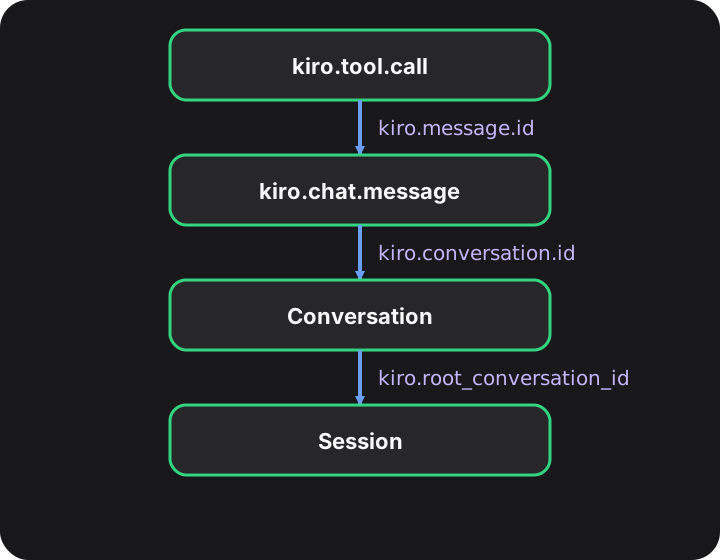
To join the events, do the following:
- Remove duplicates. A retry can deliver an event twice. Remove duplicate
kiro.chat.messageevents bykiro.message.id, and duplicatekiro.tool.callevents bykiro.tool.use.id. - To join a tool call to its LLM request, use
kiro.message.id. Thekiro.tool.callevent does not containkiro.root_conversation_idorkiro.user.email. Get them from the request. - To join events to a conversation, use
kiro.conversation.id. To join events to a session, including its sub-agents, usekiro.root_conversation_id. - Expect events without a match. If a user cancels a response after a tool runs, the tool call has no request event. A request can list a tool in
kiro.tool_callsthat did not run.
| Level | Question | Event | How to answer |
|---|---|---|---|
| User | How many people use Kiro, and on which client? | kiro.chat.message | Count distinct kiro.user.id by kiro.client.type. |
| User | Which users are close to their credit limit? | kiro.chat.message | Sum kiro.credits.used by kiro.user.id for the month, and divide by kiro.usage.limit. Exclude kiro.usage.limit values of 999999. These are shared-pool users with no individual limit. |
| Conversation | How much does a session cost? | kiro.chat.message | Sum kiro.credits.used by kiro.root_conversation_id. The sum includes sub-agents. To get the cost of one conversation without its sub-agents, sum by kiro.conversation.id. |
| Conversation | How many conversations does each user start? | kiro.chat.message | Count distinct kiro.conversation.id by kiro.user.id, where kiro.request.subagent is false. |
| LLM request | Which models do users use, and what do they cost? | kiro.chat.message | Count events and sum kiro.credits.used by kiro.model.name. |
| LLM request | What is the p95 response time? | kiro.chat.message | Calculate p95 of kiro.response.duration_ms by kiro.client.type. |
| LLM request | How many answers stop at the output limit? | kiro.chat.message | Count events where kiro.answer.cut_off is true. |
| LLM request | How many credits do requests that use a tool spend? | kiro.chat.message | Sum kiro.credits.used where kiro.tool_calls contains the tool name, for example read_file. |
| LLM request | How much do sub-agents and internal requests cost? | kiro.chat.message | Sum kiro.credits.used by kiro.request.subagent. The value true includes sub-agents and internal requests, such as summaries. |
| LLM request | How many credits does each agent mode use? | kiro.chat.message | Sum kiro.credits.used by kiro.agent_mode. |
| Tool call | Which tools are used, and by how many people? | kiro.tool.call | Count events and distinct kiro.user.id by kiro.tool.name. |
| Tool call | Which tools fail, and why? | kiro.tool.call | Count events where kiro.tool.outcome is ERROR or FAULT, or FAILURE from clients that send it, by kiro.tool.name and kiro.error.type. |
| Tool call | Which tools are the slowest? | kiro.tool.call | Calculate p95 of kiro.tool.duration_ms by kiro.tool.name. |
| Tool call | Which MCP servers are used, slow, or failing? | kiro.tool.call | Calculate the count, error rate, and p95 duration by kiro.mcp.server. |
| Tool call | How often do users deny or cancel a tool? | kiro.tool.call | Count events where kiro.tool.outcome is ABORT, and divide by all events. |
| Tool call | Which agent modes run tools? | kiro.tool.call | Count events by kiro.tool.agent_mode. |
| Tool call | How often does each skill load? | kiro.tool.call | Count events where kiro.tool.kind is SKILL, by kiro.skill.name. |
The CSV report and OpenTelemetry metrics answer the user-level questions as counts and averages. For percentiles, conversations, or a join between a request and its tool calls, use the real-time events.
The CSV report and OpenTelemetry metrics total the same data for each user and day. This table shows which column and metric each event attribute feeds. For the type and presence of each attribute, see OpenTelemetry real-time events. For the column rules, see Report columns.
| Event attribute | CSV report column | OpenTelemetry metric or attribute |
|---|---|---|
kiro.user.id | UserId | kiro.user.id attribute |
kiro.user.email | User_Email | kiro.user.email attribute |
kiro.client.type | Client_Type | kiro.client.type attribute |
kiro.client.version | Client_Version | kiro.daily.client_version_seen |
kiro.model.name | *model_name*_messages and *model_name*_credits | kiro.daily.model_messages and kiro.daily.model_credits |
kiro.credits.used | Credits_Used | kiro.daily.credits |
kiro.credits.overage | Overage_Credits_Used | kiro.daily.overage_credits |
kiro.tool_calls | *tool_name*_tool_calls | kiro.daily.tool_calls |
kiro.tool_call_count greater than 0 | Requests_With_Tools | kiro.daily.requests_with_tools |
kiro.answer.cut_off | Answers_Cut_Off | kiro.daily.answers_cut_off |
kiro.response.duration_ms | Avg_Response_Ms | kiro.daily.avg_response_ms |
kiro.subscription.tier | Subscription_Tier | kiro.subscription.tier attribute |
kiro.usage.limit | Usage_Limit | kiro.usage.limit attribute |
kiro.overage.enabled | Overage_Enabled | kiro.overage.enabled attribute |
kiro.overage.cap | Overage_Cap | kiro.overage.cap attribute |
kiro.tool.name on kiro.tool.call | *tool_name*_tool_calls_client and *tool_name*_tool_errors_client | kiro.daily.tool_calls_client and kiro.daily.tool_errors_client |
kiro.tool.kind | *kind*_tool_calls_by_kind_client | kiro.daily.tool_calls_by_kind_client |
kiro.tool.outcome | *outcome*_tool_calls_by_outcome_client | kiro.daily.tool_calls_by_outcome_client |
kiro.tool.duration_ms | *tool_name*_tool_duration_ms_avg_client, *kind*_tool_duration_by_kind_ms_avg_client, and *server*_mcp_server_duration_ms_avg_client | kiro.daily.tool_duration_ms_avg_client, kiro.daily.tool_duration_by_kind_ms_avg_client, and kiro.daily.mcp_server_duration_ms_avg_client |
kiro.error.type | *errorType*_tool_errors_by_type_client | kiro.daily.tool_errors_by_type_client |
kiro.mcp.server | *server*_mcp_server_calls_client and *server*_mcp_server_errors_client | kiro.daily.mcp_server_calls_client and kiro.daily.mcp_server_errors_client |
kiro.skill.name | *skill*_skill_calls_client | kiro.daily.skill_calls_client |
kiro.tool.agent_mode | *mode*_tool_calls_by_agent_mode_client | kiro.daily.tool_calls_by_agent_mode_client |
kiro.message.id, kiro.conversation.id, kiro.root_conversation_id, kiro.request.subagent, kiro.agent_mode, kiro.tool.use.id, and kiro.source have no daily column. CSV column names use lowercase kind, outcome, and agent mode values. The daily metrics keep them uppercase, as in the events.
- Turns have no key. No attribute identifies the requests that come from the same user prompt. To estimate turns, order the requests of a conversation by time. Start a new turn after each request that has no
kiro.tool_calls. - Sub-agents start a new conversation. A sub-agent's requests have their own
kiro.conversation.id. To link them to the parent session, usekiro.root_conversation_id. Requests withoutkiro.root_conversation_id, such as requests from Kiro CLI on the V2 agent engine, can't be linked to their parent. kiro.tool_callsandkiro.tool.callcount different things.kiro.tool_callscounts the tools that the model asked for.kiro.tool.callcounts the tools that the client ran. The CSV report has a column for each:*tool_name*_tool_callsand*tool_name*_tool_calls_client.- Credits are reported for each request, not for each tool call. To find the credits for a tool, use the requests whose
kiro.tool_callscontains that tool.
For the client versions that send each attribute, see Client versions.
Understanding real-time events