Loading image...Kiro

Product

  • About Kiro
  • IDE
  • CLI
  • Web
  • Mobile
  • Crew
  • Pricing
  • Downloads

For

  • Enterprise
  • Startups
  • Students

Community

  • Overview
  • Ambassadors
  • Discord
  • Events
  • Powers
  • Shop
  • Showcase

Resources

  • Docs
  • Blog
  • Changelog
  • FAQs
  • Report a bug
  • Suggest an idea
  • Billing support

Social

Site TermsLicenseResponsible AI PolicyLegalPrivacy PolicyCookie Preferences
Loading image...Kiro
  • Enterprise
  • Pricing
  • Docs
SIGN INDOWNLOADS
Loading image...Kiro

Get Started

InstallationAuthenticationYour first project

Models

OverviewAvailable modelsReasoning effort

Features

How Kiro works
Specs
Steering
Hooks
MCP
Permissions
Custom agents
Agent Skills
Powers
Cloud sessionsCompactionKiroignoreCheckpoints and rewind
Built-in tools
Configuration scopes

IDE 1.x

What's new in 1.0
Setup & First Run
Editor
Chat
Experimental
Troubleshooting0.x reference

CLI

What's new in 3.0
Setup & First Run
Terminal UI
Chat
Voice modeHeadless modeACPAuto complete
Experimental
2.x reference

Crew

Quick startInstallationRunning 24/7
Chat
Agent Capabilities
Features
Interfaces
Apps
ConfigurationSecurityTroubleshooting

Web - Preview

Setup & First RunIdentity Center
Connect your repositories
Working with the agent
Autonomous modeAutomationsMemory
Sandbox

Mobile - Preview

Overview

Commands and Reference

CLI commandsSlash commandsBuilt-in toolsExit codesSettings

Billing

OverviewManaging your subscriptionUpgrading your planDowngrading your planCancelling your planPurchasing add-on creditsManaging your paymentsManaging usage notificationsManaging your taxesContacting billing supportDeleting your accountRelated questions

Enterprise

ConceptsOnboarding quickstart
Connecting your identity provider
Subscribe your teamManage subscriptions
Governance
Monitor and track
SettingsManaged updatesBillingIAMSupported regions

Privacy and Security

OverviewData protectionCode referencesCompliance validationInfrastructure securityIAM permissionsFirewalls, proxies, and data perimetersVPC endpoints (AWS PrivateLink)

Guides

Overview
Language support
Learn by playing
Setup dev environment and launch the game
Steering Kiro, and improving the game homepage
Fixing a subtle physics bug
Fixing an interactions bug across several files
Vibe refactoring is 50% of vibe coding
Using specifications for complex work
Managing game assets with agent hooks
Extending Kiro with MCP
Conclusion

Migration

Migrating from Q DeveloperMigrating from VSCodeUpgrading from Q CLI
  1. Docs
  2. Guides
  3. Learn by playing
  4. Steering Kiro, and improving the game homepage
View as Markdown

Steering Kiro, and improving the game homepage

View as Markdown

This module assumes you have already launched the game locally, by following the setup instructions.

1

Understand the problem

Load up localhost:5173 in your browser to see the home page. As you can see this homepage starts out very minimalistic. There are no graphics, explanations of what the game is, and there is no marketing copy. This is a perfect task for "vibe coding".

2

Setup Kiro steering files

But before we "vibe" we must prepare. Because this game is fairly complex, it will be very useful to prepare Kiro to properly understand what the project is, what tech it utilizes, and how to navigate the code.

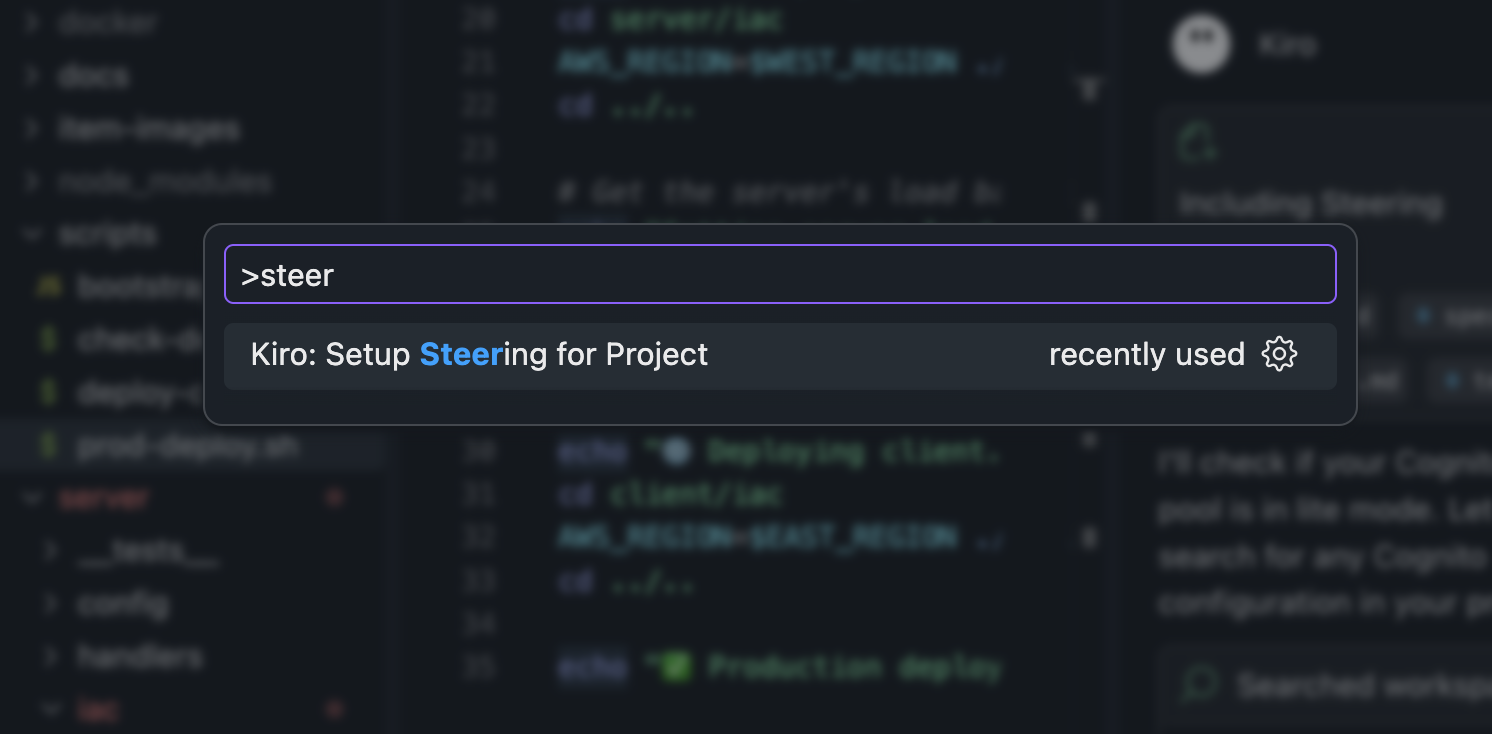
Use Control/Command + Shift + P to open the command palette, then search for the word “Steering”. Select the option “Kiro: Generate project steering documents”

Loading image...alt !!alt
The Kiro agent will go to work exploring key files from the repository and creating some “steering” files that describe the project purpose, structure, and tech. These files will help guide all future runs of the agent interactions, making them faster and more accurate.

Loading image...alt !!alt
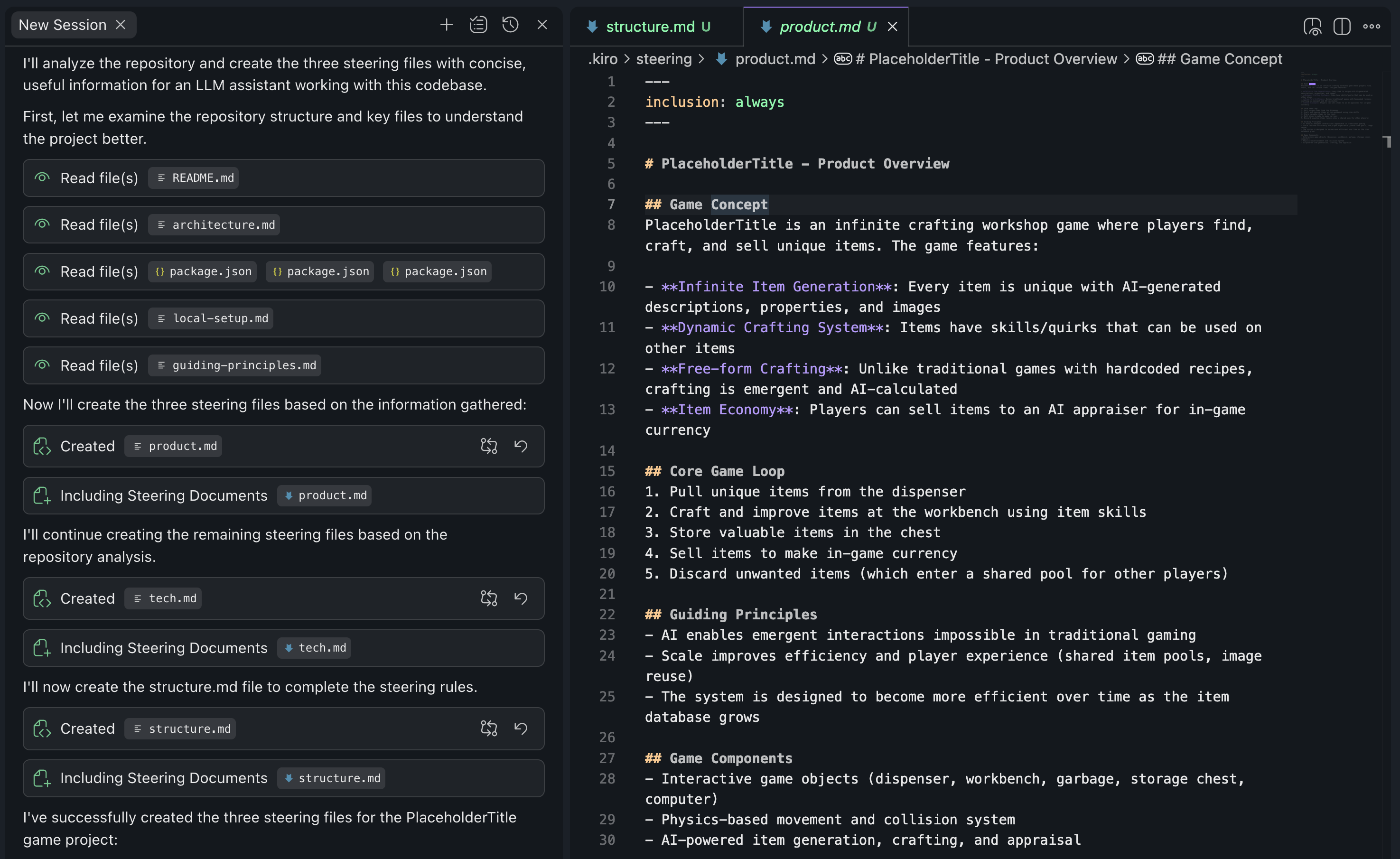
Take a moment to look at the .kiro folder that has been created. You should see a few files:

  • product.md - Describes what the project is. This helps Kiro understand the big picture view of what is going on when you ask it to do something.
  • tech.md - Describes all the tech used in this project. This helps Kiro stick to your existing tech choices, instead of recommending divergent options.
  • structure.md - Describes key folders and areas of the project. This helps Kiro get to the right place faster when it is working.
3

Make some improvements

Now that the steering files are setup, try a basic “vibe coding” prompt like “I want you to make my homepage better.”

The game client is being served by Vite, so you will be able to see changes reflected in real time as Kiro makes modifications to the page.

4

Get creative!

Ask Kiro a question like:

Give me 20 potential themes for a game landing page.

Then ask Kiro to reimagine the landing page in that theme.

Tip

AI can be very imaginative, and is perfect for prototyping designs, even if you don’t yet have a solid plan in your head. Try out asking it to make the home page have different styles such as: "Apple product marketing page", "Retro", or "Startup" and/or ask for specific features that you want on the page like a "carousel", "quotes", or "animations".

In this module we learned two core concepts:

  1. Steering files help guide an AI through your project. Your first step should always be to collect and setup this basic context for the AI.
  2. AI can be very creative, and it significantly lowers the barrier to experimentation. Try out several different prototypes very quickly, then throw away takes you don't like.

Let's move on to the next task:

Fixing a subtle physics bug

Page updated: August 4, 2026
Setup dev environment and launch the game
Fixing a subtle physics bug