This module assumes you have already launched the game locally, by following the setup instructions.
In previous modules we:
- Wrote HTML and CSS to improve the homepage
- Fixed a physics bug in the core of the game's physics engine
Both of these tasks were fairly self contained. Let's try something a bit more complicated, spanning multiple files.
Understand the problem
Players of the game report that sometimes the "E" prompt doesn't work as expected. This seems to happen when standing near walls:
View transcript: Recording of the interact-prompt bug near a wall
In this recording you can see that the "E" prompt disappears even though the player is close enough to the chest and to the item.
Try asking Kiro to solve this. For example:
Sometimes when the player is closer to the wall than to an interactive object like an item or the chest, then the interact prompt does not appear over the interactive object.
Think about the proposed solution
Kiro should be able to correctly identify the issue. The function which finds which object is nearest to the player is not filtering out walls, therefore when the player is close to a wall it marks the wall as the nearest object, even though the wall is not actually interactive.
Loading image...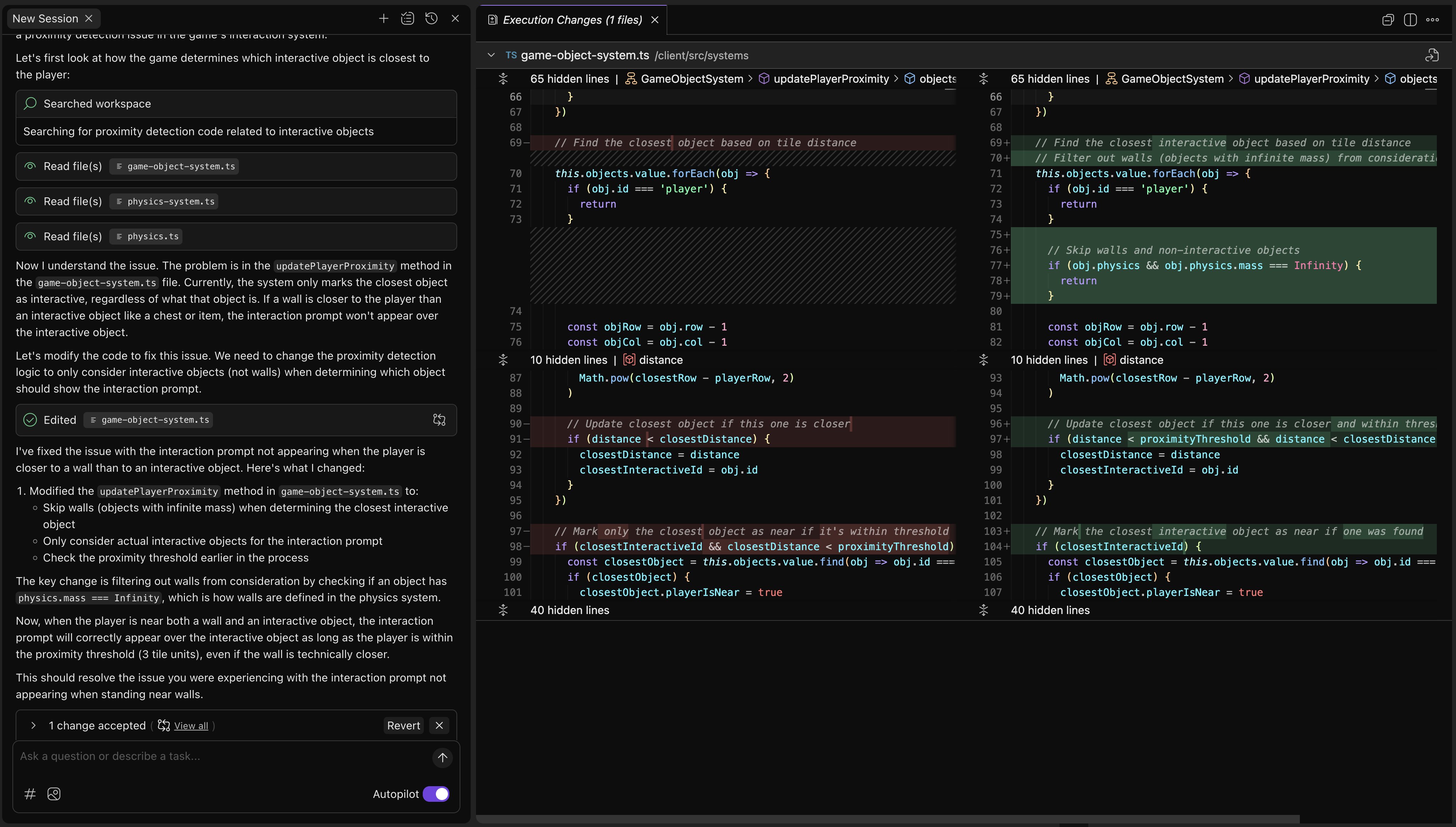
The model has proposed to fix the bug by introducing a check to exclude
objects that have a physics mass of Infinity. While this
technically works to solve the problem in the short term, is this
the best fix? What if there are non interactive objects that have
a finite mass? Or what if there are objects that have an Infinity
mass but are still interactive?
This proposed code solution is adding logic triggered by a property whose semantic meaning is not directly related to that logic. While this fix works temporarily, the overloaded behavior will absolutely break or cause subtle bugs later on.
Refactoring across the project
Instead of trying to treat this as a problem entirely self contained
in the file game-object-system.ts, let's do a bigger refactor.
Everywhere that game objects are created, we should probably
indicate up front whether the created object is intended to be
interactive.
Try a prompt like:
In #GameObject add a new required property interactive.
In #updatePlayerProximity filter out non interactive objects
All calls to #addObject throughout the code need to set interactive to true or false
Your results should look something similar to this:
Loading image...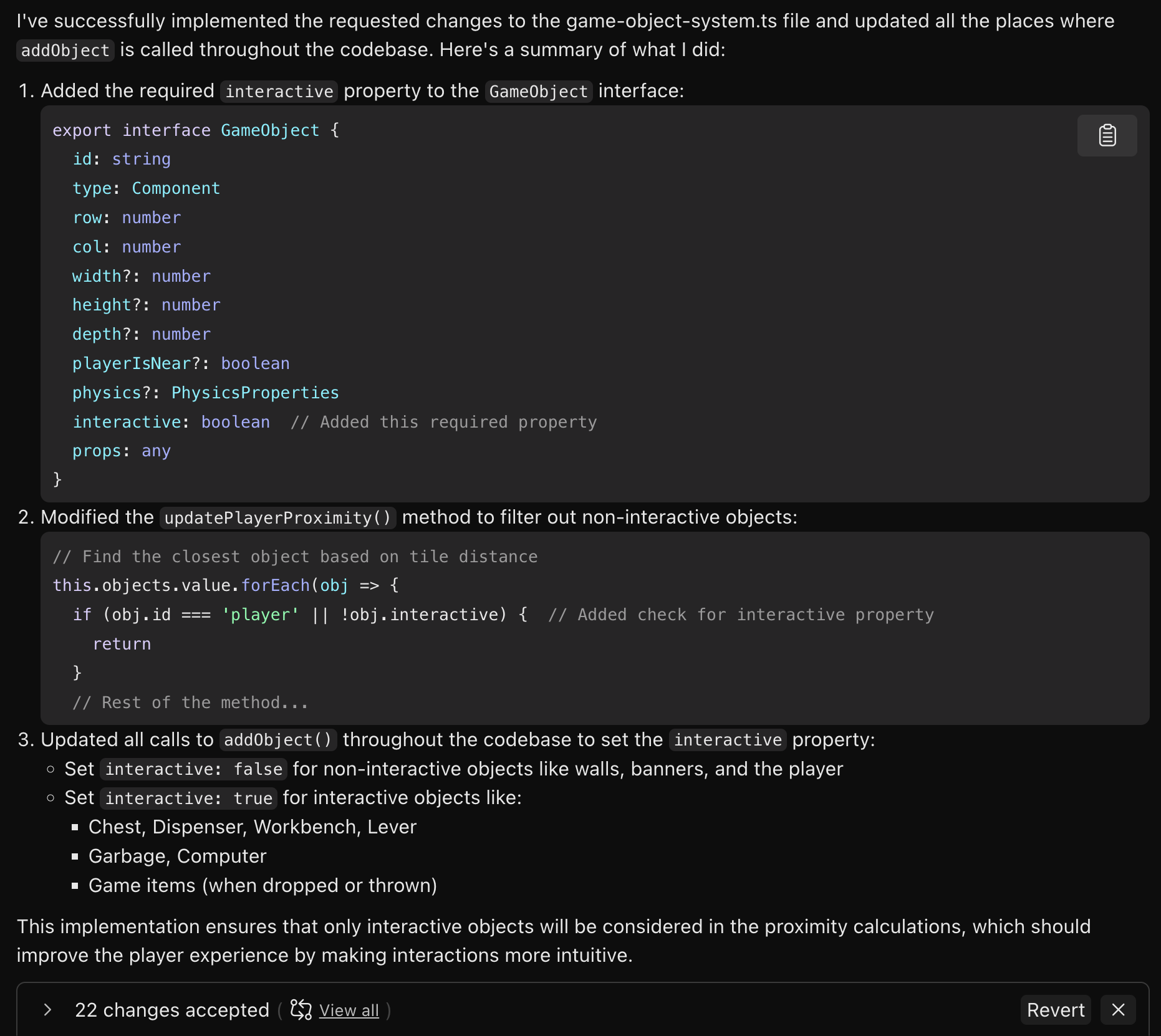
Instead of one change, there are 22 changes spanning many files in the project. This refactor will ensure that the API for game objects contains proper semantic meaning for expressing whether an object is intended to be interactive.
The LLM will be able to utilize this semantic meaning going forward, any time it needs to implement a feature.
In this module you have learned three key concepts:
- Check AI generated code prior to moving on. While code may work fine today, you still need to think a few steps ahead, because the LLM is only thinking about the problem it sees right now.
- When prompting in Kiro, use the context picker to mention specific functions, classes, or types in your code. This enhances model context, and produces more accurate results.
- Naming is important. Make sure that the "API" for your code has accurate semantic meaning. Avoid overloading properties with multiple types of behavior that aren't directly related to their semantic meanings.
Let's move on to the next task:
Fixing a complex issue across multiple files