Loading image...Kiro

Product

  • About Kiro
  • IDE
  • CLI
  • Web
  • Mobile
  • Crew
  • Pricing
  • Downloads

For

  • Enterprise
  • Startups
  • Students

Community

  • Overview
  • Ambassadors
  • Discord
  • Events
  • Powers
  • Shop
  • Showcase

Resources

  • Docs
  • Blog
  • Changelog
  • FAQs
  • Report a bug
  • Suggest an idea
  • Billing support

Social

Site TermsLicenseResponsible AI PolicyLegalPrivacy PolicyCookie Preferences
Loading image...Kiro
  • CLI
  • Web
  • Enterprise
  • Pricing
  • Docs
SIGN INDOWNLOADS
Loading image...Kiro

Get Started

InstallationAuthenticationYour first project

Models

OverviewAvailable modelsReasoning effort

Features

How Kiro works
Specs
Steering
Hooks
MCP
Permissions
Custom agents
Agent Skills
Powers
Cloud sessionsCompactionKiroignoreCheckpoints and rewind
Built-in tools
Configuration scopes

IDE 1.x

What's new in 1.0
Setup & First Run
Editor
Chat
Experimental
Troubleshooting0.x reference

CLI

What's new in 3.0
Setup & First Run
Terminal UI
Chat
Voice modeHeadless modeACPAuto complete
Experimental
2.x reference

Crew

Quick startInstallationRunning 24/7
Chat
Agent Capabilities
Features
Interfaces
Apps
ConfigurationSecurityTroubleshooting

Web - Preview

Setup & First RunIdentity Center
Connect your repositories
Working with the agent
Autonomous modeAutomationsMemory
Sandbox

Mobile - Preview

Overview

Commands and Reference

CLI commandsSlash commandsBuilt-in toolsExit codesSettings

Billing

OverviewManaging your subscriptionUpgrading your planDowngrading your planCancelling your planPurchasing add-on creditsManaging your paymentsManaging usage notificationsManaging your taxesContacting billing supportDeleting your accountRelated questions

Enterprise

ConceptsOnboarding quickstart
Connecting your identity provider
Subscribe your teamManage subscriptions
Governance
Monitor and track
SettingsManaged updatesBillingIAMSupported regions

Privacy and Security

OverviewData protectionCode referencesCompliance validationInfrastructure securityIAM permissionsFirewalls, proxies, and data perimetersVPC endpoints (AWS PrivateLink)

Guides

Overview
Language support
Learn by playing
Setup dev environment and launch the game
Steering Kiro, and improving the game homepage
Fixing a subtle physics bug
Fixing an interactions bug across several files
Vibe refactoring is 50% of vibe coding
Using specifications for complex work
Managing game assets with agent hooks
Extending Kiro with MCP
Conclusion

Migration

Migrating from Q DeveloperMigrating from VSCodeUpgrading from Q CLI
  1. Docs
  2. Guides
  3. Learn by playing
  4. Vibe refactoring is 50% of vibe coding
View as Markdown

Vibe refactoring is 50% of vibe coding

View as Markdown

This module assumes you have already launched the game locally, by following the setup instructions.

In previous modules we:

  • Wrote HTML and CSS to improve the homepage
  • Fixed a physics bug in the core of the game's physics engine
  • Fixed an interactions bug through an logic refactor

Now it's time to explore a hidden truth about vibe coding. If at least half of your prompts aren't "vibe refactors" you are probably messing up.

1

Understand the problem

AI is very good at using example context to implement new solutions. Unfortunately, this tends to lead to a lot of duplicated code. In the previous module we started looking at the "E" prompt. It's time to take an even closer look.

Try a prompt like:

Where is the interact prompt implemented in the components?

You should see that Kiro locates multiple copies of the interact prompt:

The interact prompt is consistently implemented across multiple interactive game objects (Computer, Workbench, Chest, Garbage, GameItem, PullLever, Dispenser)

If you open these files: Computer.vue, Workbench.vue, Chest.vue, etc you will notice that each component has a very similar implementation of the interact prompt with similar CSS.

But then if you move the ghost around the game play area, you will also notice subtle differences. For example, the size of the pull lever's interact prompt is slightly different from the size of the workbench interact prompt.

We can improve the code by removing duplication. There's a repeated pattern here - it would be better if we refactored the interact prompt into a single component that could be shared across all these components.

2

Do a refactor

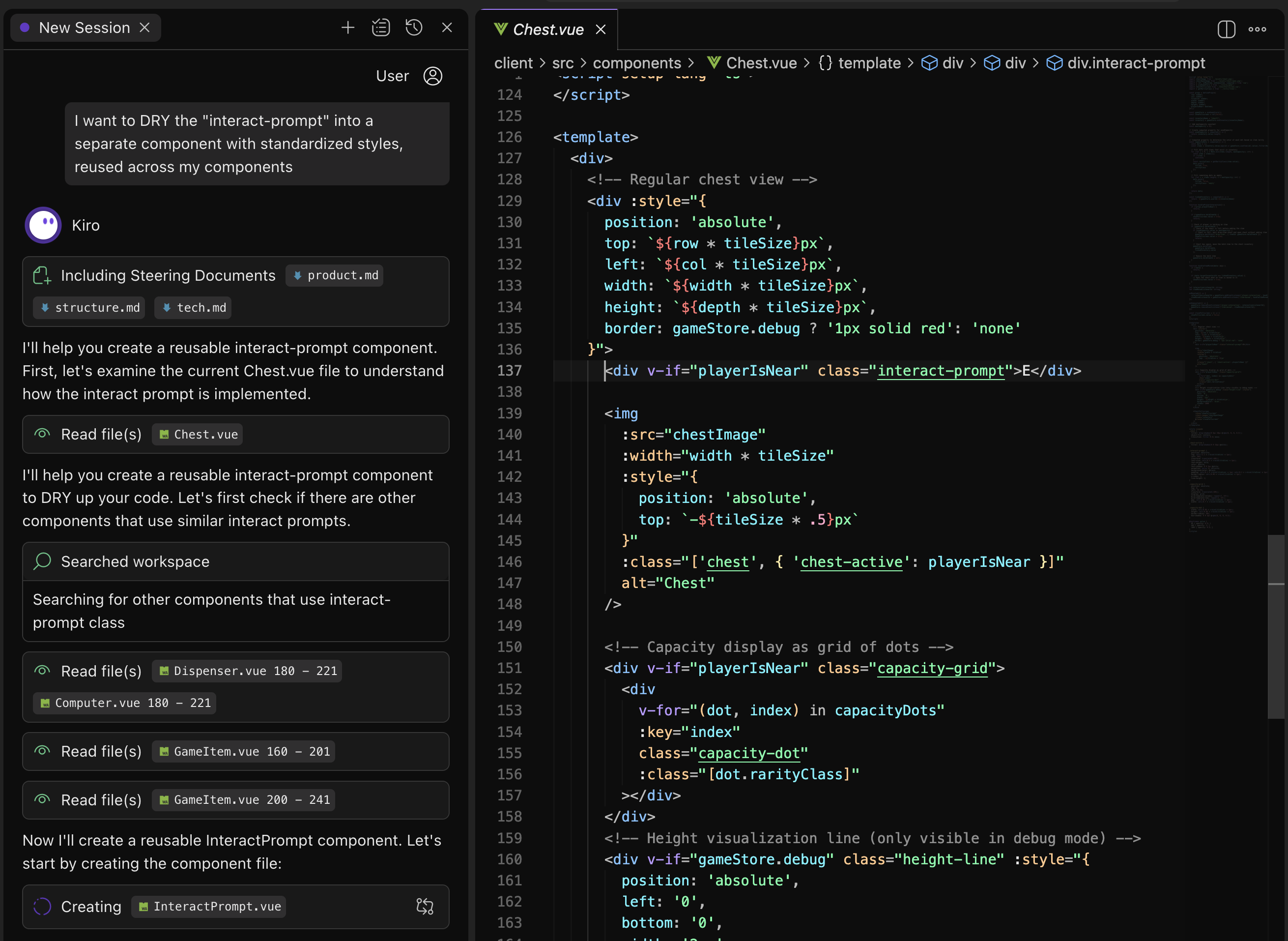
Let's ask Kiro to refactor this. Open a file that contains an "E" prompt such as "Chest.vue". Then try a prompt like:

I want to DRY the "interact-prompt" into a separate component with standardized styles, reused across my components

Loading image...alt !!alt
Tip

Kiro uses your currently open files as context. Consider opening relevant files prior to sending a prompt.

3

Verify the results

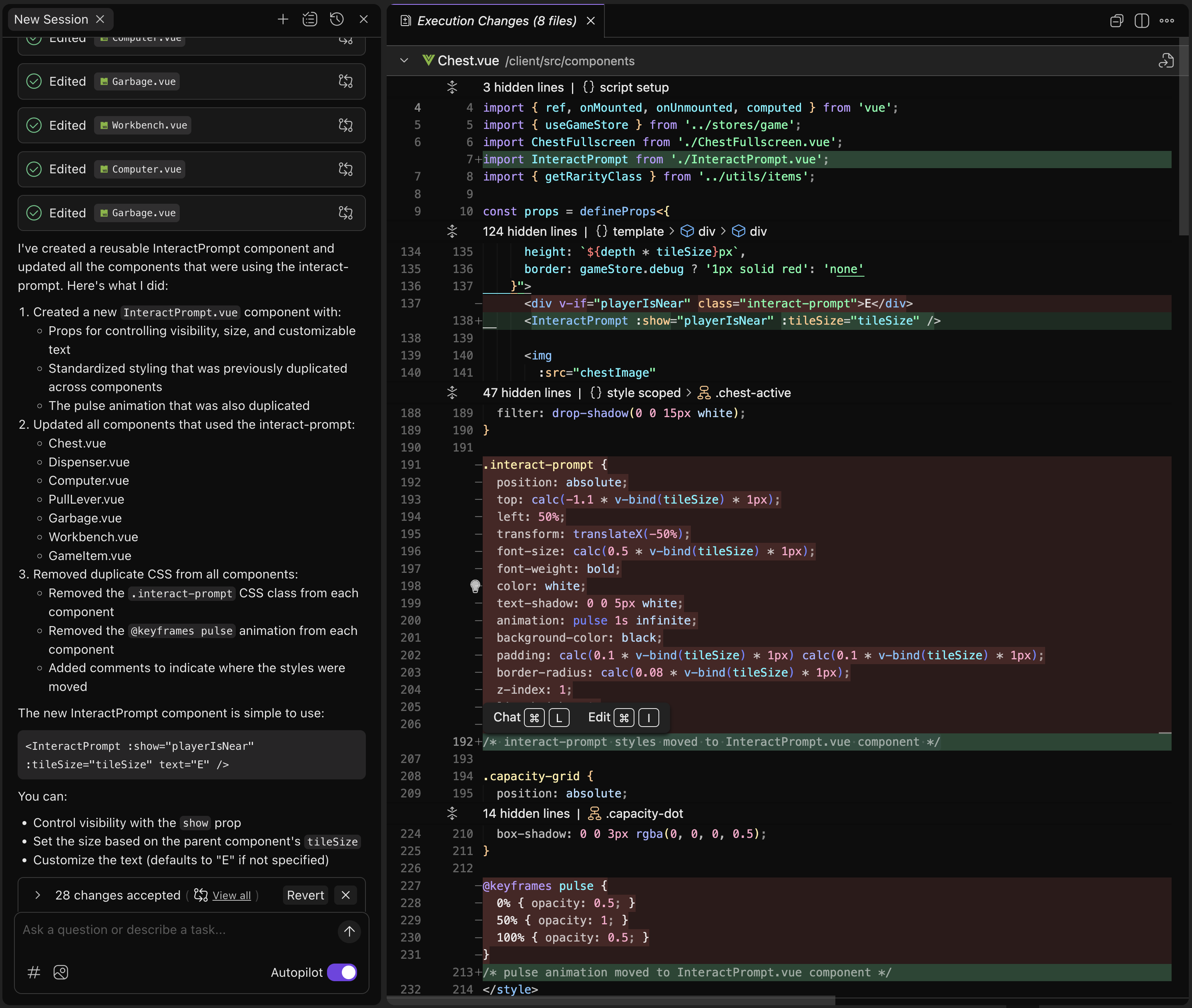
Kiro should discover all the components that have an "interact-prompt" element and refactor them to make use of a new shared component instead:

Loading image...alt !!alt
Things to check for:

  • The original implementation has interact prompts with different locations relative to the parent component: above, left, right, etc. Did that get lost in the refactor?
  • There were two different approaches to ensuring that the interact prompts text stayed at an appropriate size, no matter what the screen dimension was. Which approach, if any, did the AI model choose?
Tip

Trust, but also verify. While AI models can do a fantastic job at refactoring, its always necessary to double check generated code to ensure that functionality did not degrade during that refactor.

4

Find more to do

Try asking Kiro:

Look through my components. Do you see any things that should be refactored or opportunities to implement best practices?

Tip

AI models are trained via reinforcement learning to be friendly and compliant. Therefore a model will rarely, if ever, initiate criticism or question what you ask it to do. Models will do as you ask, even if what you asked was flawed.

However, you can still use AI as a code reviewer or critic by explicitly asking it to tell you what it sees wrong or in need of improvement.

In this module you have learned two key concepts:

  • Vibe coding works, but just like regular coding, it requires regular refactors. Do "vibe refactoring" as well.
  • AI won't directly contradict you or push back on your asks, but that doesn't it isn't capable of seeing the mistakes. You just need to ask it to double check the work.

Let's move on to the next task:

Using specification for complex work

Page updated: August 11, 2026
Fixing an interactions bug across several files
Using specifications for complex work